Introduction
UNEX is a program environment for investigation of molecular structure. It provides methods for processing of data from experimental methods for obtaining results with best possible accuracy and precision. At the current stage the full support of gas electron diffraction (GED [1, 2, 3]) method is provided, starting from calibration of instruments and data reduction to the refinement of molecular structure. Additionally, rotational constants from microwave [4] and high-resolution molecular spectroscopy [5] can be used solely or in combination with GED data for determination of molecular geometry.
|
Cite UNEX as
Yury V. Vishnevskiy, 2026, UNEX 2.2, https://unex.vishnevskiy.group [latest access date] |
|
UNEX is created in an independent research project. It does not originate from any other programs. Nevertheless, many implemented in UNEX methods and algorithms are inspired by and based on investigations of other authors, see respective references for details. |
|
If you are reading an offline version of this manual, it may well be already outdated. Check the online version, when in doubt! |
|
The aim of this manual is not to teach how to investigate molecules but only to describe UNEX functionality. Please remember that incorrect or not optimal settings and inappropriate usage of different methods can lead to erroneous output! You are responsible for your results! |
Philosophy of UNEX
-
Exploration of experimental possibilities for investigation of molecular structure.
-
Development of the gas electron diffraction (GED) method and its automation.
-
Extending procedures for molecular structure refinement from spectroscopic data.
-
Providing abilities to carry out detailed and controlled studies due to flexibility of the methods and their fine tuning.
-
Elaboration of joint approaches for molecular structure investigations.
UNEX capabilities
-
Investigation of molecular structure by means of GED method.
-
Refinement of geometrical parameters from rotational constants.
-
Combined refinements on the basis of GED data and rotational constants.
-
Definition of molecular geometry in terms of Z-matrix.
-
Both internal geometrical parameters and Cartesian coordinates can be used as parameters.
-
Support for dummy atoms in geometrical models of molecules.
-
Semi-rigid and dynamic models in GED.
-
Numerical and analytical parametric forms of potential functions.
-
Support for relaxation of geometrical parameters, GED amplitudes and corrections.
-
Modelling of any mixtures of molecules with semi-rigid and dynamic GED models.
-
Powerful methods for least squares minimization.
-
Flexible restraints and rigid constraints may be applied to model parameters.
-
Robust minimization with iteratively reweighted experimental data.
-
Automatic calculation of uncertainties for dependent parameters.
-
Global minima search by grid scanning and randomization.
-
Multidimensional scanning of refined parameters is possible.
-
Monte-Carlo simulations of parameter distributions.
-
Automatic determination of molecular point group symmetry.
-
Multiplicative and additive GED backgrounds using splines and polynomials.
-
Automatic calculation of GED scattering factors and atomic intensity.
-
No limits on GED data in refinements.
-
Non-equal steps for GED intensity curves are allowed.
-
GED data reduction from images of diffraction patterns.
-
Calibration of electron wavelength using GED gas standards: benzene C6H6, CO2, CS2, CCl4.
-
Refinement of sector functions from GED gas standard intensities and sector images.
-
Calibration of scanners.
-
Refinement of response functions for detectors.
-
Statistical thermodynamics with modified scaled models.
-
Flexible and convenient input format.
-
Methods with efficient usage of multiprocessor and multi-core systems.
-
Versions of the program are available for Linux, FreeBSD, Windows and macOS.
External data
UNEX has built-in constants and data from different external sources. Fundamental physical constants are used from the CODATA2022 collection [6]. The relative atomic masses of isotopes have been taken from the AME-2020 work of Wang et al. [7]. Scattering factors for the diffraction of electrons were taken from the 2004 (third) edition of the International Tables for Crystallography Volume C [8].
Conditions of program usage
UNEX is distributed for free. Conditions of its distribution are of "AS IS" type.
You use this program on your own risk.
Before downloading and using UNEX you must accept the license agreement,
see files license.html, license.pdf or license.txt.
In case of problems
If you think you’ve found a bug or some incorrectness in UNEX the first thing to do is to check everything including your commands, control keywords and data. Second, make sure you are using the latest version of UNEX. If you still cannot find the source of the problem it is possible to write an e-mail to the main UNEX developer (see below). Before you do so, it is highly recommended to isolate the problem and to send a smallest possible input file generating erroneous or suspicious results.
Support
For questions, comments or bug reports you can use one the following E-mail addresses of the main UNEX developer, Dr. Yury V. Vishnevskiy
yu.v.vishnevskiy@gmail.com
yu.v.vishnevskiy@yandex.ru
yu.v.vishnevskiy@mail.ru
Basics of usage
General conventions
Reading this manual you can meet numbers expressed using scientific notation and symbol e, for example 5.5e13.
This corresponds to base-10 exponentiation, so the number above is equivalent to 5.5×10¹³.
Note, UNEX can read numbers in scientific notation.
In many examples you can see triple dots …. This does not reflect the input format but just indicates that further data may follow.
Otherwise the examples would be too long.
Installation
UNEX program is distributed together with some supplementary programs, testing files, documentation and other parts.
For the installation there is no need to do any special actions, simply copy all files from the distribution to any suitable directory.
It is recommended to place them to one dedicated directory listed in the environment variable PATH
so that the executable can be called from any directory in the system.
If all UNEX files are in one place then it is also easier to update them by replacing old files in this particular directory.
Checking for new versions and updating can be also performed automatically by starting the special script update.sh (in Linux and other UNIX-type operating systems)
or update.cmd (for Windows). Note, automatic update may not work for different reasons. First, it requires access to internet for
checking the availability of new versions. Second, the scripts use some system utilities, which must be already installed.
Finally, the automatic update may possibly not work due to some major changes in the procedure. In this case you need to download
the newest version of UNEX and install it manually.
Running UNEX
UNEX is a command line program.
In order to use it, an input file should be prepared first (for details see below).
Starting UNEX without any input file prints general information about its usage.
In the simplest case real usage UNEX requires only one command line parameter, the name of the input file.
After starting UNEX the input file remains unmodified and an output file is created,
which contains all results in text form.
If you do not indicate the output file name explicitly in the command line,
then UNEX automatically creates one named similar to the input file
with added underline symbol together with a number and an extension .log.
The number indicates version of the output and it increases each time when run UNEX
with the same input file.
Thus, in this mode output files are never overwritten.
Alternatively, you can define in command line the name for the output file explicitly.
|
All available command line options are listed by running UNEX with the |
Input syntax
Input data and commands for UNEX are provided in normal text files (not to mix up with files produced by text processors like OpenOffice). Data fields are used for introducing input information. For their arrangement the so-called tags are used, i.e. a logically complete fragment of data is placed between two certain words which are called tags. In general they may contain any letters. A standard practice is to use constructions like
<myinfo>
Here goes my info/data...
</myinfo>
Here <myinfo> and </myinfo> are examples of opening and closing tags, respectively.
In spite of considerable number of different commands and field types, all these elements follow similar pattern,
which is easy to understand and use. The sequence of commands is naturally important.
It is not recommended to use very long strings in input files.
The lexical structure of UNEX input follows the principles:
-
Commands are constituted by capital letters and must end with the colon symbol
:. -
Keywords start from capital letter. A value must be assigned to a keyword using the
=symbol without whitespaces. -
Keyword options, if defined as strings, start from small letters.
-
Global keywords are usually organized in groups. For example, keywords related to least-squares refinements of model parameters start with
Lsqprefix.
The syntax for setting keywords is simple, like
Keyword=value
The values can be strings, integers or floating point numbers. Usually keywords accept only one value.
Some other keywords can accept list of strings separated by the semicolon ; symbol, for example
Molecules=mol1;mol2;mol3
The syntax for commands is usually complex, with indication of possible mode, processed objects, sources of input data and control parameters in form of keywords.
COMMAND:MODE [argument1,argument2, ...] [Keyword1=value1 Keyword2=value2a;value2b]
For example
BASE:READ,<BASE>,</BASE>
Here the first word BASE is the name of the command.
After the colon symbol : goes the mode which can also be understood as a subcommand.
Here for BASE the mode READ is used, which indicates that UNEX must read some basic information.
The other two arguments are tags pointing to the start and the end lines of the respective field containing the basic information.
Thus, UNEX will try to find the field and read the corresponding information from the input file between the following tags
<BASE>
Basic info goes here...
</BASE>
Note, whitespaces are allowed so, for example, the following syntax is also possible:
BASE: READ <BASE>,</BASE>
Some other commands must contain an identifier of the object to be processed or for which some information must be read, for example
ZMATRIX: READ,mol,<ZMAT>,</ZMAT>
will read a Z-matrix for the molecule already defined as mol.
Any line in the input file can be commented out.
For this in the very first position of the line you should type the symbol #.
It is also possible to place a comment after command or keyword, for example
# Run UNEX command in the next line
COMMAND:   # This should start some procedure
Control flow
GOTO
GOTO command is used for unconditional jumps to commands coming after particular label.
Labels are defined using the command LABEL.
The following example demonstrates the principle.
GOTO: MYLABEL
COMMAND1:
LABEL: MYLABEL
COMMAND2:
In the demonstrated code, when the GOTO is executed, all subsequent commands (in the example only COMMAND1) are skipped until the
required label (here is MYLABEL) is found, which is defined in the command LABEL. After this point the execution is continued,
so that COMMAND2 is started.
STOP
STOP command terminates execution of UNEX.
Data input
In the next subsections we describe commands and keywords, which are required primarily for introducing and definition of data.
UNEX has limited abilities for using namespaces. Therefore many commands and most of the keywords are composed of several words. For compactness they are often abbreviated. Most frequent abbreviations used in command and keyword names are:
-
Mol— molecule or molecular -
Isotop— isotopologue or isotopomer -
Img— image -
Ptrn— pattern -
Geom— geometry -
Calc— calculation -
ED— electron diffraction -
Trm— (ED) term -
Std— standard -
Rot— rotation(al) -
Con— constant -
RotGT— rotational g-tensor -
RotA,RotB,RotC— rotational constant A, B and C, respectively. -
Vib— vibration(al) -
Cor— correction -
XYZ— Cartesian coordinate(s) -
PAS— principal axes system -
Sym— symmetry -
Freq— frequency -
RDF,Rdf— radial distribution function -
Thermo— thermodynamic(s) -
PE— potential energy -
Func— function or functional -
Sec— (ED) sector -
Resp— response -
Exp— experiment(al) -
Stdev— standard deviation -
Covar— covariance(s) -
PDF— probability distribution function -
Scat— scattering -
Itot— (ED) total intensity -
Imol— (ED) molecular intensity -
Bgr— (ED) background -
Lvl— level(led) -
Conf— conformer or conformation -
PCD— pseudo-conformer dynamic (ED model) -
Lsq— least squares -
Ref— refinement -
MC— Monte-Carlo -
Sim— simulation -
Prm— parameter -
Grp— group -
Reg— regularization -
Rst— restrain(ing) -
Surv— survey(ing) -
Rand— random(ization) -
Pol— polynomial -
Pow— power -
Spl— spline -
Val— value -
Init— initial(ization) -
Min— minimal -
Max— maximal -
Iter— iteration(s) -
Der— derivative -
Conv— convergence -
Tol— tolerance -
Thr— threshold -
Abs— absolute -
Add— addition(al) -
Grd— gradient -
Rel— relative -
Wgt— weight(ed) -
Win— window -
Lam— lambda -
Eps— epsilon -
Incr— increment -
Decr— decrement -
Coef— coefficient -
Num— number or numeric -
Hist— histogram -
Src— source -
Inp— input -
Out— output -
Imp— import -
Fac— factor -
Sf— scale factor -
Frac— fraction(al) -
Mod— modification -
Def— default -
Aprx— approximation -
Infl— inflection (point) -
NInfl— number of inflection points -
PSD— power spectral density -
RBPSD— relative background PSD -
SVD— singular value decomposition -
Gen— generate or generation -
Excl— exclude -
Mult— multiplicity -
Degen— degeneracy -
Err— error -
Appl— apply
Note, some specific fields already define namespace so keywords in these fields must not use particular prefixes.
For example, in molecule-specific fields the prefix Mol is not used, and the bare prefix Geom indicates molecular geometry.
Global
In most cases UNEX input files begin with introduction of some basic and global information.
For this purpose the BASE command is used:
BASE: READ otag,ctag
The BASE field can contain various global control keywords. Depending on the job type different keywords can be important.
The keyword Molecules is used most often whenever models of molecules are created and manipulated,
for example in structural analyses. See section Molecules on how to read in molecule-specific keywords.
Sometimes it is useful to apply different settings on different stages of the job.
This can be achieved by calling the BASE command several times, for example
BASE: READ <BASE1>,</BASE1>

# At this point LsqIterMax is equal to 20

BASE: READ <BASE2>,</BASE2>

# From here on LsqIterMax is equal to 30

<BASE1>
 LsqIterMax=20
</BASE1>

<BASE2>
 LsqIterMax=30
</BASE2>
Below is the list of keywords valid in the BASE field:
-
Basic keywords
- Molecules
-
Name(s) of molecule(s) participating in the current model. (Warning, using this keyword implies that defined earlier molecules will be deleted!) In simple cases only one molecule is defined here. Several molecules can be defined, for example in order to model a mixture. In this case the names of molecules are separated by the semicolon symbol
;. UNEX will try to find a special field for each molecule defined here. The opening and closing tags of such fields must correspond to the names of molecules, for example:<BASE> Molecules=mol1 </BASE> # Special field for mol1 <mol1> # mol1-related info goes here... </mol1> - AddMolecules
-
Name(s) of molecule(s) to be added to the current model. Using this keyword does not lead to deleting of the defined earlier molecules.
- Images
-
Name(s) of image(s) to be processed. UNEX can handle uncompressed Intel TIFF 8/16-bit grayscale files. Special fields for each image are expected, where image-related parameters can be defined, including the path to the corresponding image file. If the image-specific information field is not provided, then UNEX assumes that the name of the image corresponds to the name of file. After this keyword all old images will be deleted.
- AddImages
-
This is a keyword for adding new images to the list of the already existing.
- DataSamples
-
Name(s) of data samples to be processed.
- AddDataSamples
-
Names of data samples to be added to the list of already existing.
-
Related to rotational constants
- RotAExpStdev
- RotBExpStdev
- RotCExpStdev
-
Global values of standard deviations (in MHz) for experimental rotational constants. Default values are 1.0.
- RotAExpStdevLocalIgnore
- RotBExpStdevLocalIgnore
- RotCExpStdevLocalIgnore
-
Boolean flags (true/false), which allow to control whether local molecule-specific keywords
RotAExpStdev,RotBExpStdevandRotCExpStdevare ignored. By default all three settings are off (i.e. equal tofalse), which means that the respective molecule-specific keywords operate normally. - RotAExpStdevVFrac
- RotBExpStdevVFrac
- RotCExpStdevVFrac
-
Global values of standard deviations for experimental rotational constants expressed as fractions of respective experimental rotational constants. No default values exist for these keywords.
- RotAExpStdevFac
- RotBExpStdevFac
- RotCExpStdevFac
-
Factors for standard deviations of experimental rotational constants A, B and C. Initialized standard deviations will be multiplied by these factors. By default all of them are equal to 1.0.
- RotAExpPDFPrm2StdevFrac
- RotBExpPDFPrm2StdevFrac
- RotCExpPDFPrm2StdevFrac
-
If initialized, from these values second parameters of respective PDFs for experimental rotational constants are calculated. For details, see analogous molecule-specific keywords.
- RotAVibCorPDFPrm2AFrac
- RotBVibCorPDFPrm2AFrac
- RotCVibCorPDFPrm2AFrac
-
If initialized, from these values second parameters of respective PDFs for vibrational corrections of rotational constants are calculated. For details, see analogous molecule-specific keywords.
- RotGTaaRShift
- RotGTbbRShift
- RotGTccRShift
-
Global values of relative shifts (in fractions of unit) for the components gaa, gbb and gcc of molecular rotational g tensors. Individual relative shifts for each molecule are initialized using these values. By default they are equal to 0.0.
- RotGTaaPDFPrm2AFrac
- RotGTbbPDFPrm2AFrac
- RotGTccPDFPrm2AFrac
-
If initialized, from these values second parameters of respective PDFs for rotational g tensor components are calculated. For details, see analogous molecule-specific keywords.
-
Refinement of parameters
- LsqIterMax
-
Maximal allowed number of iterations for least-squares method in
LSQFUNC:MINIMIZE. The default value is 20. - LsqDampType
-
Type of damping in the least-squares method of parameter refinement. There are three options:
-
const— constant damping factor. The respective constant parameter must be defined using theLsqDampPrm1keyword. -
linear— damping factor increases linearly from minimal to maximal value. This is default option. The minimal, maximal values and step size must be defined usingLsqDampPrm1,LsqDampPrm2andLsqDampPrm3keywords, respectively. -
sigma— damping factor increases sigmoidally. The parameters may be defined by using theLsqDampPrm1,LsqDampPrm2andLsqDampPrm3keywords.
-
- LsqDampPrm1
- LsqDampPrm2
- LsqDampPrm3
-
Parameters of damping function. By default they are all negative, which indicates automatic initialization to UNEX default values depending on the type of the function.
- LsqFuncTol
- LsqAddTol
- LsqGrdTol
-
tolerance values for the relative functional change, maximal relative addition to refined parameters and maximal weighted gradient of the LSQ functional. All three parameters are used as convergence criteria in the least-squares procedure for parameter refinement. By default they are all negative, indicating that UNEX must automatically choose appropriate values.
- LsqStopLowFunc
-
Value of functional, which is enough low to stop LSQ procedure and consider it as converged. The default value is 0.0.
- LsqRelFuncMinFunc
-
Minimal allowed value of LSQ functional in calculation of relative change of LSQ functional for convergence testing. The default value is 1.0e-8.
- LsqRelAddMinPrm
-
Minimal absolute value of refined parameter, which can participate in calculation of relative additions for convergence testing. The default value is 1.0e-6.
- LsqWgtGrdMinFunc
-
Minimal allowed value of LSQ functional in calculation of weighted gradient for convergence testing. The default value is 1.0e-8.
- LsqLamIncrMax
-
Maximal allowed number of consecutive increments of parameter
Lambdain Levenberg-Marquardt method for minimization of non-linear least-squares functionals. Default value is 10. - LsqLamDecrFac
-
Decrement factor for parameter
Lambdain Levenberg-Marquardt method. Default value is 0.1. - LsqLamIncrFac
-
Increment factor for parameter
Lambdain Levenberg-Marquardt method. Default value is 10.0. - LsqLamValInit
-
Initial value of parameter
Lambdain Levenberg-Marquardt method. Default value is 0.01. - LsqLamValMin
- LsqLamValMax
-
Minimal and maximal allowed values for parameter
Lambdain Levenberg-Marquardt method. Default values are 1.0e-50 and 1.0e50, respectively. - LsqEDTrmAmplSfRef
-
Turns on (
=true) or off (=false, default) refinement of scale factors for ED vibrational amplitudes. Ratios of amplitudes within each group remain constant if scale factors are refined, otherwise differences between amplitudes remain constant within one group. - LsqMethod
-
method for minimization of least squares functional in
LSQFUNC:MINIMIZE. The available options are:-
levmar— Levenberg-Marquardt, default. -
goldsec— golden section method.
-
- LsqSurvSeed
-
Seed (integer number) for random number generator used in
LSQFUNC:RANDcommand. Default value is 0, meaning automatic generation of seed, if required. - LsqNumDerTolMin
- LsqNumDerTolMax
-
During least-squares procedures various derivatives may be calculated numerically. The accuracy of the numerical differentiation is adjusted dynamically. These two keywords define the allowed range of tolerances for relative errors of numerical derivatives. Default values are 1.0e-5 and 1.0e-10, respectively.
- LsqIRIterMax
-
Maximal number of macro iterations in iteratively reweighted LSQ minimization
LSQFUNC:IRMINIMIZE. The default value is 10. - LsqFuncEDImolAlpha
- LsqFuncRegPrmAlpha
- LsqFuncRotConAlpha
- LsqFuncMolGeomRstAlpha
-
Global factors for the parts of LSQ functional corresponding to ED molecular intensities, regularization, rotational constants and restraining geometrical parameters. Default value for all of them is 1.0.
- LsqAbsWeighting
-
Turns on (
=true) or off (=false, default) using absolute weights in LSQ method for calculation of standard deviations of refined parameters. The weights are calculated from standard deviations of experimental data as .
. - LsqCalcFuncContrib
-
Controls the calculation of contributions from different parts of LSQ functional into refined parameters using W1 [9] (if the keyword is
=w1) or W2 [10] (=w2) methods. By default this is turned off (=none). If enabled, the calculation is performed at the end of theLSQFUNC:MINIMIZEprocedure. - LsqCalcExpErrExclFunc
-
This keyword defines the types of parts of the LSQ functional which should be excluded from calculation of experimental errors of refined parameters. The idea and the method are described in [9]. The types are defined using similar literals as in the
LSQFUNCcommand but in lower-case format. Combinations of types can also be provided concatenating literals with the;symbol as usually. By default regularization and molecular geometry restraining parts of LSQ functional are excluded. - LsqPrint
-
Flags for printing particular information in
LSQFUNC:MINIMIZEprocedure. Can accept valuesfellips(for LSQ functional (hyper)ellipsoid),sensib(first order sensibility analysis) andnonefor none of the above.
-
LSQ Monte-Carlo simulations
- LsqMCCyclesMax
-
Maximal allowed number of cycles in Monte-Carlo procedure
LSQFUNC:MCMINIMIZE. The default value is 0, so the user must set the required number of cycles explicitly. - LsqMCSeed
-
Seed for the random number generator (RNG) in Monte-Carlo procedure. The default value is zero, which indicates that UNEX must initialize the RNG to a unique value based on current time and process ID. If you want to obtain deterministic results then you have to define the seed using this keyword.
- LsqMCCalcRotCon
-
Calculate (
=true) or do not calculate (=false, default) rotational constants during the MC simulation. - LsqMCApplStdev
-
Turn on (
=true, default) or off (=false) the application (i.e. assignment) of determined inLSQFUNC:MCMINIMIZEstandard deviations to respective refined parameters. - LsqMCApplBias
-
Turn on (
=true, default) or off (=false) application of determined in the simulation biases to respective refined parameters. - LsqMCApplCovar
-
Turn on (
=true, default) or off (=false) application of determined in the simulation covariances to respective refined parameters. - LsqMCConvRelMeanThr
-
Threshold for convergence of relative mean values of parameters. Default value is 0.0001.
- MCConvRelStdevThr
-
Threshold for convergence of relative values of standard deviations. Default value is 0.01.
- LsqMCConvTestWin
-
The size of the "window" (number of cycles) for convergence testing. This number of cycles in the generated data will be used for testing of the convergence. The default value is negative, i.e. is determined automatically.
- LsqMCHistNBins
-
Number of bins in histograms used for integration of determined distributions. Default value is 0, indicating that no integration will be performed.
-
ED intensity
- EDItotModel
-
Default model for the total ED intensity. This also controls the type of background used for calculation of the total intensity. The available options are
mbgr,a1bgranda2bgr. The default option ismbgr. For details see Models for ED intensity. - EDImolAnhTrmModel
-
Model for anharmonic terms of distances in calculation of ED molecular intensity. Available options are
asym(asymmetry parameters, default) andmorse(Morse parameters). For details see chapter Models for ED intensity. - EDIntDeltaSMin
-
Minimal allowed difference between s-values. Default value is 1e-7 Å-1.
-
ED scattering factors
- EDScatFacElMethod
-
Method for calculation of ED elastic scattering factors.
-
pwTab1— the method of partial waves using old tabulated factors. This option is available only for historical reasons. -
pwTab2— the method of partial waves using factors from Table 4.3.3.1 in [8]. This is default. -
born1Pot1— first Born approximation for the scattering amplitude of a screened atomic Coulomb potential (Eq. 11 in [11]). -
born1Pot1C1— similar toborn1Pot1plus correction (Eq. 13 in [11]). -
born1Tab1— first Born approximation for the scattering amplitudes using tabulated values from Table 4.3.2.3 [8] (see also the original paper [12]) and corrected for relativistic effects as described in [11]. -
born1Tab1C1— similar toborn1Tab1plus correction (Eq. 13 in [11]).
-
- EDScatFacInelMethod
-
Method for calculation of ED inelastic scattering factors.
-
none— do not calculate inelastic scattering factors. -
morseTab1— Morse approximation using old tabulated factors. This option is available only for historical reasons. -
morseTab2— Morse approximation using factors from Table 4.3.3.2 in [8]. This is default.
-
- EDScatFacSMin
- EDScatFacSMax
-
Minimal and maximal s-values (in Å-1) for precalculated scattering factors. Default values are 0.0 and 60.0, respectively.
- EDScatFacSStep
-
Step size on the s-scale (in Å-1) for precalculated scattering factors. Default value is 0.1.
-
ED background
- EDBgrAprxType
-
Type of approximating function for background lines. Available options are
-
spline— cubic spline, this is default, -
polynom— simple polynomial, -
chebPolynom— orthogonal Chebyshev polynomial.
-
- EDBgrSplNInflMax
-
Maximal number of inflection points for ED background lines when approximated with splines. The default value is 3.
- EDBgrPolPow
-
Global value of the polynomial power for ED background lines. By default it is 3.
- EDBgrPrintRaw
-
Turns on (
=true) or off (=false, default) printing of raw (before smoothing) background in theEDIMOL:GETEXPprocedure. - EDBgrSmoothReduced
-
Turns on (
=true) or off (=false, default) smoothing of the reduced (divided by the sector function and atomic scattering) multiplicative background inEDIMOL:GETEXPcommand. - EDBgrRefScaleIterMax
-
Maximal number of iterations (by default 0) in the refinement of the scale factor for sM(s) in the
EDIMOL:GETEXPprocedure. For the case of additive backgrounds this keyword just turns on (any positive value) or off (=0) the refinement of the t factor for the total intensity. - EDBgrRefScaleTol
-
Relative change (0.001 by default) in scale factor as convergence criterion for procedure of refinement of sM(s) scale factors in the or t-factors of the total intensity in
EDIMOL:GETEXPprocedure. - EDBgrPSDStrRMin
- EDBgrPSDStrRMax
-
Minimal and maximal interatomic distances in the molecular model when power spectral density of background line is analyzed. By default these parameters are negative, which indicates automatic determination of the corresponding values.
- EDBgrPSDStrRMinShift
- EDBgrPSDStrRMaxShift
-
Shifting factors for the automatically determined minimal and maximal interatomic distances in the molecular model for the analysis of background line PSD. Default values are -0.2 and 1.0, respectively.
- EDBgrPSDNoiseThr
-
Default threshold (in dB) for relative power spectral density of noise for background lines. The default value is -20.0.
- EDBgrPSDNoiseThrFac
-
Default factor of importance for the noise threshold
EDBgrPSDNoiseThr. The default value is 0.01. - EDBgrPrintPSD
-
Turns on (
=true) or off (=false, default) printing of the power spectral density for background and experimental intensity in theEDIMOL:GETEXPprocedure. - EDBgrPSDInitScan
-
Number of steps when scanning spline functional value at the initial stage of background smoothing procedure with PSD threshold.
-
ED sector
- EDSecModelType
- EDSecRegModelType
-
Type of model for sector function and regularization sector function, respectively. Possible values are
rpn,sinpnandconst. For explanation see below section related to introduction of sector functions. Default isrpn. - EDSecPrmA
- EDSecRegPrmA
-
Parameter A in the model for (regularization) sector function. Default value is 2π.
- EDSecPrmN
- EDSecRegPrmN
-
Parameter n in the model for (regularization) sector function. Default value is 3.0.
- EDSecPrmRmax
- EDSecRegPrmRmax
-
Parameter rmax (in mm) in the model for (regularization) sector function, see chapter ED sector function. The default value is 100.0.
-
ED standards
- EDStdDefType
-
Default type of standard if it is not indicated explicitly in the input of ED intensities. Possible values are
CCl4,C6H6,CO2andCS2. The default setting for this keyword isCCl4. - EDStdLsqIterMax
-
Maximal number of iterations in least-squares refinement of parameters from ED gas standard data. The default value is 100.
- EDStdSecRegAlpha
-
Factor for regularization of refined sector function. By default it is 0.0, which indicates the absence of regularization.
- EDStdBgrRegAlpha
-
Factor for regularization of refined background functions. Default value is 0.0.
- EDStdBgrRegValue
-
Regularizing value for background. Default value is 0.0.
- EDStdLsqRefPrm
-
Parameters to be refined in
EDSTDusing LSQ method. The available options arelam,sec,bgr,itotsfandrespf, which correspond to the electron wavelength, sector function, background line, scale factor for total intensity and response function. Several options can be combined using;symbol, for exampleEDStdLsqRefPrm=lam;sec. By default nothing is enabled. - EDStdLsqPrint
-
Additional types of information to be printed in
EDSTD:LSQMINprocedure. The options arecorrelatandfellips, corresponding to correlations between refined parameters and LSQ functional (hyper)ellipsoid. By default nothing is enabled. - EDStdDBgrRegAlpha
-
Prefactor for least-squares term calculated as sum of squares of second derivatives of background lines. By default this factor is zero meaning that this term is not included.
- EDStdScanIter
-
Number of iterations in scanning of electron wavelength in
EDSTD. By default it is zero, i.e. scanning is not performed. - EDStdScanLamMin
- EDStdScanLamMax
-
Minimal (default value is 0.039 Å) and maximal (default value is 0.120 Å) values of electron wavelength in scanning.
- EDStdRefLamIterMax
-
Maximal number of iterations in refinement of electron wavelength. Default number is 50.
- EDStdRefLamTol
-
Convergence tolerance in relative change of refined lambda. Default value is 1.0e-4.
- EDStdSecInitRStep
-
Step size (in mm) for the automatically initialized reduced sector function in LSQ refinement in
EDSTD. Default value is 1.0 mm. - EDStdSecInitRMin
- EDStdSecInitRMax
-
Minimal and maximal allowed r-values (in mm) of the auto-generated reduced sector function for refinement in
EDSTD. Default values of these keywords are negative, which means that the corresponding parameters should be determined automatically. - EDStdLsqBgrInit
-
The source of initial approximation for additive background in
EDSTD:LSQMIN. The background can be calculated and smoothed using the current model (model, default) or taken from respective data set (data). - EDStdBgrRefScaleIterMax
-
Maximal number of iterations for refinement of scale- or t-factors in background procedures used from
EDSTD. Default number is 30. - EDStdLsqBgrCor
-
Correct refined in
EDSTD:LSQMINbackground if it gets negative. By default this is turned off (=false).
-
ED radial distribution functions
- EDRdfType
-
Method for calculation of radial distribution curves. There are three options:
old,classic(this is default) andmodern. For details see description of theEDRDFcommand. - EDRdfMultR
-
The keyword determines whether the Fourier curve is multiplied (
=true, default) or not (=false) by r. Multiplication by r produces a better approximation to the P(r) function, but also increases the difference curve. - EDRdfRMax
-
Maximal value of r (in Å), for which radial distribution curves are calculated. By default it is determined automatically depending on the maximal interatomic distance in the model.
- EDRdfRStep
-
Step size along r-scale for calculation of radial distribution functions. Default value is 0.01 Å.
- EDRdfPruneRlen
-
Allowed distance between points along the radial distribution function. Default value is 0.02 Å. The value 0.0 turns off the pruning.
- EDRdfAdaptiveR
-
Turns on (
=true) or off (=false, default) the usage of the adaptive method for choosing points on the r-scale for calculation of radial distribution functions. - EDRdfDamp
-
Coefficient in an exponential function used for multiplying of molecular intensity before Fourier transformation. By default it is calculated according to
 , where smax is the maximal s-value of the transformed molecular intensity function.
 - EDRdfModGf
-
This key enables (
=true, default) or disables (=false) the division of molecular intensity functions by a g-function (by default corresponding to a term with maximum contribution) before Fourier transformation. - EDRdfModGfAtoms
-
Types of atoms (for example
=C;O), for which the corresponding g-function must be calculated and used for modification of molecular intensity before Fourier transformation ifEDRdfModGf=true. By default this is initialized automatically so that the pair of atoms available in molecule(s) of the model have highest atomic numbers. Note, in some cases this may be not optimal and requires manual tuning. - EDRdfTrmDifR
-
Influences results of the
PRINT:EDTERMScommand withFormat=urdfplot. This parameter defines maximal allowed difference between distances of degenerate terms in calculation of their contributions. By default this key is negative, which turns off the searching for degenerate terms. - EDRdfTrmModAmpl
-
Influences results of the
PRINT:EDTERMScommand withFormat=urdfplot. Turns on (=true, default) or off (=false) the division of calculated term contributions by the respective amplitudes. - EDRdfIntegMethod
-
Method of numerical integration:
trapezoidal(default, fast) orromberg(slow but potentially a bit more accurate). - EDRdfCalcStdev
-
Turns on (
=true) or off (=false, default) calculation of standard deviations for experimental radial distribution functions. - EDRdfMCIter
-
Number of iterations in Monte-Carlo procedure for calculation of standard deviations for experimental radial distribution functions. Default value is set 0, turning off this procedure.
- EDRdfCalcStdevPrintTime
-
Time interval in seconds for printing progress of calculation of RDF standard deviations. The default value is 60 seconds.
- EDRdfNConcat
-
Number of common points (by default 11) for experimental and model molecular intensity curves when they are concatenated in RDF procedure. The larger this number the greater is the overlap of the intensity curves.
-
ED patterns
- EDPtrnRefIterMax
-
Maximal number of iterations in the least-squares procedure of the
IMAGE:EDPTRNREFINEcommand. The default value is 50. - EDPtrnRefWriteImg
-
Enables writing of image files with refined asymmetric additive background (
=bgr), intensity curve (=intcurve) and weights of processed image pixels (=weights), or disabling all of them (=none). The options can be combined, for exampleEDPtrnRefWriteImg=bgr;intcurve;weights. By default only images of intensity curves are created. - EDPtrnRefPrint
-
Enables printing of various data. The available options are:
intr— print refined intensity in points on the r-scale (in mm) instead of s;intcrl— print correlations between intensity values;allcrl— print correlations between all refined parameters;dhist— print histogram of the data actually utilized in refinement;none— print nothing of the above. - EDPtrnRefSec3ThetaCor
-
Apply (
=true, default) or not (=false) the sec3(θ) correction to the refined intensity curve.
-
Thermodynamics
- ThermoTemperature
-
Temperature in Kelvins. This parameter affects calculations related to GED with dynamic models, mole fractions, and calculations of thermodynamic functions with the
MOLTHERMOcommand. The default value is 298.15 K. - ThermoPressure
-
Pressure in standard atmospheres (atm). It is used in calculations of thermodynamic functions. The default value is 0.986923267 atm, which corresponds to 1 bar (14.5038 psi, 100 kPa).
-
Mathematical
- MathSVDTol
-
Factor for calculation of threshold value for minimal singular number in SVD decomposition procedure. The threshold value determined as product of this factor and maximal singular number. Singular numbers less than the threshold value are discarded. Default value is 103 times machine double precision, which usually corresponds to 2e-13.
- MathSVDIterMax
-
Maximal number of iterations in SVD procedure. Default value is 30.
-
Printing of data
- PrintStdevFac
-
Factor for printed standard deviations of parameters. By default it is 1.0.
- PrintXYZPAS
-
Boolean keyword for turning on (when
true) or off (false, default) printing of Cartesian coordinates in principal axes system (PAS). - PrintSymUniqAtoms
-
Defines whether symmetrically unique atoms should be printed (
=true) or not (=false, default) by thePRINT:MOLSYMcommand. - PrintStdevZMat
-
Defines whether standard deviations of Z-matrix parameters should be printed (
=true) or not (=false, default) by thePRINT:ZMATRIXcommand. - PrintF3cBlockCols
-
Maximal number of columns in each block of cubic force constants printed by the
PRINT:MOLVIBF3Ccommand. The default value is 5.
-
Other
- RotConDerPrmStep
-
Starting step size for parameters in calculation of numerical derivatives of rotational constants. The default value is 1.0e-8. For small molecules 1.0e-10 is usually better.
- MolGeomRstDerPrmStep
-
Starting step size for parameters in calculation of numerical derivatives of restraining geometrical parameters. The default value is 1.0e-6.
- MolGeomGenBondTol
-
Parameter to control detection of bonds between atoms. If the distance between atoms is less than the sum of their covalent radii plus ist
MolGeomGenBondTolfraction then a bond is recognized. The default value is 0.15. - EDTrmRaDerPrmStep
-
Starting step size for parameters in calculation of numerical derivatives of interatomic distances. The default value is 1.0e-6.
- PrmCalcStdevUseCovar
-
Turns on (
=true, default) or off (=false) the usage of covariation matrix in calculations of standard deviations for dependent parameters. - MolPEFuncEUnits
-
Potential energy units on input, when data are introduced in numerical form with
MOLPEFUNC. Possible values are-
au— atomic units -
kcal— kcal/mol -
kJ— kJ/mol, default
-
- MolSymTol
-
Tolerance factor in detection of molecular symmetry elements. By default it is equal to 1.0. The less this factor is, the more accurate must be the molecular geometry for determination of the full symmetry.
There are special keywords with prefixes HashAbsEps and HashRelEps,
indicating absolute and relative (in fractions of unit) precision for
various types of data used in calculating of hashes.
They are required only for testing purposes and thus not documented here.
Molecules
For each molecule declared in BASE a special field must be defined, which contains some general information about the molecule. The starting and ending tags of this field must be constructed as <name_of_molecule> and </name_of_molecule>, respectively. For example, for a molecule mymol the corresponding field is
<mymol>
# mymol-specific info goes here...
</mymol>
Possible keywords in field of molecule:
- Formula
-
Empirical formula of the molecule, for example
Formula=C6H12O6. This is a mandatory keyword. - MoleFracVal
-
Mole fraction of the respective molecule in a mixture, if several molecules are defined in
BASE. The value must be in range 0.0-1.0. For the last molecule listed inBASEthis keyword is irrelevant because its mole fraction is calculated automatically. - MoleFracRefGrp
-
Group number for mole fraction. In order to refine the mole fraction a positive integer group number must be defined using this keyword. Note, this must be unique number, since mole fractions cannot be refined in groups with other parameters.
- MoleFracPDFGrp
-
Group number for the PDF of mole fraction.
- MoleFracPDFType
-
Type of PDF for mole fraction. The available options are the same as for other PDFs. Default is
shNormal. - MoleFracPDFPrm1
- MoleFracPDFPrm2
-
Parameters of PDF for mole fraction of the molecule.
- EDModel
-
ED model of the molecule. Possible values are
semirigid(default) andpsconfdyn. The latter indicates the pseudo-conformer-based dynamic model and the required pseudo-conformers must be defined using thePseudoConfskeyword. - EDModelImolPCD
-
The model for molecular intensity function when pseudo-conformer dynamic ED model is used. Possible options are
integral(default) andsum. For details see section Models for ED intensity. - PseudoConfs
-
List of names of pseudo-conformers for usage in ED dynamic model of the molecule. Syntax is the same as for
MoleculesinBASE. - AddPseudoConfs
-
Additional pseudo-conformers for the dynamic ED model. This keyword can be used if names of all pseudoconformers cannot be conveniently defined by
PseudoConfs. - PseudoConfNum
-
Total number of pseudo-conformers in the ED dynamic model of the molecule. By default this equals to the number of pseudo-conformers defined using
PseudoConfskeyword. However, additional pseudo-conformers can be automatically generated and populated ifPseudoConfNumhas larger value. - PEDegen
-
Degeneracy of the molecule on the potential energy surface. This parameter is relevant in calculation of mole fractions using Boltzmann distribution and thus also important for pseudo-conformers in ED dynamic models. The default value is 1.
- PEDegenInitChild
-
Initialization value for degeneracy of child pseudo-conformers relative to the current parent molecule.
- PEFuncType
-
Type of potential function used in the dynamic model of the molecule. The possible options are
-
spline— cubic spline, no fittable parameters. This is default. -
cos1— parametric function .
. -
cos2— parametric function .
. -
gauss— parametric function, sum of gaussians .
. -
polynom— parametric function, polynomial .
.
For details on how to introduce potential functions see Potential energy functions.
-
- PEFuncCoefNum
-
Total number of parameters in potential function including free term if applicable. Makes no sense in case of splines.
- PCDRelaxPolPow
-
Power of relaxational polynomials used for generation of additional pseudo-conformers in ED dynamic models. Default value is 4.
- SpinMult
-
Spin multiplicity of the molecule. The default value is 1.
- EnergyEl
-
Electronic energy in atomic units. By default initialized to zero.
- ThermoModel
-
Type of model for thermodynamic functions. The available options are
-
sRRHO— rigid rotator - harmonic oscillator approximation with possibly scaled vibrational frequencies. -
msRRHO-1— modified scaled RRHO with correction for entropy as implemeted in [13, 14]. -
msRRHO-2— modified scaled RRHO with corrections for internal thermal energy from [15] and for entropy from [13, 14].
For details see section Thermodynamics.
-
- ThermoGibbsEnergy
-
Gibbs free energy in atomic units. By default initialized to zero.
- ThermoFreqCutoff
-
Cut-off value (in cm-1, by default equals to 0.0) for vibrational frequencies in calculation of ZPVE and thermodynamic functions. Frequencies below or equal to this value are ignored.
- ThermoFreqScale
-
Scaling factor (1.0 by default) for vibrational frequencies in calculation of ZPVE and thermodynamic functions.
- ThermoMSRRHOWCutoff1
- ThermoMSRRHOWAlpha1
-
Cut-off vibrational frequency value τ (in cm-1, default is 50.0) and α-factor (default value is 4.0) in the weighting function for entropy in the msRRHO-1 and msRRHO-2 methods. Note, in the earlier publication [13] the same frequency cut-off parameter was denoted as ω0, see equation 8 therein.
- ThermoMSRRHOWCutoff2
- ThermoMSRRHOWAlpha2
-
Cut-off vibrational frequency value τ (in cm-1, default is 50.0) and α-factor (default value is 4.0) in the weighting function for enthalpy in the msRRHO-2 method [15].
- RotConModel
-
Type of model for rotational constants. The available options are
-
rrpam— Rigid rotor - point atomic masses. -
rrpam-vibc— Rigid rotor - point atomic masses with vibrational correction. -
rrpam-vibc-elc1— Rigid rotor - point atomic masses with vibrational and electronic corrections. This is the default option.
For details see section Models of rotational constants.
-
- IsotopMols
-
Names of other molecules related to this molecule as isotopologues or isotopomers. Each of them must have its own field just like a normal molecule. This keyword is generally used in refinements of molecular structures from rotational constants of parent molecule and its isotopologues and/or isotopomers. Usage of this keyword discards defined earlier isotopomers and isotopologues.
- AddIsotopMols
-
Names of molecules which are to be added to the list of the already defined isotopologues and isotopomers.
- RotConInpUnits
-
Input units for rotational constants. Possible values are
-
cm— cm-1 -
MHz— MegaHertz, this is default setting.
-
- RotAExpVal
- RotBExpVal
- RotCExpVal
-
Values of experimental rotational constants in units defined by the
RotConInpUnitskeyword of the current molecule. - RotAExpStdev
- RotBExpStdev
- RotCExpStdev
-
Standard deviations (in units defined by
RotConInpUnits) of the corresponding experimental rotational constants. These values are used for calculation of weights in least-squares functional. There are no default values for these keywords. - RotAExpStdevVFrac
- RotBExpStdevVFrac
- RotCExpStdevVFrac
-
Standard deviations of the experimental rotational constants expressed as fractions of the values of the correspodning rotational constants. There are no default values for these keywords.
- RotAExpPDFType
- RotBExpPDFType
- RotCExpPDFType
-
Type of probability density function (PDF) for experimental rotational constants A, B and C. For the available options see section Statistical modeling. The default option is
shNormal. - RotAExpPDFPrm1
- RotAExpPDFPrm2
- RotBExpPDFPrm1
- RotBExpPDFPrm2
- RotCExpPDFPrm1
- RotCExpPDFPrm2
-
Parameters of probability density functions (PDF) for experimental rotational constants A, B and C. The meaning of parameters depends on the type of PDF (see
RotAExpPDFTypeand analogous keywords). The values are expected in units defined byRotConInpUnits. The default values are zero. - RotAExpPDFPrm2StdevFrac
- RotBExpPDFPrm2StdevFrac
- RotCExpPDFPrm2StdevFrac
-
Second parameters of PDFs of experimental rotational constants expressed as fractions of respective standard deviations. For example, by setting
RotAExpPDFPrm2StdevFrac=0.1the second parameter of the PDF will be calculated as 10 % of the already defined standard deviation (usually introduced by theRotAExpStdevkeyword). These are molecule-specific keywords. If they are not defined, then analogous global keywords are checked. Note, the calculation is performed only if the PDF parameter is not yet defined, for example by usingRotAExpPDFPrm2. - RotAExpPDFGrp
- RotBExpPDFGrp
- RotCExpPDFGrp
-
Group numbers for PDFs of experimental rotational constants A, B and C, respectively.
- RotAVibCorVal
- RotBVibCorVal
- RotCVibCorVal
-
Vibrational corrections (in units defined by
RotConInpUnits) for rotational constants. For the definition of the corrections see section Models of rotational constants. - RotAVibCorPDFType
- RotBVibCorPDFType
- RotCVibCorPDFType
-
Types of PDFs for vibrational corrections to rotational constants A, B and C. The available options are the same as for
RotAExpPDFType(see above). Default isshNormal. - RotAVibCorPDFGrp
- RotBVibCorPDFGrp
- RotCVibCorPDFGrp
-
Group numbers for PDFs of vibrational corrections to rotational constants A, B and C, respectively.
- RotAVibCorPDFPrm1
- RotAVibCorPDFPrm2
- RotBVibCorPDFPrm1
- RotBVibCorPDFPrm2
- RotCVibCorPDFPrm1
- RotCVibCorPDFPrm2
-
Parameters of probability density functions (PDF) for vibrational corrections to rotational constants A, B and C. The values are expected in units defined by
RotConInpUnits. The default values are zero. - RotAVibCorPDFPrm2AFrac
- RotBVibCorPDFPrm2AFrac
- RotCVibCorPDFPrm2AFrac
-
Second parameters of PDFs for vibrational corrections to rotational constants A, B and C expressed as fractions of vibrational correction absolute values. For example, a vibrational correction ΔBvib = -10.0 is already introduced using
RotBVibCorVal=-10.0. Then, a fraction f = 0.1 can be introduced using theRotBVibCorPDFPrm2AFrac=0.1keyword, which means 10 % of the vibrational correction absolute value. From this the second parameter of the PDF will be calculated as p2 = |-10.0| × 0.1 = 1.0. This is equivalent to setting manuallyRotBVibCorPDFPrm2=1.0. Note, there are analogous global (defined inBASE) keywords. If defined, the global value will be in effect if local is not provided. Also bear in mind that already defined PDF parameters are not recalculated from fraction keywords, neither local nor global. - RotGTaaVal
- RotGTbbVal
- RotGTccVal
-
Values of rotational g tensor components gaa, gbb and gcc. By default all of them are zero.
- RotGTaaRShift
- RotGTbbRShift
- RotGTccRShift
-
Relative shifts (in fractions of unit) for the components gaa, gbb and gcc of the rotational g tensor. They can be used for correcting of the respective g tensor components, see Models of rotational constants for details. The definition of the shift is

By default the molecule-specific shifts are initialized to be equal to the global shifts defined using the same keywords in the
BASEfield. - RotGTaaPDFType
- RotGTbbPDFType
- RotGTccPDFType
-
Type of probability density functions (PDF) for respective components of the rotational g tensor. The available options are the same as for
RotAExpPDFType(see above). The default isshNormal. - RotGTaaPDFGrp
- RotGTbbPDFGrp
- RotGTccPDFGrp
-
Group numbers for PDFs of respective components of the rotational g tensor.
- RotGTaaPDFPrm1
- RotGTaaPDFPrm2
- RotGTbbPDFPrm1
- RotGTbbPDFPrm2
- RotGTccPDFPrm1
- RotGTccPDFPrm2
-
Parameters of probability density functions (PDF) for diagonal components of the rotational g tensor. All are zero by default.
- RotGTaaPDFPrm2AFrac
- RotGTbbPDFPrm2AFrac
- RotGTccPDFPrm2AFrac
-
Second parameters of PDFs for respective components of rotational g tensor, expressed as fractions of absolute values of these components. The keywords function in the analogous way as
RotAVibCorPDFPrm2AFracdoes, see details therein. - GeomAddDistance
-
Pairs of atoms which must be included as interatomic distances in autogenerated lists of internal parameters, for example in
PRINT:MOLGEOMPRM(see below).
Note, there is a particular scheme for initialization of standard deviations for experimental rotational constants. The scheme is depicted below.

The highest priority have absolute values defined locally for particular molecules,
using keywords RotAExpStdev, RotBExpStdev and RotCExpStdev.
However, these keywords can be blocked by the global keywords RotAExpStdevLocalIgnore and similar.
If a standard deviation is not initialized at this level, then the next lower level is tested as shown in the scheme.
At the final stage the initialized value is scaled by the value defined with the respective global keyword,
one of RotAExpStdevFac, RotBExpStdevFac or RotCExpStdevFac.
Similarly, there is a particular scheme for initialization of PDF parameters for experimental rotational constants, vibrational corrections to rotational constants and diagonal components of rotational g tensors. The scheme is as follows.

Here the highest priority have absolute values defined locally for particular molecules, using keywords RotAExpPDFPrm1, RotAExpPDFPrm2 and alike.
Next, the local keywords for relative values are checked, RotAExpPDFPrm2StdevFrac, RotAVibCorPDFPrm2AFrac, RotGTaaPDFPrm2AFrac and alike.
At the next level global relative values can be used, if defined.
Finally, global keywords for absolute values are checked.
If a parameter has been defined at some level, no further actions are performed at lower levels.
Images
Images are defined in UNEX similar to molecules — i.e. image names are listed using the Images keyword in BASE.
Accordingly, for each image can be defined a field with starting and ending tags constructed from the name of this image.
For example
<BASE>
Images=img1
</BASE>

# Special field for img1
<img1>
# img1-related info goes here...
File=img1.tif  # Path to the file.
</img1>
Valid keywords in image fields are:
- File
-
Path to the file of the image. The path may be absolute or relative.
- ResolutionX
- ResolutionY
-
Resolution of the image along X- and Y- directions, corresponding to width and height of the image. These keywords are not obligatory since TIFF files must already contain this information and UNEX can read it. However, the nominal resolution values may not represent the real resolution, for example due to imperfections in scanning device. In such cases true resolution can be defined explicitly with these keywords.
- BitsPerPixel
-
Number of bits per pixel. Normally this is determined automatically. If not, this can be defined here. Allowed values are 8 or 16.
- PixelValidMin
- PixelValidMax
-
Minimal and maximal values of valid pixels. Only pixels within this range are processed. By default these keywords correspond to the full range of possible pixel values.
- PixelIntModel
-
Model of pixel intensity. Determines how relative intensity is calculated from pixel value (see Image data). The only implemented option is
logri. - EDPtrnXc
- EDPtrnYc
-
Coordinates of the center of diffraction pattern in pixels. In ED data reduction procedure these values can be further refined.
- EDPtrnXs
- EDPtrnYs
-
Coordinates of the center of rotating sector device in pixels. Similarly to
EDPtrnXcandEDPtrnYcthese values play role in ED data reduction and can be refined. By default they are equal toEDPtrnXcandEDPtrnYc, respectively. - EDPtrnLambda
-
Electron wavelength (in Å) for the diffraction pattern used in the ED data reduction.
- EDPtrnNtoD
-
Distance (in mm) from nozzle to detector in ED experiment.
- EDPtrnStoD
-
Distance (in mm) from sector to detector in GED experiment.
- EDPtrnRefPrm
-
Parameters to be refined from this ED diffraction pattern. The available options are
int,center,scenter,bgrandbadpix, corresponding to ED intensity profile, diffraction pattern center, the center of sector rotation, background and bad pixels. By default all types are enabled. - EDPtrnRefRMin
- EDPtrnRefRMax
-
Minimal and maximal distances (in mm) from pixels to the center of the diffraction pattern in ED data reduction. Pixels outside this range will not be processed.
- EDPtrnRefSStep
-
Step size in Å-1 for s-values of intensity curves refined from ED diffraction pattern in data reduction.
- EDPtrnRefRStep
-
Step size in mm for r-values of intensity curves refined from ED diffraction pattern in data reduction.
- EDPtrnRefBgrNx
- EDPtrnRefBgrNy
-
Number of anchor points for additive asymmetric background along the X and Y axes.
- EDPtrnRefMaxBgrFracAvSignal
-
Maximal allowed value for the additive background expressed in fractions of the average signal value on the diffraction pattern. The default value is negative, indicating atomatic setting of this parameter (see produced UNEX output). It is, however, recommended to set it explicitly depending on the quality of the processed diffraction patterns.
- EDPtrnRefFog
-
Intensity of pixel corresponding to the zero level of the measured electron diffraction intensity. By default it is 0.0. Note, the units of this parameter must correspond to the units of pixel intensity formula or standard values of scanner calibration or standard values of detector calibration, depending on what is applied last.
- EDPtrnRefUseSectorFunc
-
Turns on (
=true) or off (=false, default) the usage of sector function in ED data reduction of this diffraction pattern.
|
It is not strictly necessary to provide image information field with the path to the image file.
Instead, the image name can be equal to the respective file name, even if it contains the relative or absolute path.
If UNEX cannot find the corresponding opening tag for the image information field,
it assumes that the name of the image file is the same as the name of the image itself.
However, keep in mind that if you already have an image information field then the path to the file must be defined using the |
Data samples
In general case data samples are defined in UNEX similar to molecules.
You need to use the keyword DataSamples and provide respective field(s).
The code below demonstrates an example:
BASE: READ <BASE>,</BASE>
STOP:

<BASE>
 DataSamples=ds1
</BASE>

<ds1>
 File=ds1.dat
</ds1>
Keywords available for data samples are:
- File
-
Path to the file with the data sample or where it will be written later. The path may be absolute or relative.
- StorageDisk
- StorageRAM
-
Boolean keywords for controlling whether data are stored on disk and memory, respectively. Both are
falseby default, when data sample is defined byBASE. Note, automatically created data samples by different procedures may have also different settings of these parameters.
A data sample can also be imported directly from file.
For this the DATASAMPLE command must be used with the mode IMPORT:
DATASAMPLE: IMPORT sample.dat [ImpDS=ds]
With the optional keyword ImpDS you can explicitly define the name (identifier) for
the imported data sample, otherwise a new one will be created automatically.
Old data from previously existing data sample will be deleted.
Note, importing data from file does not imply setting File=sample.dat and StorageDisk=true.
However, it effectively sets StorageRAM=true.
Molecular geometry
Z-matrices
In UNEX geometrical structure of molecules can be defined by means of Z-matrices. For this purpose ZMATRIX command is used
ZMATRIX: READ,mol,<ZMAT>,</ZMAT>
Here READ is the subcommand indicating to read a Z-matrix for the molecule mol.
The rest are the tags of the respective field in the input file.
The format is rather flexible so that Z-matrices from many other programs can be transferred without problems.
Positions of atoms can be defined by independent internal geometrical parameters (bond lengths, angles and torsional angles),
Cartesian coordinates or combination of both. Usually a Z-matrix consists of two sections,
the main body of the Z-matrix and the list of its parameters. Items in each line of Z-matrix can be separated by spaces, commas and/or tabulation characters.
Variable(s) can be used multiple times within one Z-matrix. In the most general case, definition of an atom in the body of a Z-matrix is as follows:
number of atom, symbol of atom, atomic mass, 1st reference atom, 1st parameter, 2nd reference atom, 2nd parameter, 3rd reference atom, 3rd parameter, type of definition
All items must be in one line. The number of the atom, atomic mass and type of definition are optional. First three atoms require less reference atoms (see examples). Parameters can be explicitly defined as floating point numbers (in this case they cannot be modified or refined later) or as names of variables. The list of variables goes after the main body of the Z-matrix. In the very end of the line the type of definition can be defined as an integer. The possible types are
-
0, default type, three internal parameters are used for the definition of atom position: bond length, angle and torsional (dihedral) angle. -
1or-1, expected parameters are bond length, and two angles. There are two equivalent mirror-symmetric positions of atom corresponding to this set of internal parameters, therefore this type can be positive (+1) and negative (-1). The sign of the type corresponds to the sign of the torsional angle constructed on the defined atom and 1st, 2nd and 3rd reference atoms. -
2or-2, similar to the type above, internal parameters are bond length, 2nd bond length and an angle. -
3or-3, similar to the types above, internal parameters are three bond length to three reference atoms, respectively. -
4, expected internal parameters are bond length, 2nd bond length and a torsional angle.
In case of using Cartesian coordinates, positions of atoms are defined as
Number of atom, symbol of atom, atomic mass, first parameter, second parameter, third parameter
Here the parameters are Cartesian coordinates of the atom.
As in the case of bond lengths, angles and torsional angles, explicit values of Cartesian coordinates or names of variables can be defined here.
If variables are used, a minus sign - can be prepended to a variable,
indicating that in calculations of the atom position negated value of the corresponding parameter must be used.
Note, it is impossible to use both Cartesian coordinates and internal geometrical parameters for definition of the same atom.
However, within the same Z-matrix different atoms can be defined using both internal parameters and Cartesian coordinates.
Atoms can be also defined in centroids. For this the keyword centroid should be indicated after the definition of the atom and a list of reference atoms should be given.
See below for particular examples.
The second part of Z-matrix is the list of variables, their values and, optionally, group numbers. Values of bond lengths cannot be negative or equal to zero. Values for angles must be between 0 to 180 degrees. Extreme values (0 or 180) are possible only in some special cases. Torsional angles can have any values.
Group number of a parameter is an integer value indicating the group, in which the parameter can be refined. Differences between values of parameters within one group are fixed during refinement. It is impossible to combine in same group
-
bond lengths and (torsional) angles,
-
Cartesian coordinates and bond lengths,
-
Cartesian coordinates and (torsional) angles.
In ED dynamic models, non-rigid coordinates (for example, torsional angles) must be labeled with negative group numbers. This is a special case, not an indication of a refinable parameter. In dynamic models there is no need to specify groups in Z-matrices for each pseudo-conformer, it is enough to specify group numbers only for parameters of the first pseudo-conformer.
Examples of Z-matrices:
-
Simplest example
 Figure 1. Molecular structure of H2O2.
H O 1 0.960 O 2 1.480 1 120.0 H 3 0.960 2 120.0 1 120.0
This is a simplest example. First three atoms are defined in a special way, the fourth one is defined in a general way. To specify the first atom no parameters are required, position of the second atom is determined by the H—O bond length, position of the third atom is determined by the O—O bond length and the H—O—O angle. The fourth atom is determined by a triple of parameters: a bond length, an angle and a torsional angle. The values of all parameters are given explicitly in the Z-matrix body. However, in many cases it is more convenient to define variables in a second part of Z-matrix and use them in the first part:
H
O  1  Roh
O  2  Roo  1  Aooh
H  3  Roh  2  Aooh  1  Fhh

Roh=0.960     1
Roo=1.480     1
Aooh=120.0    2
Fhh=120.0     3
In this example it is also demonstrated how group numbers are assigned to parameters. Here two bond lengths
RohandRooare in group1, the angleAoohis in group2and the torsion angleFhhis in group3. The parameters with assigned group numbers can be processed and refined, for example inLSQFUNC:MINIMIZEprocedure. -
Alternative way for definition of third atom
 Figure 2. Molecular structure of H2O.
Usually (see first example) position of third atom is determined by a distance to second atom and by an angle to the first atom. Here is an example of an alternative way for definition of the third atom, where a distance to the first atom and an angle of 3—1—2 atoms are used:
H
O  1  Roh
H  1  Rhh  2  Ahho

Roh=0.960
Rhh=1.663
Ahho=30.0
-
Definition of third atom by means of two distances
 Figure 3. Molecular structure of cyclopropane.
C C 1 Rcc C 1 Rcc 2 Rcc 3 Rcc=1.508
Only distances can be used to define position of atoms. For a third atom only two distances are required. Here to define position of the third carbon distances to the first and to the second carbons are used and a special integer key
3is given in the very end of the corresponding line. -
Definition of atoms with distance and two angles
 Figure 4. Molecular structure of carbon tetrachloride.
Cl C 1 R1 Cl 2 R1 1 A1 Cl 2 R1 1 A1 3 A1 -1 Cl 2 R1 1 A1 3 A1 1 R1 1.7724 A1 109.47122063Here is an example of carbon tetrachloride defined with Td symmetry. The last two chlorine atoms are defined using bond lengths and angles, represented as
R1andA1variables. This type of definition is indicated with1or-1keywords in the very end of the corresponding lines. The sign of this keyword always corresponds to the sign of the respective torsion angle X—A—B—C, where X is the defined atom and A, B and C are the first, second and third anchor atoms, respectively. In this example positions of the last two atoms are determined by exactly the same parameters but with two different by sign keys1and-1. -
Definition of atoms using two distances and one angle
 Figure 5. Fragment of a molecule with 5-membered ring.
C C 1 Rcc O 2 Rco 1 Acco C 3 Rco 2 Acoc 1 F1 N 1 Rcn 4 Rcn 3 Anco 2 Rcc 1.51 Rco 1.53 Rcn 1.40 Acco 106.0 Acoc 108.0 Anco 90.0 F1 0.0
In this example the 5-th atom is defined using two distances C1—N5 and C4—N5 (both equal to
Rcn) and an angle O3—C4—N5 (parameterAnco). This type of definition is indicated by the integer key2in the very end of the line. Sign of this parameter corresponds to the sign of the torsional angle N5—C1—C4—O3. In this case the configuration with parameter-2would be symmetrically equivalent to the presented structure. -
Definition of atoms using two distances and a torsional angle
 Figure 6. Fragment of another molecule with 5-membered ring.
C C 1 Rcc C 2 Rcc2 1 Accc C 3 Rcc 2 Accc 1 F1 N 1 Rcn 4 Rcn 3 F2 4 Rcc 1.5152 Rcc2 1.53 Rcn 1.40 Accc 106.0 F1 0.0 F2 90.0
This is an example of geometry definition of a five-membered ring in envelope conformation with symmetry Cs. Here the 5-th atom is defined using two distances C1—N5 and C4—N5 (both equal to
Rcn) and a dihedral angle C3—C4—C1—N5 (parameterF2). This is indicated by the key4in the very end of the respective line. There is no-4type since the geometrical configuration is already defined by the sign of the dihedral angle. -
Definition of atoms using three distances
 Figure 7. Tetrahedral structure of P4 molecule.
P P 1 Rpp P 1 Rpp 2 Rpp 3 P 1 Rpp 2 Rpp 3 Rpp -3 Rpp 1.60
This is an example of a Z-matrix for the tetrahedral P4 molecule with only one independent geometrical parameter within Td point group. The third atom is defined as in example 3. The fourth atom is defined using three distances and a key
-3. The sign of the key defines geometrical configuration and corresponds to the sign of the dihedral angle P3—P2—P1—P4. -
Using Cartesian coordinates
 Figure 8. Structure of cubane carbon skeleton.
C xx yy zz C -xx yy zz C xx -yy zz C xx yy -zz C -xx -yy zz C -xx yy -zz C xx -yy -zz C -xx -yy -zz xx = 0.8 yy = 0.8 zz = 0.8
In UNEX it is possible to define molecular geometry using Cartesian coordinates within Z-matrix. In this example a cubane carbon skeleton is defined using only Cartesian coordinates. Here formally three independent parameters are used:
xx,yyandzz. However, for the octahedral symmetry they are all equal and can be reduced to just one parameter. Note also the usage of minus signs before variables in some places. -
Mixing Cartesian coordinates and internal parameters
 Figure 9. Molecular structure of cubane.
C xx yy zz C -xx yy zz C xx -yy zz C xx yy -zz C -xx -yy zz C -xx yy -zz C xx -yy -zz C -xx -yy -zz H 2 Rch 3 Rch 4 Rch -3 H 1 Rch 6 Rch 7 Rch 3 H 3 Rch 4 Rch 8 Rch 3 H 1 Rch 5 Rch 7 Rch -3 H 2 Rch 4 Rch 8 Rch -3 H 5 Rch 6 Rch 7 Rch -3 H 2 Rch 3 Rch 8 Rch 3 H 1 Rch 5 Rch 6 Rch 3 xx = 0.8 yy = 0.8 zz = 0.8 Rch = 2.4
In UNEX it is also possible to define molecular geometry using Cartesian and internal coordinates together. The cubane skeleton from the previous example is supplemented here with hydrogen atoms using the ±3 type of definition (three distances). This is only for illustration purposes. In real practice for this molecule in the case of octahedral symmetry it would be more simple to use Cartesian coordinates for definition of hydrogens just like for carbons.
-
Dummy atoms
 Figure 10. Molecular structure of NH3 with a dummy atom.
X N 1 1.0 H 2 Rnh 1 Ahnx H 2 Rnh 1 Ahnx 3 Dx H 2 Rnh 1 Ahnx 3 -Dx Rnh=1.1 Ahnx=110.0 Dx=120.0
Dummy atoms can be utilized for definition of molecular structure. The
Xsymbol must be used for them. Also note the possibility to apply negative sign to the dihedral angleDx. -
Centroids
C
H  1 RCH
C  1 RCC 2 120.0
H  3 RCH 1 120.0  2   0.0
C  3 RCC 1 120.0  4 180.0
H  5 RCH 3 120.0  4   0.0
C  5 RCC 3 120.0  6 180.0
H  7 RCH 5 120.0  6   0.0
C  7 RCC 5 120.0  8 180.0
H  9 RCH 7 120.0  8   0.0
C  9 RCC 7 120.0 10 180.0
H 11 RCH 9 120.0 10   0.0
X centroid 1 3 5 7 9 11

RCH=1.08105                1
RCC=1.39157                2
Here the last dummy atom is defined in the centroid of the ring of atoms 1,3,5,7,9 and 11.
-
Explicit numeration of atoms
If default numbering is not acceptable atom numbers can be given explicitly in Z-matrix:
5 X
1 N 5 1.0
2 H 1 Rnh  5  Ahnx
3 H 1 Rnh  5  Ahnx  2   Dx
4 H 1 Rnh  5  Ahnx  2  -Dx

Rnh=1.1
Ahnx=110.0
Dx=120.0
Here the first defined dummy atom is in fact the 5-th in the list of atoms.
-
Definition of atomic masses
By default UNEX uses masses of the most stable isotopes of atoms. However, masses of individual atoms can be defined right in Z-matrix, like in the example for D2O below
H 2.0141
O         1 Roh
H 2.0141  2 Roh 1 Ahoh

Roh=1.0
Ahoh=109.0
-
Definition of standard deviations for parameters
In UNEX there is a possibility to define values of Z-matrix parameters together with their respective standard deviations. This can be useful if you want to calculate propagation of the defined specific errors to some other dependent geometrical parameters. In the example below the distance
Rnhhas the value1.1and standard deviation0.001, the angleAhnxis defined to be110.0degrees with standard deviation0.2, while the parameterDxis defined with a standard deviation equal to0.0. For the latter it is also possible just to omit the value0.0. Note, for calculation of errors for other dependent geometrical parameters it is necessary to assign group numbers to parameters in Z-matrix, otherwise they will not participate in calculation even if their standard deviations are not zero.X N 1 1.0 H 2 Rnh 1 Ahnx H 2 Rnh 1 Ahnx 3 Dx H 2 Rnh 1 Ahnx 3 -Dx Rnh=1.1 0.001 1 Ahnx=110.0 0.2 2 Dx=120.0 0.0
Cartesian coordinates
In some cases to perform required computations it is sufficient to define
molecular structure only in the form of Cartesian coordinates.
For this purpose the MOLXYZ command can be used:
MOLXYZ: READ mol otag,ctag Format=fmt
Here mol is the name of molecule,
otag and ctag are opening and closing tags of the corresponding data field to be read.
The keyword Format accept options unex, gaussian and orcavpt2.
The first format unex is the most flexible.
In the most complete form each line defines atom number, atom symbol, mass (in amu) and Cartesian coordinates:
<xyz>
1 O  16.0     0.000000    0.000000    0.115719
2 H   1.0     0.000000    0.748790   -0.462876
3 H   1.0     0.000000   -0.748790   -0.462876
</xyz>
Numbering must not be sequentially ordered. The following is also possible:
<xyz>
3 H   1.0     0.000000   -0.748790   -0.462876
1 O  16.0     0.000000    0.000000    0.115719
2 H   1.0     0.000000    0.748790   -0.462876
</xyz>
In the simplest form, the numbering and masses can be omitted. In this case the sequentially ordered numbering and default masses are assumed.
|
If masses are not given in the data field explicitly and the structure has been already defined earlier, then the original masses are not altered. |
Default units for Cartesian coordinates are Angstroms.
With the local CoordUnits keyword also Bohrs can be used:
<xyz>
CoordUnits=bohr
O           0.00000000     0.00000000     0.12236619
H           0.00000000     1.41500832    -0.97102012
H           0.00000000    -1.41500832    -0.97102012
</xyz>
Otherwise CoordUnits=angstrom is assumed.
The other possible format is gaussian.
It can be used for reading data printed by Gaussian [16] program, for example
<xyz2>
      1          1           0        0.000000    0.000000    1.539305
      2          6           0        0.000000    0.000000    0.458150
      3         17           0        0.000000    1.678636   -0.084082
      4         17           0        1.453741   -0.839318   -0.084082
      5         17           0       -1.453741   -0.839318   -0.084082
</xyz2>
Note, Gaussian can print Cartesian coordinates with or without atomic types (integer zeros in the example above). Both cases are recognized by UNEX automatically, so the following data can be read using exactly the same command:
<xyz2>
      1          1                    0.000000    0.000000    1.539305
      2          6                    0.000000    0.000000    0.458150
      3         17                    0.000000    1.678636   -0.084082
      4         17                    1.453741   -0.839318   -0.084082
      5         17                   -1.453741   -0.839318   -0.084082
</xyz2>
The other format option is orcavpt2.
In this format the Orca program [17] prints Cartesian coordinates
to VPT2 output files (not to mix up with the general output), for example:
# Atomic coordinates in Angstroem
3
O     8    15.994914620      0.00000000000     -0.06428314752      0.00000000000
H     1     1.007825032      0.75034709185      0.51011010004      0.00000000000
H     1     1.007825032     -0.75034709185      0.51011010004      0.00000000000
Accordingly, UNEX can read the coordinates from the correspodning file using a command like
MOLXYZ: READ mol mol.vpt2 Format=orcavpt2
or by placing the data directly into UNEX input file between some tags.
Note, UNEX can recognize this format only if the string # Atomic coordinates in Angstroem is found.
Upon reading of data the atoms can be automatically renumbered using the Renumber keyword,
which must be given inside the data field:
<xyz1>
Renumber=1-2;2-3;3-1
 C  12.0               -1.03693735   -0.02315941    0.76526551
 C  12.0                0.02512688   -1.12502827    0.77820594
 C  12.0                0.02512688   -1.12502827   -0.77820594
</xyz1>
Here the renumbering works as C1→C2, C2→C3 and C3→C1.
|
|
Special commands
UNEX implements several commands for introducing geometrical parameters of molecules for some special purposes. These are:
-
MOLGEOMRST— definition of restraining geometrical parameters, see the chapter Least squares minimization. -
MOLGEOMPRT— definition of parameters for printing, described in the chapter Data printing. -
MOLGEOMCONF— definition of conformational basins, see the chapter Calculation of ED terms.
Atomic properties
As soon as atoms of a molecules are initialized in UNEX, it is possible to modify their properties
with the MOLATOM command:
MOLATOM: SET mol Atoms=numlist [Keywords]
Here Atoms defines a single atom number or a list of atom numbers to be processed.
Currently the only property, which can be modified, is the atom mass.
For this the keyword Mass is used, for example:
MOLATOM: SET mol Atoms=3 Mass=2.0
will set mass equal to 2.0 for the atom 3. The numbering starts from 1. A range of atoms can be processed, for example:
MOLATOM: SET mol Atoms=1-10 Mass=13.0
multiple ranges and combinations of single numbers and ranges are possible:
MOLATOM: SET mol Atoms=1;3-7;10-15;20;25 Mass=2.0
Potential energy functions
In order to construct a dynamic model for molecular part of electron diffraction intensity
a potential function must be introduced.
This can be done using the MOLPEFUNC command:
MOLPEFUNC: READ mol otag,ctag Form=fo [Format=fmt]
here mol is the name of molecule, otag and ctag are
opening and closing tags of the data field as usually,
the keyword Form accepts options numeric and parametric and
the optional keyword Format can accept only unex.
With Form=numeric the potential energy function in numeric form can be introduced,
for example:
MOLPEFUNC: READ mol <pot>,</pot>  Form=numeric

<pot>
  0.0  52.759317
 10.0  52.265898
 20.0  50.701285
 30.0  47.791786
 40.0  43.252047
 50.0  37.535062
 60.0  31.751394
 70.0  23.594173
 80.0  13.194505
 90.0   5.294997
100.0   1.090070
110.0   0.000000
</pot>
Here in the first column are the values of the geometric parameter corresponding to the dynamic coordinate
In the second column are the respective energy values. Their units can be defined by MolPEFuncEUnits keyword in BASE.
After reading the data UNEX performs two major actions.
First, all the values are shifted so the the minimal value equals to zero.
Second, the data are approximated with a function.
Type of the function depends on the PEFuncType setting in the field of the respective molecule.
If it is a parametric function then the PEFuncCoefNum keyword should be set to a proper value.
Note, this keyword defines total number of parameters in the potential function including free term, if applicable.
For example, the combination PEFuncType=cos1 and PEFuncCoefNum=3 defines the following potential energy function
(note the numeration of parameters Vi):
![$$V = V_0 + \frac {V_1}{2} \left[ 1 - \cos(1 \times F) \right] + \frac {V_2}{2} \left[ 1 - \cos(2 \times F) \right]$$](images/stem-7a3fae8cd12b37c2a66cfc9883a9463b.svg)
Similarly, for PEFuncType=polynom and PEFuncCoefNum=5 the potential function will be

The model gauss for potential function has no free term and the combination PEFuncType=gauss and PEFuncCoefNum=6 gives

The data field in this format may contain two special keywords: PrmValInit and PrmRefGrp.
The first one is for setting initial values for parameters of the model potential function.
They are used in approximation procedure.
Generally, for cosine series they are not required but for a sum of Gaussians it is very advisable
to set them to some reasonable values, which will be refined further by UNEX upon introducing the numeric form of the function.
The other keyword, PrmRefGrp, is for setting group numbers for those parameters,
which should be refined in LSQFUNC:MINIMIZE and related commands.
The example below demonstrates both keywords
<pot>
PrmRefGrp=0-31;1-32;2-33;3-34;4-35;5-36
PrmValInit=0-53.0;1--0.3;2-1.0;3-2.0;4--2.8;5-1.0
        0.0    -2104.2041440921
      -10.0    -2104.2043320255
      -20.0    -2104.2049279551
      -30.0    -2104.2060361246
      -40.0    -2104.2077652201
      -50.0    -2104.2099427046
      -60.0    -2104.2121455875
      -70.0    -2104.2152525088
      -80.0    -2104.2192135333
      -90.0    -2104.2222222971
     -100.0    -2104.2238238691
     -110.0    -2104.2242390548
     -120.0    -2104.2240176886
     -130.0    -2104.2236761259
     -140.0    -2104.2234703951
     -150.0    -2104.2234587732
     -160.0    -2104.2235955815
     -170.0    -2104.2237665581
     -180.0    -2104.2238429817
</pot>
Several important points can be mentioned for this example.
-
The energy values are given in atomic units so
MolPEFuncEUnits=aushould be defined inBASE. -
This potential is best described with a sum of two Gaussians, so
PEFuncType=gaussshould be defined in the molecular data field. -
Two Gaussians require in total six parameters, so
PEFuncCoefNum=6should be defined. -
PrmRefGrpdefines group numbers for the potential function parameters in formatParameterNumber-GroupNumber. In this example the parameters get group numbers 31—36. -
PrmValInitdefines initial values for the potential function parameters in formatParameterNumber-Value. For the negative values the format includes second minus signParameterNumber--Value. In this example the initial values for parameters are 53.0 for V1, -0.3 for Δ1, 1.0 for w1, 2.0 for V2, -2.8 for Δ2 and 1.0 for w2. See above for the example of analytical expression of the sum of two Gaussians. -
Numbering of parameters in
PrmRefGrpandPrmValInitstarts from zero. -
Not necessarily all parameters should be declared in
PrmRefGrpandPrmValInit.
|
With the |
The other option, Form=parametric, is for the case of introducing particular values of parameters for the potential energy function.
The following example demonstrates the usage of this format.
<pot>
0  0.0
1  1.5    101
2  0.2    102
3  0.001
4  0.04   103
</pot>
In this data field at least two columns must be provided. The first column is for parameter indices,
the second column contains values of respective parameters.
The optional third column can contain refinement group numbers for the parameters.
In this example the introduction of values for the first five parameters is done.
As in the examples above the keys PEFuncType and PEFuncCoefNum here must also be defined before reading the data.
Additionally, group numbers 101, 102 and 103 are assigned to parameters 1, 2 and 4, respectively.
Note, the numbering of parameters starts from zero. The scheme for the numbering is described above.
In particular, for the gauss model the special scheme is used: the parameters 0, 1 and 2 correspond to V, Δ, and w of the first Gaussian in the sum.
The next tripple, 3, 4 and 5, corresponds to the parameters V2, Δ2 and w2 (parameters of the second Gaussian) and so on.
It is possible to execute several MOLPEFUNC:READ commands for introducing different values
of parameters and/or group numbers if required.
Also it is not necessary to set all parameters in the data field. It is possible to define values only for selected parameters.
In this case the other parameters will not be affected.
|
There is no general scheme for units of parameters for all types of parametric potential functions. Thus UNEX reads values of parameters without any internal conversion. It is user’s responsibility to provided such numeric values so that the potential function gives energy in kJ/mol for a dynamic coordinate in radians. |
Vibrational data
Quadratic force constants
Quadratic (also known as harmonic) force constants in Cartesian coordinates are introduced with the MOLVIBF2C command:
MOLVIBF2C: READ mol otag,ctag Format=fmt
where the keyword Format must correspond to the input format.
Several formats are implemented: free, gauarch, orcahess, cfourlog, cfourfcm and cfourfja64.
The option free is used when data are not formatted in any particular manner.
In this case UNEX reads floating point numbers line by line from left to right and correspondingly fills
the lower-left triangle of the force constants matrix.
The data must be provided in Hartree Bohr-2 units.
For example, data for a triatomic molecule can look like
<data2>
-0.00011
 0.00000  0.69921
 0.00000  0.00000  0.47159
 0.00006  0.00000  0.00000 -0.00006
 0.00000 -0.34961  0.20819  0.00000  0.38113
 0.00000  0.27346 -0.23580  0.00000 -0.24082  0.22485
 0.00006  0.00000  0.00000  0.00001  0.00000  0.00000 -0.00006
 0.00000 -0.34961 -0.20819  0.00000 -0.03153 -0.03264  0.00000  0.38113
 0.00000 -0.27346 -0.23580  0.00000  0.03264  0.01095  0.00000  0.24082  0.22485
</data2>
or
<data3>
  -0.00011233   0.00000000   0.69921020   0.00000000   0.00000000
   0.47159438   0.00005616   0.00000000   0.00000000  -0.00006270
   0.00000000  -0.34960510   0.20818553   0.00000000   0.38113336
   0.00000000   0.27346025  -0.23579719   0.00000000  -0.24082289
   0.22485174   0.00005616   0.00000000   0.00000000   0.00000654
   0.00000000   0.00000000  -0.00006270   0.00000000  -0.34960510
  -0.20818553   0.00000000  -0.03152826  -0.03263736   0.00000000
   0.38113336   0.00000000  -0.27346025  -0.23579719   0.00000000
   0.03263736   0.01094545   0.00000000   0.24082289   0.22485174
</data3>
The gauarch format is used for reading archive entry in the very end of Gaussian [16] output files.
Here is an example for water molecule (a part of Gaussian output obtained from a calculation with Freq keyword):
<data>
 1\1\GINC-CHEOPS10401\Freq\RPBE1PBE\6-31G(d,p)\H2O1\YVISHNEV\04-Nov-201
 5\0\\#P PBE1PBE/6-31G(d,p) Freq\\H2O\\0,1\O,0.,0.,0.118417\H,0.,0.7569
 23,-0.473669\H,0.,-0.756923,-0.473669\\Version=EM64L-G09RevD.01\State=
 1-A1\HF=-76.3369645\RMSD=8.979e-09\RMSF=4.171e-06\ZeroPoint=0.0217171\
 Thermal=0.024552\Dipole=0.,0.,-0.8151838\DipoleDeriv=-0.7285751,0.,0.,
 0.,-0.4461319,0.,0.,0.,-0.3542551,0.3642876,0.,0.,0.,0.223066,0.078652
 ,0.,0.1104485,0.1771276,0.3642876,0.,0.,0.,0.223066,-0.078652,0.,-0.11
 04485,0.1771276\Polar=3.0234315,0.,7.2833047,0.,0.,5.4419574\PG=C02V [
 C2(O1),SGV(H2)]\NImag=0\\-0.00011233,0.,0.69921020,0.,0.,0.47159438,0.
 00005616,0.,0.,-0.00006270,0.,-0.34960510,0.20818553,0.,0.38113336,0.,
 0.27346025,-0.23579719,0.,-0.24082289,0.22485174,0.00005616,0.,0.,0.00
 000654,0.,0.,-0.00006270,0.,-0.34960510,-0.20818553,0.,-0.03152826,-0.
 03263736,0.,0.38113336,0.,-0.27346025,-0.23579719,0.,0.03263736,0.0109
 4545,0.,0.24082289,0.22485174\\0.,0.,-0.00000976,0.,0.00000261,0.00000
 488,0.,-0.00000261,0.00000488\\\@
</data>
|
Instead of copying data to UNEX input file it is also possible to read the data directly from other files. For this, the respective name (occasionally with relative or full path) of file must be provided instead of two tags: MOLVIBF2C: READ mol calculation.log Format=gauarch This option is also available for |
For this format there is a possibility to define which particular archive entry will be parsed by UNEX.
For this, the keyword GauArchEntry must be used. For example, if you have a multi-job Gaussian output file and want to read the
data from the second archive entry, then you must use
MOLVIBF2C: READ mol calculation.log Format=gauarch GauArchEntry=2
Otherwise by default only the first entry is be parsed and processed.
The format cfourfcm is used for reading force constants as they are written by the Cfour program [18] in FCM files,
for example:
<data1>
2   12
   -0.0000000000        0.0000000000        0.0000000000
    0.0000000000        0.0000000000        0.0000000000
    0.0000000000       -0.0000000000        0.0000000000
    0.0000000000        0.0000000000        0.0000000000
    0.0000000000        0.0000000000        2.0658524394
    0.0000000000        0.0000000000       -2.0658524394
    0.0000000000        0.0000000000        0.0000000000
   -0.0000000000        0.0000000000        0.0000000000
    0.0000000000        0.0000000000        0.0000000000
    0.0000000000       -0.0000000000        0.0000000000
    0.0000000000        0.0000000000       -2.0658524394
    0.0000000000        0.0000000000        2.0658524394
</data1>
Note, in this format Cfour prints full matrix of force constants and UNEX reads all the data.
The other format option cfourlog is used for reading harmonic force constants from Cfour log files.
The respective data may look like
           CL#1 x      CL#1 y      CL#1 z      CL#2 x      CL#2 y      CL#2 z

 CL#1 x    0.037440
 CL#1 y    0.000000    0.150729
 CL#1 z    0.000000   -0.080107    0.094084

 CL#2 x    0.005503    0.000000    0.000000    0.037440
 CL#2 y    0.000000   -0.042209   -0.004598    0.000000    0.150729
 CL#2 z    0.000000    0.004598    0.007082    0.000000    0.080107    0.094084
|
It is important to check the molecular orientation, for which the Hessian is printed in Cfour log. Also, the numbering of atoms in the Hessian can be different from that in the input file! |
The cfourfja64 format option is suitable for Cfour formatted job archive files (FJOBARC), which are produced by the Cfour program using 64 bit integers.
In this format the data starts with the string D2EZORDR, for example (only few lines are shown):
D2EZORDR
    -1619558400     1052094016              0              0
              0              0    -1800863744    -1096438098
              0              0              0              0
    -1800863744    -1096438098              0              0
              0              0              0              0
    -1541880946     1072243206              0              0
              0              0    -1542781662    -1076289018
      961544973     1070820251              0              0
    -1542781662    -1076289018      961544973    -1076663397
              0              0              0              0
Using the orcahess format it is possible to read force constants in Cartesian coordinates as they are printed by Orca [17]
program in *.hess files after the keyword $hessian.
For example (only first few lines are shown here):
$hessian
9
                    0                  1                  2                  3                  4
    0      8.0292682091E-01   8.3460223548E-14   9.7340153014E-17  -4.0146341046E-01  -3.0732160356E-01
    1      8.3460223548E-14   5.4244904491E-01  -1.9508314770E-16  -2.4246471749E-01  -2.7122452246E-01
    2      9.7340153014E-17  -1.9508314770E-16   2.5021344996E-09   1.2784996001E-16   9.5383934231E-17
Cubic force constants
Cubic force constants in Cartesian coordinates are introduced with the MOLVIBF3C command:
MOLVIBF3C: READ mol otag,ctag Format=fmt
In this case the only available format is gauarch, which expects Gaussian archive entry with cubic force constants
in Cartesian coordinates, printed by Gaussian with job type Freq=cubic. Note, you can control from which entry to read the data
using the GauArchEntry keyword in the same way as for the MOLVIBF2C command (see above).
Cubic force constants in normal coordinates can be read into UNEX with the MOLVIBF3N command:
MOLVIBF3N: READ mol otag,ctag Format=fmt
The available formats are idxval and orcavpt2.
The first one, idxval, is used for reading indexed values, one per line like in the example:
<cubic>
    7    7    7           311.3047211506
    7    7    8           338.7184194394
    7    8    8           -38.5261283132
    8    8    8         -1848.3145392607
    7    9    9          -246.5539755370
    8    9    9         -1854.0526848303
</cubic>
In each line the first three integers are indices (i, j, k) of normal modes.
The numbering starts from 1. First 6 (5 for linear molecules) modes correspond to rotations and translations and must not be provided.
After the indices the corresponding force constant is given.
By default they are expected in cm-1 units.
However, using the local keyword Units it is possible to define the units explicitly.
It has two options, hartree-amu-Bohr (corresponds to units Hartree amu-3/2 Bohr-3)
and cm (means reduced values in cm-1).
The units can also be defined in the command line.
For example, to read data in cm-1 from the external file cubic.dat one can do
MOLVIBF3N: READ mol cubic.dat Format=idxval Units=cm
Note, UNEX assumes force constants equal to zero for combinations (i, j, k) not given in the input. Also, in this mode it makes no sence to provide on input multiple equivalent (i, j, k), for example both (7, 8, 9) and (7, 9, 8), as they correspond to the same value of the force constant due to symmetry properties. The last read value will be used by UNEX.
The option Format=orcavpt2 is used for reading force constants from Orca vpt2 files.
UNEX locates the string # Cubic[i][j][k] force field in 1/cm and reads the following data.
Vibrational frequencies
Harmonic vibrational frequencies are introduced with the MOLVIBFREQ command
MOLVIBFREQ: READ mol otag,ctag [Format=fmt]
The only available format is unex, which expects the data in the form
<freqs>
7  1775.8172
8  4113.7584
9  4212.0880
</freqs>
where in each line the mode number and respective frequency in cm-1 is provided. Note, the numbering of modes starts from 1 and the first 6 (5 for linear molecules) correspond to rotations and translations. The mode numers are optional, one can also provide the data as
<freqs>
 1775.8172
 4113.7584
 4212.0880
</freqs>
In this case the numbering is done automatically.
Vibrational normal coordinates
Vibrational normal coordinates can be read using the MOLVIBNC command:
MOLVIBNC: READ mol otag,ctag Format=fmt [Basis=bas]
UNEX supports two formats: orcahess and cfourfja64.
The optional keyword Basis is used for defining the type of coordinates, which constitute the basis for the normal coordinates.
At present the only available option is cmw, indicating mass-weighted Cartesian coordinates.
With the orcahess format it is possible to read the modes appearing in Orca *.hess files after the keyword $normal_modes
The respective part may look like
$normal_modes
9 9
                    0                  1                  2                  3                  4
    0      0.0000000000E+00   0.0000000000E+00   0.0000000000E+00   0.0000000000E+00   0.0000000000E+00
    1      0.0000000000E+00   0.0000000000E+00   0.0000000000E+00   0.0000000000E+00   0.0000000000E+00
    2      0.0000000000E+00   0.0000000000E+00   0.0000000000E+00   0.0000000000E+00   0.0000000000E+00
    3      0.0000000000E+00   0.0000000000E+00   0.0000000000E+00   0.0000000000E+00   0.0000000000E+00
    4      0.0000000000E+00   0.0000000000E+00   0.0000000000E+00   0.0000000000E+00   0.0000000000E+00
    5      0.0000000000E+00   0.0000000000E+00   0.0000000000E+00   0.0000000000E+00   0.0000000000E+00
    6      0.0000000000E+00   0.0000000000E+00   0.0000000000E+00   0.0000000000E+00   0.0000000000E+00
    7      0.0000000000E+00   0.0000000000E+00   0.0000000000E+00   0.0000000000E+00   0.0000000000E+00
    8      0.0000000000E+00   0.0000000000E+00   0.0000000000E+00   0.0000000000E+00   0.0000000000E+00
                    5                  6                  7                  8
     0      0.0000000000E+00   2.1663493053E-17  -2.6137484626E-17   7.0336524903E-02
     1      0.0000000000E+00   7.0212439058E-02  -5.0516880408E-02  -3.0959555454E-17
     2      0.0000000000E+00  -2.6011329560E-18   7.1419641812E-18  -1.0336224485E-17
     3      0.0000000000E+00   4.3256186384E-01   5.8140271968E-01  -5.5814293360E-01
     4      0.0000000000E+00  -5.5715827254E-01   4.0086768384E-01  -4.3128047986E-01
     5      0.0000000000E+00   1.0703631299E-16  -1.2062467606E-16   2.0674220999E-16
     6      0.0000000000E+00  -4.3256186384E-01  -5.8140271968E-01  -5.5814293360E-01
     7      0.0000000000E+00  -5.5715827254E-01   4.0086768384E-01   4.3128047986E-01
     8      0.0000000000E+00  -6.5754660800E-17   7.2771131778E-18  -4.2699682611E-17
Using the cfourfja64 format normal modes can be read from Cfour formatted job archive files FJOBARC, if they are created by a 64-bit integer version of Cfour.
The data in this format starts from the string NORMCORD followed by a list of signed integers.
Here is an example (with shortened data field):
<ncoord>
NORMCORD
     -866626241     1070475579    -1492162202    -1098255852
     1998126717    -1096612452    -1408212297     1070475562
      341220828    -1098255824     1455666656    -1096612443
    -1406332546     1070475562      342250045    -1098255824
    -1754433024    -1096612461     1288255770    -1096613896
</ncoord>
Naturally, you must not necessarily copy the data to the UNEX input file. Instead, the name of the file with the data can be indicated as a source:
MOLVIBNC: READ mol FJOBARC Format=cfourfja64
Vibrational modes can be scaled (multiplied by a factor).
For introducing only scale factors there is a special format sfac
MOLVIBNC: READ mol <modsc>,</modsc>  Format=sfac
<modsc>
7 -1.0
8 -1.0
9 -1.0
</modsc>
In this example the scale factors (each equal to -1.0) are given for vibrational modes 7, 8 and 9.
Note, the first six (five for linear molecules) modes correspond to translations and rotations
and the numbering starts from 1.
ED terms
A term in ED is a pair of atoms with associated parameters like distance, vibrational amplitude, correction and asymmetry (anharmonic, phase-shift) constant.
They are required for calculation of molecular intensities.
All these parameters can be introduced with the EDTERMS command:
EDTERMS: READ mol otag,ctag [Format=fmt]
where the optional Format keyword can accept values unex (this is default), shrink or eldiff,
which correspond to UNEX, Shrink and ElDiff programs, respectively.
Below is an example of data field in the most complete UNEX format:
<ampl>
#a1  a2      r_a          l        corr         a       gl   gr
#
O1   H2     0.9591      0.0675   -0.0126     2.0000     1    3
O1   H3     0.9591      0.0675   -0.0126     2.0000     1    3
H2   H3     1.5063      0.1125   -0.0129     1.0000     2    4
</ampl>
Here each line includes a pair of atoms, the ra distance between these atoms,
vibrational amplitude l, vibrational correction corr, asymmetry constant a,
group number gl for the amplitude and group number gr for the distance.
The format is flexible, allowing omitting some parameters as shown below.
Distances, amplitudes and corrections must be given in Å.
By default the type and units for asymmetry constants depend on the current setting of the global EDImolAnhTrmModel keyword
(for details see chapter Models for ED intensity).
For EDImolAnhTrmModel=asym the default expected type is here asymmetry parameter κ and the expected units are Å3.
In case of EDImolAnhTrmModel=morse the expected type is Morse parameter and the units are Å-1.
However, it is possible to define explicitly the type and units for the input a-parameters with the local keyword AsymUnits as in the example:
<ampl>
AsymUnits=kA3
O1   H2     0.9591      0.0675   -0.0135     8.0e-6
O1   H3     0.9591      0.0675   -0.0135     8.0e-6
H2   H3     1.5063      0.1125   -0.0137     1.8e-6
</ampl>
The setting kA3 indicates here that the input a-values are in fact asymmetry constants κ in Å3.
If the global keyword EDImolAnhTrmModel is set to morse, then these values are converted internally to Morse constants
according to the formula

where l is the respective amplitude taken from the same current input. Another option is kpm3 if κ are given in pm3.
Yet another option is AsymUnits=c3pm3, indicating that the input values are c3 parameters from the cumulant approximation [19].
They are converted internally to asymmetry parameters as κ = 10-6c3/6.
Again, if EDImolAnhTrmModel=morse, than Morse constants are calculated automatically as described above.
Also it is possible to indicate explicitly the input of Morse constants in Å-1 by defining AsymUnits=moAm1.
If at this point the current setting is EDImolAnhTrmModel=asym, then the input Morse constants are automatically recalculated
into asymmetry parameters κ according to the formula above.
If you do not need to assign group numbers (when it is not intended to refine amplitudes and/or distances), there is no need to set them to zeros explicitly. Instead, they may be simply omitted
<ampl>
#At1 At2     r_a          l        corr         a
#
O1   H2     0.9591      0.0675   -0.0126     2.0000
O1   H3     0.9591      0.0675   -0.0126     2.0000
H2   H3     1.5063      0.1125   -0.0129     1.0000
</ampl>
However, for the refinement of only ra distances, group numbers for both amplitudes and distances must be provided explicitly, for example:
<ampl>
#At1 At2     r_a          l        corr         a    gl  gr
#
O1   H2     0.9591      0.0675   -0.0126     2.0000  0   1
O1   H3     0.9591      0.0675   -0.0126     2.0000  0   1
H2   H3     1.5063      0.1125   -0.0129     1.0000  0   2
</ampl>
If a-parameters are zero, they can also be omitted. Note, the group numbers may still be defined, for example:
<ampl>
#At1 At2     r_a          l        corr         a       gl
#
O1   H2     0.9591      0.0675   -0.0126                1
O1   H3     0.9591      0.0675   -0.0126                1
H2   H3     1.5063      0.1125   -0.0129
</ampl>
If the vibrational correction is zero and the respective a-parameter is also zero, then both numbers may be omitted. However, if the correction is zero but the a-parameter is not zero, then both numbers must be defined explicitly:
<ampl>
#At1 At2     r_a          l        corr         a       gl
#
O1   H2     0.9591      0.0675
O1   H3     0.9591      0.0675                          1
H2   H3     1.5063      0.1125    0.0000     1.0000
</ampl>
Another format option is shrink. It is implemented for reading data produced by the Shrink [20] program.
Specifically UNEX expects data as it is printed by Shrink in tables for the second approximation:
<ampl>
#Amplitudes and corrections at 0010 K, second (harmonic)
#approximation, local centrifugal distortions included;
#<dr()> are deviations from equilibrium distances
#
#   Atoms   Distance  Amplitude <dr(loc)> <dr(har)>      K
#
1  O1   H2   0.9591     0.0675    0.0011    0.0000    0.00365    1
2  O1   H3   0.9591     0.0675    0.0011    0.0000    0.00365    2
3  H2   H3   1.5063     0.1125    0.0001   -0.0038    0.01201    3
</ampl>
From the given data UNEX reads amplitudes (from the fifth column) and corrections
(Shrink prints them in the column K, in the second approximation they correspond to rh1-ra).
The values in columns <dr(loc)> and <dr(har)> are ignored.
Note, in Shrink output the integers in the last column are simply indices of the corresponding atom pairs.
In contrast, UNEX interprets them as group numbers. In reality it is very unlikely that one would leave them as they are.
Normally you need to delete this column and assign group numbers manually, if required.
Also, two integer numbers can be provided if groups for both amplitudes and distances need to be defined.
If you want to use anharmonic corrections from Shrink, the column K must be substituted with the column r_e-r_a
from the very last table produced by Shrink, so the format remains for UNEX unchanged.
In the example below corrections to equilibrium structure are used and the integers are removed.
<ampl>
1  O1   H2   0.9591     0.0675    0.0011    0.0000   -0.0126
2  O1   H3   0.9591     0.0675    0.0011    0.0000   -0.0126
3  H2   H3   1.5063     0.1125    0.0001   -0.0038   -0.0129
</ampl>
The third available format eldiff is for introducing data produced by the ElDiff [21] program.
Here is a shortened example of such data field:
<ampl>
#At.pair  Num    Re     Rg     Ra     Dr    Dr(har) Dr(kin) Dr(dyn) Ampl.  c3/6
Cl1-C2   ( 1) 1.7609 1.7687 1.7672  0.0078 0.0027  0.0009  0.0042 0.0517   2.59   555
Cl1-Cl3  ( 1) 2.8755 2.8857 2.8841  0.0102 0.0018 -0.0017  0.0101 0.0668   3.76
</ampl>
Vibrational corrections are calculated from the input data as differences Re-Ra.
Amplitudes and asymmetry parameters c3/6 are read as they are given.
Note, the input c3/6 values in pm3 are converted internally to asymmetry parameters κ in Å3.
However, they can be internally further converted to Morse parameters if the EDImolAnhTrmModel keyword is set to morse.
As usually, optional integers in the very end of lines are the group numbers for
refinements of the respective amplitudes and distances.
If due to some reason the numbering of atoms in the input data does not coincide with the already defined numbering
(for example, in Z-matrix), the Renumber keyword can be used:
<ampl>
Renumber=1-2;2-3;3-1
1  O1   H2   0.9591     0.0675    0.0011    0.0000   -0.0126
2  O1   H3   0.9591     0.0675    0.0011    0.0000   -0.0126
3  H2   H3   1.5063     0.1125    0.0001   -0.0038   -0.0129
</ampl>
It works in the same way as in the case of reading Cartesian coordinates.
Namely, in the example above the following renumbering will be done: O1→O2, H2→H3 and H3→H1.
This keyword works with all format types.
Note, multiple Renumber keywords can be defined in the same data field and UNEX will process all of them.
This can be useful when large amount of atoms must be renumbered and the corresponding list would be too long for a single line.
As already mentioned integer numbers in the very end of lines are interpreted by UNEX
as group numbers for amplitudes so that they can be refined.
In case of dynamic ED models, the group numbers can be defined only for the first
pseudoconformer in the PseudoConfs list (see above).
Group numbers for amplitudes of other pseudoconformers are assigned automatically and
coincide with those for the first pseudoconformer.
|
In UNEX it is possible to refine ra distances independently, resulting in a so-called geometrically inconsistent structure. For this, corresponding group numbers for ra distances must be defined as shown above. |
Upon reading ED terms UNEX can automatically check values of parameters for symmetrically equivalent ED terms
and symmetrize them, if required.
This is done by using the keyword Symmetrize, for example:
EDTERMS: READ mol otag,ctag Format=unex Symmetrize=true
In this case UNEX will automatically determine the symmetry of the molecule mol
(the geometry of the molecule must be already defined) and the groups of symmetry-equivalent terms.
The values of amplitudes, corrections and asymmetry constants for equivalent terms
will be symmetrized (averaged) if they differ.
In case of significant differences, warning messages will be printed.
|
|
ED scattering factors
For calculation of theoretical molecular contribution to the total electron diffraction intensity scattering factors are required. In chapter Models for ED intensity these factors are denoted as f-functions, which characterize scattering ability of atom pairs. Also in some cases it is convenient to operate with so called g-functions defined as the ratio

where Iat is the atomic contribution to the total electron scattering intensity.
In UNEX calculation of all these functions can be done using the EDSCATFAC command:
EDSCATFAC: CALC mol Lambda=angstroms [Voltage=kvolts]
where with the keyword Lambda the electron wavelength in Å is indicated.
Alternatively the energy of electrons can be defined in the form of accelerating voltage
(in kilovolt units) using the Voltage keyword.
The electron wavelength and accelerating voltage are recomputed in each other internally in UNEX
using the formula (4.3.1.33) in [8].
For example the command
EDSCATFAC: CALC mol Lambda=0.05
calculates scattering factors for mol and the electron wavelength 0.05 Å.
This is equivalent to the command
EDSCATFAC: CALC mol Voltage=56.9871877
The methods for calculation of elastic and inelastic scattering factors are globally defined using the keywords EDScatFacElMethod and EDScatFacInelMethod, respectively.
For electrons with energies 10-100 kV the options pwTab2 and morseTab2 are recommended.
In this case UNEX uses built-in tables [8] of inelastic factors and scattering aplitudes and phases defined for the accelerating voltages 10, 40, 60, 90 kV and for s-values up to 60 Å-1.
Two-dimensional cubic splines are used for calculation of required parameters from tabulated values.
Note, for accelerating voltages outside the 10-90 kV range the scattering aplitudes and phases are calculated by cubic extrapolation.
This may be inaccurate for energies significantly deviating from the stated range.
For MeV electrons the recommended options are born1Tab1C1 and morseTab2, respectively.
Note, the EDSCATFAC command can be called multiple times for the same molecule.
The corresponding functions will be recalculated for requested parameters.
ED data sets
UNEX has a special system for referencing of ED data sets. Each set can contain several data types, including experimental total, molecular and background intensities, atomic scattering and sector function. Also for some of the functions the respective model counterparts can be present. Each set has its unique identifier string, which is defined when reading the data for the first time. The particular commands for working with ED data are described below.
The most important command for reading ED data is EDDATA with the syntax:
EDDATA: READ otag,ctag
where otag and ctag are opening and closing tags of the respective data field.
The format of the data is relatively flexible and can be best described by examples, like the one below:
<INT>
Set=ed1  Data=s;iTotExp
2.5     2.68973
2.6     2.54059
2.7     2.44547
2.8     2.32670
2.9     2.22836
3.0     2.16307
3.1     2.08206
3.2     1.98019
</INT>
There are two types of lines in the ED data field, keywords and actual numerical data.
The most important keyword is Set, which is required for definition of the data set name
and for which the data must be read directly from the next coming lines.
The name can used later as a data set identifier in different commands and keywords.
The other important keyword is Data. It defines the data types to be read.
In the example above two types are indicated, the s-values and experimental total intensity.
The respective numbers, in the order as defined by the Data keyword,
are provided after the keywords line.
Below is the complete list of the data types implemented for reading:
-
s— s-values in Å-1, -
iTotExp— experimental total intensity, -
iTotExpStdev— standard deviations of the experimental total intensity, -
iBgr— background intensity, -
iMolExp— experimental molecular intensity, -
iMolExpStdev— standard deviations for the experimental molecular intensity.
The requirements for the input data are as follows:
-
The values for s and total intensity must be positive,
-
s-values must be sorted in ascending order,
-
there must be no equal s-values, differences smaller than
EDIntDeltaSMinare not allowed.
More than two data types can be introduced at the same time. Here is an example for s-values, experimental total intensities and respective standard deviations:
<INT>
Set=ed1 Data=s;iTotExp;iTotExpStdev
    6.2000000000        7.4146108106        0.0039183246
    6.4000000000        7.1488355268        0.0021688941
    6.6000000000        6.8938017418        0.0021065446
    6.8000000000        6.6412539602        0.0020678461
    7.0000000000        6.3619711300        0.0020204005
    7.2000000000        6.1273418113        0.0019858103
    7.4000000000        5.8921150540        0.0019449769
    7.6000000000        5.6976865331        0.0019131756
</INT>
Apart from Set and Data there are other parameters of ED data sets, which can be defined using the following keywords:
- ImolSf
-
Scale factor for the molecular intensity curve. The default value is 1.0.
- ImolSfRefGrp
-
Group number for refinement of the molecular intensity scale factor in
LSQFUNC:MINIMIZEand alike procedures. If this parameter equals to a positive integer number then the respective scale factor will be refined. - Lambda
-
Lambda — electron wavelength in Å. Input s-values must correspond to this value.
- NewLambda
-
New value of electron wavelength in Å. This should be defined together with
Lambdaif you want to recalculate input s-values for the new value of the electron wavelength. - NtoD
-
Nozzle-to-Detector — the distance from diffraction point to detector in mm. Input s-values must correspond to this value.
- NewNtoD
-
New nozzle-to-detector value in mm. Input s-values will be recalculated from the already defined
NtoDusingNewNtoD. - StoD
-
Sector-to-Detector — the distance from rotating sector defice to detector in mm.
- ItotSf
-
Scale factor for the total electron diffraction intensity, i.e. the t-factor, which is proportional to the exposure time in the measurement of the corresponding diffraction pattern. This parameter can be used in models for the total intensity. For description of models see introduction to the theory of background lines.
- BgrSplNInflMax
-
Maximal allowed number of inflection points for background line modeled as a spline. By default the value of this keyword is negative, indicating that the global setting must be used, if required (see keyword
EDBgrSplNInflMax). - BgrRelPSDThr
-
Threshold for the relative power spectral density when smoothing background.
- BgrPolPow
-
Polynom power for the background line. If negative (this is default), then the global setting is used, see the global keyword
EDBgrPolPow. - StdMol
-
Standard molecule. Set this parameter to
CCl4,C6H6,CS2orCO2if the data set corresponds to one of these compounds and you want to use it for determination of electron wavelength with theEDSTDcommand. - LambdaPDFGrp
-
Group number for PDF of the electron wavelength. Positive value indicates that the electron wavelength can be randomized in
LSQFUNC:MCMINIMIZE. - LambdaPDFType
-
Type of PDF for the electron wavelength. The usual available options are applicable, see above.
- LambdaPDFPrm1
- LambdaPDFPrm2
-
Parameters for PDF of the electron wavelength in Å.
- BgrSplFuncPDFGrp
-
Group number for PDF of the functional used in procedure for approximation of background lines with cubic splines. Positive group number indicates that the functional value can be randomized in
LSQFUNC:MCMINIMIZEand used for recalculation of the respective background line. - BgrSplFuncPDFType
-
Type of PDF for the functional of background spline. The usual available options are applicable, see above.
- BgrSplFuncPDFPrm1
- BgrSplFuncPDFPrm2
-
Parameters for PDF of the background spline functional.
- ImolPDFGrp
-
Group number for PDF of the vector of experimental molecular intensity values.
- ImolPDFType
-
Type of PDF for the vector of molecular intensity values.
- ImolPDFPrm1
- ImolPDFPrm2
-
Parameters for PDF of the vector of molecular intensity values.
- LvlItotNInflMax
-
Maximal number of inflection points allowed for spline used for levelling of the total intensity and background.
- LvlItotPolPow
-
Power of polynomial used for levelling of the total intensity and background.
- StdBgrModelPow
-
Power of polynomial, which is used in
EDSTD:LSQMINprocedure as a model for additive background in least-squares refinement. The default value is 3. - ItotModel
-
Type of model for the total intensity, one of:
mbgr,a1bgranda2bgr. For details see Models for ED intensity and ED background lines. - DefItotExpStdev
-
Default value for standard deviations of the experimental total entensity.
- DefImolExpStdev
-
Default value for standard deviations of the experimental molecular entensity.
- GenSMin
- GenSMax
- GenSStep
-
With these keywords the parameters (in Å-1) can be defined, which activate a procedure for automatic generation and initialization of s-values. In this case there is no need to provide all s-values explicitly on input.
All used keywords must not necessarily be on a single line. You can place them on several lines. This improves the overall readability, for example:
Set=ed11
Lambda=0.05  NewLambda=0.0495  NtoD=400.0
ItotModel=a1bgr  ImolSf=1.0  ItotSf=2.0
StdMol=CO2  StdBgrModelPow=3  BgrSplNInflMax=3
Data=s;iTotExp
   1.00000000   8.02269071e-01
   1.20000000   8.71470370e-01
   1.40000000   9.30156076e-01
   1.60000000   9.70425409e-01
   1.80000000   9.92880176e-01
   2.00000000   1.00203360e+00
|
The set of parameters, which should be defined for data sets depends on the particular application. Various procedures in UNEX may require different parameters to be defined. |
ED sector function
Rotating sector is a special device in electron diffraction experiment for levelling intensity of scattered electrons so that the detector can measure it in wide range of angles without being oversaturated. Thus, the sector modifies primary data, which is mathematically equivalent to a multiplication of the primary intensity by some function. This function depends on the shape of the sector and is called sector function.
In UNEX sector function is decomposed into two parts, an analytical model part and a possible numerical correction.
The model part is controlled by the EDSecModelType keyword. For EDSecModelType=rpn the model sector is

for EDSecModelType=sinpn the model is
![$$F = A \times \left[ \sin \left( \frac {r}{r_{\max}} \right) \right]^n$$](images/stem-d0636f2faeaf259819c61a751ea94aad.svg)
and if EDSecModelType=const the model is

The parameters A, n and rmax are controlled by the EDSecPrmA, EDSecPrmN and EDSecPrmRmax keywords.
By default, the model sector function is EDSecModelType=rpn described by the formula

The other part of the sector function is the so-called reduced sector function. By default it is initialized to constant 1. However, it can be defined in the numerical form and the total sector function is then calculated as

where S is the total sector function, F is the model sector function and f is the reduced sector function.
In numerical form the sector function can be introduced with the EDSECTOR command
EDSECTOR: READ otag,ctag DataType=type FuncType=type
The keyword DataType is used for control whether we want to read the actual sector function (sfunc)
or the regularization sector function (sfreg). The other keyword FuncType defines the type of input values,
which can be total for the total function or reduced for the reduced version, respectively.
For example, to input total sector function you need to use:
EDSECTOR: READ <SEC>,</SEC>  DataType=sfunc  FuncType=total

<SEC>
 1.0	0.00000463
10.0	0.00462963
20.0	0.03703704
30.0	0.12500000
40.0	0.29629630
50.0	0.57870370
60.0	1.00000000
</SEC>
The data field in the example above contains distances in mm from the center of sector and respective values of the total sector function. The reduced sector function is then calculated from these values based on the current model. To read a reduced sector function use
EDSECTOR: READ <rsec>,</rsec>  DataType=sfunc  FuncType=reduced

<rsec>
 8.250		1.8684053318
 8.500		1.7616089813
 8.750		1.6663497956
 9.000		1.5813559000
 9.250		1.5064034587
 9.500		1.4407076490
 9.750		1.3836521842
10.000		1.3344986762
</rsec>
In the same manner the regularization sector function can be introduced by choosing DataType=sfreg.
This function can be used as regularization data in EDSTD:LSQMIN procedure for refinement of sector function from ED intensity data.
The model for the regularization sector function is controlled by keywords with the EDSecReg prefix: EDSecRegModelType and others.
By default they are initialized to the same values as for the actual sector function.
Together with the values of the sector function it is also possible to introduce respective standard deviations. For this the data field must contain a third column with standard deviations:
<rsec>
 8.250		1.8684053318   0.1
 8.500		1.7616089813   0.2
 8.750		1.6663497956   0.2
 9.000		1.5813559000   0.2
 9.250		1.5064034587   0.2
 9.500		1.4407076490   0.2
 9.750		1.3836521842   0.2
10.000		1.3344986762   0.1
</rsec>
Note, if the total sector function is introduced then the standard deviations must also correspond to the total sector function.
After introducing sector function it is possible to smooth it using natural B-splines. This can be done by the command
EDSECTOR: SMOOTH DataType=type
Here again with the keyword DataType you need to choose the type of data, i.e. the sector function or its regularization.
Data processing
Image data
Traditionally measurements of ED patterns involve usage of two-step procedure: exposing a detector (photo or IP) and its subsequent digitalization with a suitable scanner. Accordingly, there may be two sources of systematic errors in obtaining intensity values. The first one is due to imperfections in the scanner. The other is related to properties and limitations of the detector itself. To take this into account in processing of ED images UNEX uses a multistep procedure. In its most complete form the calculation of true intensity values for each pixel follows the scheme below:

Here, the pixel value (0 — 255 for 8-bit images or 0 — 65535 for 16-bit images)
is first converted into relative intensity value using a formula, defined by the keyword PixelIntModel.
Currently the only implemented option is PixelIntModel=logri, which corresponds to the following formula

where G is the maximal grayscale value (255 or 65535), J is the grayscale value of the pixel.
This formula is for the min-is-white grayscale representation, which is internal default in UNEX.
Overexposed pixels with J=G are ignored.
This option can be used for processing of scanned photofilms and thus effectively produces values
equivalent to optical densities.
Next, scanner calibration can be applied, if available.
In case of using images of photofilms with PixelIntModel=logri this corresponds to
calculation of true optical densities.
Finally, detector calibration can be used, if respective responce functions has been loaded. Again, for photofilms this corresponds to transformation of optical densities into intensty values.
Calibration
This type of calibration is used most of all for optical scanners or microphotometers, for calibration of optical density.
In this case it is represented as a relationship between the true density levels D and those calculated from scanned pixel values.
Calibration of optical density is usually done by scanning a special standard target, also known as optical wedge (see Figure below),
which has areas of different blackness with particular accurately known Dstd values.
Comparing the calculated from scanned image D-values (PixelIntModel=logri) with respective known Dstd-values shows how accurate is the scanner.
This data can be afterwards used as the scanner calibration for obtaining accurate optical densities of pixels.

First of all, information about areas on the image with particular standard optical densities must be introduced using the
IMAGE command in the READCALIBAREA mode:
IMAGE: READCALIBAREA img otag,ctag
The format of the data between the tags is like in the example:
<wed>
0.05   44 4   4 2   2 264  46 270
0.20  110 6  64 2  64 254 108 258
0.33  168 6 124 6 122 246 168 256
</wed>
Here in each line for the respective area the standard optical density Dstd and pairs of coordinates (x, y) of four corners are given in the order:
-
upper-right corner
-
upper-left corner
-
lower-left corner
-
lower-right corner
| In UNEX the origin of the coordinate system for images is always in the upper-left corner. |
Then, the image of the calibration target can be processed with the IMAGE command in the CALCCALIB mode:
IMAGE: CALCCALIB img [MoveArea=bool] [ApplScanCalib=bool] [ApplDetCalib=bool]
The procedure can be influenced by the boolean MoveArea keyword,
which can be true or false (default) and controls the possibility to adjust automatically
the sizes and positions of standard areas.
However, for noisy images it can be not reliable enough and thus by default is turned off.
If the coordinates of the corners were accurately defined,
it is recommended to fix them by setting MoveArea=false.
The other two keywords, ApplScanCalib and ApplDetCalib, can be used for applying already introduced into program respectively
scanner and detector calibrations, before doing actual calculation.
By default these options are turned off (both are false) but they can be useful in different scenarios.
For example, if equipment requires determination of both types of the calibration.
Then, at first the scanner calibration is calculated with
IMAGE: CALCCALIB img1 ApplScanCalib=false ApplDetCalib=false
The obtained data is introduced into UNEX with IMGSCANCALIB (see below for details)
and the detector calibration is calculated as
IMAGE: CALCCALIB img2 ApplScanCalib=true ApplDetCalib=false
Note, img1 and img2 must be different images, obtained by scanning two special for particular purposes standards.
After processing, a new image is created and saved under the name of the original image with added _proc suffix and the .tif extension.
This image shows areas taken into account and noisy pixels excluded from processing.
Results, including calibration data, are printed in the UNEX output file.
At the final stage of the procedure UNEX tries to fit the obtained calibration to a straight line
and reports on refined values of the linear function parameters and a coefficient of determination.
The latter must be equal to 1.0 in an ideal case and is below 1.0 for real calibration images.
The obtained calibration can be used later in processing of images, for example, in ED data reduction.
For this, the calibration curve in numeric form must be introduced in UNEX using the IMGSCANCALIB command:
IMGSCANCALIB: READ otag,ctag
The corresponding data field is simple as in the example:
<scalib>
#     Dstd        Dscanner
      0.050        0.053
      0.200        0.152
      0.330        0.215
      0.460        0.274
      0.610        0.336
      0.770        0.415
      0.920        0.481
      1.060        0.540
</scalib>
Here in the first and second columns are standard and respective scanner values of optical densities.
Similarly, detector calibration is read in UNEX with the IMGDETCALIB command, for example:
IMGDETCALIB: READ <dcalib>,</dcalib>
<dcalib>
#    Istd         I
      1.0        0.02
      2.0        0.05
      3.0        0.10
      4.0        0.20
      5.0        0.40
</dcalib>
where in the first column are standard values of (relative) intensity and in the second column are values calculated from image, with possibly applied scanner calibration.
ED sector
For determination of sector function it is also possible to use images of the sector device. A sector should be scanned with highest possible spatial resolution. The image must be in 8- or 16-bit grayscale uncompresssed TIFF format. Before processing the image must be prepared so that pixels of the sector surface have values corresponding to exactly black color and the rest of pixels must be exactly while. Intermediate grayscale values are not allowed.

For the processing of the image, several parameters should be defined:
-
Coordinates (in pixels) of the center of the sector.
-
Range of distances (in mm) from the center of sector, which should be processed.
-
Step size (in mm) for the processed distances.
Additionally, particular resolution values can be defined for the image, if they differ from the nominal values. Note, UNEX determines numerically the total sector function, which has values in the range [0,1]. This function is converted to the reduced sector function on the basis of the current sector model. Therefore it is advised to define explicitly the sector model, which fits your sector most closely. Remember, the determined reduced sector function is valid only for the model, which was defined in the processing of the sector image.
Below is an example of UNEX input for processing of a sector image.
BASE: READ <BASE>,</BASE>
IMAGE: CALCEDSECFUNC img
PRINT: EDSECTOR DataType=sfunc
STOP:

<BASE>
 Images=img
 EDSecModelType=sinpn
 EDSecPrmN=2.0
 EDSecPrmRmax=60.0
 EDSecPrmA=1.0
</BASE>

<img>
 File=sec.tif
 EDPtrnXc=5480
 EDPtrnYc=5160
 EDPtrnRefRMin=3.0
 EDPtrnRefRMax=60.0
 EDPtrnRefRStep=0.01
</img>
ED data reduction
UNEX implements procedures for ED data reduction, i.e. for transformation of 2D images of measured diffraction patterns
to profile curves of experimental electron scattering intensity functions.
Images must be in uncompressed 8- or 16-bit grayscale TIFF format with little-endian byte order.
For introduction of images in UNEX the Images keyword in BASE must be used.
The major procedure for data reduction [22] is started by command
IMAGE: EDPTRNREFINE img [ApplScanCalib=bool] [ApplDetCalib=bool]
where img is the name of the image to be processed.
Before processing it is recommended to clean images. The cleaning procedure is essentially the setting of absolute white grayscale level to pixels, which do not correspond to the diffraction pattern itself (shadows, etc) or represent areas, which should not be processed due to any other reason (defects, etc). The Figure below demonstrates on the left side an initial image of a diffraction pattern with shadows due to construction elements in the diffraction chamber and the resulted image after cleaning. Note, graphical software used for these purposes should not alter values of valid pixels, change the bit depth or compress images. Check this before using the software in real investigations!

The other important issue in data reduction is the usage of correct calibration for the detector and scanning device.
If the scanner produces uncorrected images the calibration should be taken into account on the stage of the data reduction.
This includes the spatial calibration, i.e. setting the true resolution values for the input image using
keywords ResolutionX and ResolutionY in the image information field.
Note, the deviations of true from nominal resolution values can be different in different scanning modes.
This must be carefully investigated for the particular detector, scanning device and scanning mode.
The other part of calibration is the correction of output signal. This can be controlled by the keywords ApplScanCalib and ApplDetCalib in the actual command.
For optical scanners the calibration of optical density (scanner calibration) is especially essential.
In this case optical wedges are processed for obtaining calibration curve specific for the particular device
(and possibly for the particular mode of operation), which is then introduced in the input file for the data reduction,
see Calibration section. Use ApplScanCalib=true to take into account this type of calibration.
The other option must be turned on as ApplDetCalib=true if there has been introduced a detector calibration.
Both calibrations can also be used, as described in Image data.
In effect, calibration must be done for any type of detector and scanning devices, for example in imaging plate (IP) technique. However, in this case instead of optical density the signal is calculated from pixel values using other formulas and for calibration purposes appropriate standards are required. However, if the obtained calibration data do not deviate from linear function, they must not necessarily be used in ED data reduction.
The IMAGE:EDPTRNREFINE procedure implements an iterative method [22] for refinement of parameters of diffraction patterns.
The maximal number of iterations can by adjusted with the keyword EDPtrnRefIterMax.
For the processed image the following parameters should be defined:
-
Nozzle-to-detector distance,
EDPtrnNtoD. -
Step size for the profile intensity grid,
EDPtrnRefSSteporEDPtrnRefRStep. -
Electron wavelength,
EDPtrnLambda. -
Minimal and maximal distances from the center of diffraction pattern,
EDPtrnRefRMinandEDPtrnRefRMax. -
Initial values for the coordinates of the center of the diffraction pattern,
EDPtrnXcandEDPtrnYc. -
If required, initial values for coordinates of the sector center can be defined, see
EDPtrnXsandEDPtrnYs. Otherwise they are initialized as equal toEDPtrnXcandEDPtrnYc. -
Optionally the signal (optical density) of unexposed areas can be defined using the
EDPtrnRefFogkeyword. -
Parameters for the model of the additive background,
EDPtrnRefBgrNx,EDPtrnRefBgrNyandEDPtrnRefMaxBgrFracAvSignal. -
With the keywords
PixelValidMinandPixelValidMaxit is possible to define a range of valid pixel values.
Note, some of these parameters can have reasonable default values while other must be defined explicitly. In the refinement a model of the pattern is created, which depends on the following parameters:
-
Coordinates of the diffraction pattern center.
-
Coordinates of the center of rotating sector device.
-
Values of total intensity on different distances from the center of diffraction pattern. They constitute profile of the diffraction pattern.
-
Values of background, defined on a grid (see keywords
EDPtrnRefBgrNxandEDPtrnRefBgrNy) of the image.
Whether parameters of one or other type will be refined depends on the setting of the keyword EDPtrnRefPrm.
Intensity values are always refined. The program also detects invalid pixels and sorts them out automatically.
The result of this procedure can be checked by inspecting the created image with weights of the pixels.
In the end of diffraction image processing IMAGE:EDPTRNREFINE can create several images in TIFF format with refined profile,
background and weights for original image points. The images are created, if the respective parameters were refined and the
keyword EDPtrnRefWriteImg is set to appropriate values.
The names for images are constructed automatically as <imgname>_profile.tif, <imgname>_bg.tif and <imgname>_w.tif, where
<imgname> is the name of the original processed image.
Note, these image files are created in the current working directory.
Histograms
UNEX can print histograms of images in numerical form, which can be useful for detailed analysis of data. For this the following command should be used
IMAGE: CALCHIST img1,...
If at least one of the keywords PixelValidMin or PixelValidMax were defined for the processed image, then a new image is created with the name
<imgname>_lvl.tif, where <imgname> is the original image.
In the created image the levels are adjusted by zeroing pixel values outside the range from PixelValidMin to PixelValidMax
whereas the values of other pixels are rescaled to the full range depending on the bit depth of the original image.
The figure below demonstrates the effect.

Averaging
Averaging of images can be done with the command
IMAGE: AVERAGE img1,img2,...
where img1 and img2 are names of images, which should be defined in BASE with the keyword Images as usually.
At least two images must be provided. All of them must be of the same size, bit depth, and photometric interpretation.
The procedure does a pixelwise averaging of pixel values and calculation of respective standard deviations.
In the processing two new images are created and saved in files <imgname>_average.tif and <imgname>_stdev.tif,
which correspond to the averaged image and the image representing standard deviations of pixels.
The <imgname> is the basename of the first processed image.
ED response function
In general, response function determines relationship between detector signal and level of stimulus, which is detected. In ED the detector is irradiated by scattered electrons. For photomaterials the response function is the relationship between measured optical density and intensity of electrons. In analogy response functions exist for other types of detectors.
In UNEX there is a possibility to refine response functions from series of experimental total intensity functions using the method of Kochikov [23]. For this, for following command should be used:
EDRESPFUNC: REFINE ed1,ed2,ed3,... [RespFuncPolPow=int]
where ed1, ed2 etc, are the identifiers of ED data sets with experimental total intensity functions, which should be processed.
The intensity functions must meet special requirements:
-
They must be measured in equal conditions.
-
They must be measured with different exposure times.
Also, the number of different exposures must be as large as possible.
According to experience, the best strategy is to measure background patterns
with explicitly marked center (using primary beam; this is to increase reliability of data reduction)
starting with some minimal exposure time and doubling it (or increasing in some other strategy) for each subsequent measurement.
This should ensure stability of the primary electron beam and of the residual gas in the diffraction chamber for the series of the measurements.
The number of measurements should be as large as possible and the measured patterns should contain signal values spanning as large as possible range.
Sector device is irrelevant for the procedure. Most importantly, sector function does not change during the measurements.
Note, for each intensity function participating in this procedure the exposure time must be defined with the ItotSf keyword.
The units can be any suitable for the particular case, for example seconds. Most importantly, they must be proportional to the real time.
The other important issue is that the refined response function is defined in the form of a polynomial.
The degree of the polynomial can be defined using the option RespFuncPolPow. By default it is 10.
Note, the best value for this parameter depends on the particular detector and data set.
It can be determined only in trial-and-error procedure.
Keep in mind that too large polynomial degrees can lead to unstable and unreliable solutions.
Too low degrees can poorly describe the response function.
The refined response function is printed in numerical form in the end of the procedure. This data can be read later for using in other calculations as
EDRESPFUNC: READ otag,ctag
where the numerical data must be located between corresponding opening and closing tags, for example:
EDRESPFUNC: READ <resp>,</resp>

<resp>
 1.0  1.1
 2.0  2.1
 3.0  3.1
 4.0  4.1
</resp>
Here in the first column detector values are given and in the second column are the corresponding intensity values.
For example, in the case of a photomaterial as a detector, the first column contains optical densities.
The introduced response function can be used for correction of experimental total intensity functions, see EDDATA:RESPCOR command.
Note, the application of the response function can be applied only to intensity functions numerically defined in units of detector values.
Again, in the case of photomaterias, intensity functions must be in units of optical density.
After the applying of the response function, the intenity is in units as defined in the second column of this response function.
Do not apply response function to the same intensity twice!
The currently active response function can be printed by PRINT:EDRESPFUNC.
Models for ED intensity
Before describing the methods for processing ED intensity data, it is reasonable to introduce the basic concepts and ED data models implemented in UNEX.
In the independent atom approximation the total electron diffraction intensity can be defined [24] as a sum of two contributions:

where Imol is its molecular part (i.e. function depending on molecular dynamics and geometry) and Iat is the atomic part — a function depending only on properties of atoms but not on their relative positions. In reality the measured total intensity also contains some additional extraneous additive background B:

Note, the total intensity and all its components are here per unit time, that is in fact they represent flux parameters. In real experiments signal is accumulated over finite time, so in general case the model for the total intensity must include a t-factor proportional to the exposure time:

In this case Itot can be directly compared with experimental data. If rotating sector is used, it modifies the measured total intensity. Mathematically this can be defined using the sector function S as

where M is the reduced molecular scattering intensity and β is the reduced additive background:

This model of Itot corresponds to the setting EDItotModel=a1bgr.
For details on how sector function is defined and calculated see chapter ED sector function.
The other possibility is

which corresponds to the setting EDItotModel=a2bgr.
In case of using multiplicative background (see the chapter Multiplicative background)
the model is set to EDItotModel=mbgr and the total intensity is then calculated as

where k is the scale factor (the keyword ImolSf when introducing ED data) for the molecular intensity M and Φ is the multiplicative background.
Calculation of molecular intensity Imol depends on the setting of the keyword EDImolAnhTrmModel.
If it is equal to morse then the formula is

where ij are the indices for the pair of atoms i and j, f is the scattering factor (see chapter ED scattering factors), l is the mean amplitude of interatomic vibrations, ra is the thermal-average interatomic distance, a is the parameter of the Morse anharmonic potential. The summation is performed over all pairs of atoms.
For EDImolAnhTrmModel=asym the model is

The symbols here have the same meaning as above, except that the asymmetry constants κ are used. This is the default approximation. Note, the c3 constants from the cumulant approximation [19] (as printed, for example, by the ElDiff program [21]) are related to κ parameters as κ = c3/6.
Dynamic models
The formulae above for Imol are for semi-rigid molecules.
For non-rigid molecules dynamic models can be constructed using pseudoconformers
and defining a potential energy function (see chapter Potential energy functions).
In this case the molecular intensity is calculated according to the EDModelImolPCD setting for the respectively modeled molecule.
If EDModelImolPCD=sum then Imol is defined as a weighted sum of molecular intensities of pseudo-conformers:

here Pi and Imol(i) are weighting factor and molecular intensity function for the pseudoconformer i.
The summation is performed over all N pseudoconformers.
The pseudoconformers are considered as semi-rigid and their respective Imol are calculated as described above.
UNEX explicitly implements one-dimensional dynamic models,
i.e. it is possible to choose one geometrical parameter as a coordinate φ for large-amplitude vibrations.
This is done assigning negative group number (usually -1) to the respective parameter in Z-matrix of the first pseudoconformer
(the assignment for others is done automatically).
All pseudoconformers have different fixed values of this dynamic coordinate and it is excluded from all refinements.
Its values are used for calculation of potential energies of respective pseudoconformers.
The weighting factors are calculated from potential energies using a variant of Boltzmann distribution:

where ki is the degeneracy factor of the pseudoconformer (see the keyword PEDegen),
Q is the normalization denominator (sum of all Pi calculated with Q=1),
V(φi) is the pontential energy of the pseudoconformer with dynamic coordinate φ=φi,
R and T are universal gas constant and temperature, respectively.
The other possibility is EDModelImolPCD=integral. In this case the molecular intensity of a non-rigid molecule
is defined as the integral [25]:
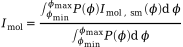
where Imol,sm is calculated using the semi-rigid approximation.
In UNEX the integration is done numerically (using trapezoidal rule) from φmin to φmax
defined by respective pseudoconformers. Here P is the same Boltzmann distribution as above.
The integral variant is computationally slightly more expensive but also more consistent in comparison to the sum model described above.
Mixtures of molecules
When the sample is a mixture of different species then the molecular and atomic scattering intensities are defined as weighted sums

where xi is the mole fraction of species i, Imol(i) and Iat(i) are the molecular and atomic scattering functions of the species i.
Values for mole fractions can be defined using the keyword MoleFracVal in information fields of respective molecules.
Note, they must be in the range 0.0 — 1.0 and are constrained as

The complete reduced molecular intensity M(s) is defined in UNEX as

which is generally not equal to the less accurate (well, strictly speaking it is invalid) approximation

Below is an extreme example of 1:1 mixture of CH4 and CI4 showing differences between the accurate (implemented in UNEX) and inaccurate methods for calculation of the complete M(s) or sM(s) function.

The figures demonstrate that the later equation significantly overweights the contribution of CH4 in the total sM(s). This can be even better seen on the corresponding radial distribution functions below.

The figure on the left side correctly depicts the dominant contribution of CI4, whereas the signals from CH4 can hardly be seen. On the right is the RDF from molecular intensity calculated using the last inaccurate equation. Clearly the contribution of CH4 is significantly overestimated.
Note, both methods are equal for models of mixtures of species with equal empirical formulae. For example, this is the case for models of conformational mixtures.
ED background lines
Structural analysis in gas electron diffraction is performed on the basis of the molecular part of total ED intensity. The molecular intensity is obtained by applying the background elimination (extraction) procedure, which can be called simply as background procedure. In UNEX are implemented models for two major types of backgrounds, the multiplicative and additive. The later can be additionally defined in two variants. All of them are described below.
Multiplicative background
The model for the total intensity can be defined as (see the chapter Models for ED intensity)

This can be further modified to

From here an exact expression for the sM function can be easily obtained as

where function Φ is the so called multiplicative background (designated mbgr in UNEX),
defined as

The advantage of the last expression for the sM is that it has no sector function S in explicit form. If the sector function is smooth (i.e. the sector device is of good quality) and experimental conditions result in smooth background β then the multiplicative background Φ must also be smooth. However, separation of the two smooth functions, β and Φ is a very ill-posed problem and in real practice an approximate formula is used for calculation of experimental sM function:

This expression becomes exact if extraneous background β is zero, which is never achieved in real experiments.
However, in structural analysis, when model sM functions are fitted to the experimental data,
scale factors (ImolSf) for the sM curves are usually refined to compensate for this problem.
If experimental sM curves are obtained by accounting for multiplicative background as shown above then
the refined scale factors k can be defined as

Clearly, in real cases they are less than 1 due to positive β. The smaller is the background, the closer is k to 1. A refined scale factor larger than 1 is a strong indication of deficiency in the theoretical model. It should also be mentioned that the presence of strong background does not necessarily lead to significant inaccuracies in the obtained experimental sM curve. Much worse is a possible deviation of the forms of the functions B and Iat, making β non-constant in the range of observable diffraction angles and, as such, not allowing for compensation with a single scale factor k.
Technically, multiplicative background is estimated on the basis of the calculated model molecular intensity sMmod. First, the model background is obtained from the equation

In real practice the calculated Φmod is not smooth and can contain oscillations due to inexact sMmod and experimental noise from the total intensity Itot. On the next step Φmod is smoothed using cubic splines [26] or fitted with a polynom by minimizing the functional

The obtained in this way smooth line is traditionally called estimated experimental background Φexp and is used for extraction of the experimental molecular intensity from the total intensity as

which can be afterwards used in structural analysis, for example in the least-squares method. Thus, the background Φexp is in fact model-dependent and, as a consequence, the so called experimental molecular intensity sMexp is to some degree also model-dependent. To overcome this problem it is recommended to refine the model on the basis of the retrieved sMexp for obtaining updated sMmod, which is then again used in the background procedure in order to get a more accurate sMexp for the next refinement iteration. This procedure should be repeated until self-consistency.
Additive background
Two types of additive background can be modeled in UNEX.
The first type is designated as a1bgr and corresponds to the following
definitions of the total intensity

and of the background β itself:

For the second type, termed a2bgr, the model of the total intensity is

where B is the background.
Extraction of background and molecular intensity
From the structural point of view the most important part of the total intensity is the molecular intensity.
Accordingly, the background separation procedure, as a part of the molecular intensity extraction,
is implemented in the EDIMOL command, namely in its GETEXP mode:
EDIMOL: GETEXP ed [Keywords]
Here ed is the identifier of a ED data set, which contains a total intensity and must be processed.
With keywords you can control the procedure and tune the methods implemented within. Below is the total list of keywords:
-
ItotModel— the model for the total intensity, which includes the respective indicator of the background type. Can be one ofmbgr,a1bgranda2bgr. -
BgrSrc— the source of the background data to be smoothed, the options aremodel(smoothing of model background, default) anddata(smoothing input data). -
BgrSplNInflMax— maximal number of inflection points (integer number) on the smoothing cubic spline. -
BgrSplFunc— target functional value (a floating point number) of the cubic spline used for the approximation of background. -
BgrPolPow— polynomial power, the highest degree of a polynomial used for the approximation of background. -
BgrCPolPow— symilar toBgrPolPowbut for Chebyshev polynomial. -
BgrRelPSDThr— threshold (a floating point number) for the relative background PSD in appoximation procedure. -
BgrAnchor— anchor point(s) for the smoothing background line. -
CalcImolExpStdev— boolen keyword (can accepttrueorfalse) for turning on or off the calculation of standard deviations for experimental molecular intensity. -
CalcRBPSD— boolean keyword (trueby default) for turning on/off the calculation and analysis of relative background power spectral density.
Note, by using one or another keyword you can choose which particular method of approximation and smoothig will be used in the procedure.
For example, setting BgrSplNInflMax=3 will use cubic spline and maximal three inflection points as a smoothness criterium.
This method has beed described in literature, see details in [27].
By setting BgrPolPow you choose a simple polynomial smoothing.
Note, the keywords in this command are optional. If some setting is not provided, then it is taken from the higher-level context. The overall priority scheme of settings (in the order from highest to lowest) is as follows:
-
Local keywords in the
EDIMOLcommand. -
Settings of the ED particular processed data set, see ED data sets chapter.
-
Global settings.
For example, the most important setting, the total intensity model, can be defined in the EDIMOL command using the ItotModel keyword.
If it is not indicated, the setting from the respective ED data set is checked (the name of the respective keyword is also ItotModel).
If it is also not defined, then the setting of the global keyword EDItotModel is used.
Note, not for all local keywords exist global or specific for data sets analogs.
CalcImolExpStdev=true can be used if there are reasonable standard deviations
(introduced on input or calculated at run time) for the experimental total intensity,
which should be propagated into standard deviations of the extracted experimental molecular intensity.
BgrSplFunc can be defined for spline approximation as a particular functional value Q,
for which the spline must be calculated. However, it is usually not recommended, since there are no
well established ranges for these values.
Another criterion for the background smoothness is its relative power spectral density in the range of structural frequencies.
This can be activated by using the BgrRelPSDThr keyword, for example
EDIMOL: GETEXP ed1 BgrRelPSDThr=-20.0
In this case a cubic spline will be used for approximation of the background and its smoothness will be adjusted iteratively so that the final RelPSD will be not larger than the requested value (-20.0 in the example above).
UNEX also provides a possibility to control approximation of background lines with help of anchor points,
which can be defined using the BgrAnchor keyword as triples of numbers.
For example, the command
EDIMOL: GETEXP ed1 BgrSplNInflMax=1 BgrAnchor=1.0/0.530/1.0;18.4/0.485/1.0
starts the procedure for the calculation of background for the intensity curve ed1.
Here with the BgrAnchor keyword two triples of numbers are indicated. These are the anchor points.
The format of the keyword does not allow spaces or commas. The numbers must be separated by slashes / and semicolons ;.
In each triple the first number is the argument s-value, the second is the background anchor value
and the third is its weighting factor.
Technically, the anchor points simply substitute the corresponding points of Φmod,
so the anchor s-values must be also in the intensity data set.
The procedure should approximate background so that its calculated values are close to anchor points.
The larger are the weights of the anchor points, the closer the approximated background line will be to them.
Note, this is true for cubic spline and simple polynomial approximations, but not for Chebyshev polynomial approximation.
Also the final result may be influenced by possible constraint(s) on the amount of inflection points, polynomial order, etc.
Finding optimal anchor points is in general a manual trial-and-error procedure.
The number of anchor points is not limited.
If several ED data sets are indicatyed in one command, they will be processed sequentially and independently. For example, the command
EDIMOL: GETEXP ed11,ed12 BgrSplNInflMax=3
is equivalent to two sequential commands
EDIMOL: GETEXP ed11  BgrSplNInflMax=3
EDIMOL: GETEXP ed12  BgrSplNInflMax=3
Unless BgrSrc=data is indicated, EDIMOL:GETEXP calculates model-dependent background
because of the usage of the model molecular intensity function.
The recalculated background and, as a consequence, the updated experimental molecular intensity
can be used for refinement of model parameters, including scale factor(s) k for the molecular intensity(-ies).
In UNEX it is possible to refine the best scale factors k internally in the EDIMOL command.
This is an iterative procedure, which can be turned on by setting the global keyword
EDBgrRefScaleIterMax to a some positive value, for example 30.
The convergence criterion of this procedure can be controlled by the optional global keyword EDBgrRefScaleTol.
The accuracy of refined molecular parameters directly depends on the accuracy of the used experimental molecular intensity function [28]. In turn, the molecular intensity is the result of the background elimination procedure. Thus, it is very important that the background is reasonably smooth, otherwise the frequencies in the experimental molecular intensity can be significantly biased, leading to biased refined parameters. The quality of the background line depends on how the total intensity is levelled. This property strongly depends on the form of the sector device used in the experiment. Best of all if values of the total intensity are in a narrow range of values for all observable diffraction angles. In this case the default procedure for smoothing of background lines works well and the amount of inflection points serves as a good indicator of the background quality. However, this criterion is not significant if the intensity curve changes too quickly along diffraction angles. A possible solution of this problem is to smooth the reduced background, obtained using division by the sector function and atomic scattering:
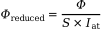
where S is the total sector function and Iat is the atomic intensity of the molecule. In the same way the reduced variant of the total intensity is defined:

This requires setting EDBgrSmoothReduced=true and introduction of sector function into UNEX.
Note, for this particular procedure the sector function must not be necessarily very accurate.
It is enough to define calculated values for your type of the sector.
The most important is to ensure that this function is smooth and together with the atomic scattering
lead to a well levelled reduced-total intensity. The figures below demonstrate a case for the total intensity of CCl4.
The first two show results of the default procedure when only 3 inflection points are allowed.
It is hardly possible to assess the quality of the total background line (on the left side).
However, in the reduced form (on the right side) the relatively low quality of the background is evident because of significant osciallations.
In contrast, smoothing of the reduced background results in the line of much
superior quality as the figure below shows.
It should, however, be noted that higher quality background lines naturally lead to higher R-factors,
at that the overall stability of the inverse ED problem is increased.


Other operations with background
Some operations with ED background are implemented in the EDBGR command.
In particular, it is possible to calculate the (relative) power spectral density
in the CALCRBPSD mode:
EDBGR: CALCRBPSD edid
where edid is the ED data set identifier with already available background intensity.
Note, this is currently implemented only for multiplicative type of background.
Averaging of ED data
In UNEX there is a possibility for averaging ED intensity curves with the EDDATA command in the AVERAGE mode:
EDDATA: AVERAGE ed1,ed2[,...] Data=type GenSet=edid CalcStdev=bool
where ed1, ed2 (more is possible) are the identifiers of the ED data sets to be used in averaging;
Data is used for indicating the type of data to be averaged, which can be iMolExp (experimental molecular intensity) or iTotExp (experimental total intensity);
GenSet indicates the ED data set id for the output averaged data;
CalcStdev is the boolean (true or default false) keyword for turning on the calculation of standard deviations.
Note, averaged intensity values are calculated for s values of the first curve ed1 indicated in the command.
If points of the other curves are defined not in the same s values then interpolation with cubic splines is used.
In addition to averaging of data and optional calculation of standard deviations this command also calculates the so called experimental R-factors [32]. For each of the curve, participating in the averaging procedure, individual experimental R-factors are calculated as

where  is the i-th point of the intensity curve, for which the R-factor is calculated,
 is the corresponding point of the averaged intensity with weight wi,
N is the total number of intensity points.
Here I can be total intensity or sM(s) depending on the type of the averaged data.
Individual experimental R-factors show how much each of the curves deviates from the average curve.
This information allows to sort out curves of low quality. An average value of individual Rexp is also printed.
Regarding weighting, UNEX calculates two types of experimental R-factors:
is the corresponding point of the averaged intensity with weight wi,
N is the total number of intensity points.
Here I can be total intensity or sM(s) depending on the type of the averaged data.
Individual experimental R-factors show how much each of the curves deviates from the average curve.
This information allows to sort out curves of low quality. An average value of individual Rexp is also printed.
Regarding weighting, UNEX calculates two types of experimental R-factors:
-
with account of weights w, which are calculated from respective standard deviations of the averaged curve as
. -
without weighting, assuming all wi = 1.
Note, with the setting CalcStdev=false the standard deviations are not calculated so both types of experimental R-factors are equal,
unless standard deviations were calculated once before.
|
If molecular model is updated, for example in LSQ refinement,
then it is not recommended to recalculate the standard deviations in the intensity averaging procedure.
Model parameters may be highly correlated with data weights. If experimental sM(s) are obtained using model background,
then the calculated standard deviations and refined model are correlated. In this case use |
Next, UNEX calculates total experimental R-factor as

Here summation is performed over all points of all M intensity curves. I can also be total or molecular sM(s) intensity, depending on the averaged data type.
The total experimental R-factor allows to represent numerically the overall reproducibility of experimental data and their general quality.
Weighted and non-weighted (setting all wi = 1) total and average experimental R-factors are calculated.
Note, the weighted experimental R-factors are calculated even if the standard deviations were not computed in this particular procedure.
They could have been defined or calculated earlier for the averaged data set.
If uncertain, run PRINT:EDDATA for the averaged data set to see the values of standard deviations used for the calculation
of the weighted experimental R-factors.
The advantage of experimental R-factors based on total intensities is that no molecular model is needed for their calculation. However, the absolute values of such Rexp are generally meaningless. They can mostly be useful for comparison of data sets produced only by the same experimental setup. In contrast, experimental R-factors on the basis of sM(s) curves are directly comparable with structural R-factors:

where  and
and  are the experimental and model sM(s), respectively.
Rstr indicates the level of disagreement of the model with experimental data, while Rexp indicates reproducibility of the experimental data. There can be several situations:
-
Rstr >> Rexp: the data are reproducible but the model cannot describe them and should be improved.
-
Rstr << Rexp: the model describes data too well, probably not reproducible data features are fitted and better data are needed.
-
Rstr ≈ Rexp: optimal solution if both values are small.
Note, if both Rstr and Rexp are large, then something went completely wrong, first of all in experiment and/or in data reduction.
Also note that weighted Rstr (named wRd in UNEX output) should be compared with weighted Rexp, likewise non-weighted Rstr should be compared with non-weighted Rexp.
Below are several examples of averaging commands.
-
Simple averaging of total intensity curves
ed1,ed2anded3. A new data set is created automatically (see UNEX output for id) and the average curve is placed therein.EDDATA: AVERAGE ed1,ed2,ed3 Data=iTotExp
-
Same as above, but also standard deviations are calculated for the averaged data.
EDDATA: AVERAGE ed1,ed2,ed3 Data=iTotExp CalcStdev=true
-
Similar to the first example. Here the output average curve is accessible using the
ed4identifier.EDDATA: AVERAGE ed1,ed2,ed3 Data=iTotExp GenSet=ed4
-
Averaging of experimental sM(s) curves.
EDDATA: AVERAGE ed1,ed2,ed3 Data=iMolExp
Combining of ED data
Another possibility of converting multiple ED curves into a single curve provides the COMBINE mode of the EDDATA command:
EDDATA: COMBINE ed1,ed2[,...] Data=type GenSet=edid CalcStdev=bool
the identifiers and keywords have here the same meaning as in the AVERAGE mode.
However, in contrast to AVERAGE, where output s points are taken only from the first input curve,
the combining procedure creates a curve with s-values present in all input data sets.
Thus, curves with different s-ranges can be combined together. For the overlapping areas averaged values are calculated.
If standard deviations were initialized for the respective input data sets, weighted averaging is used,
where weights are calculated as inverse squares of the respective standard deviations.
The Figure below demonstrates how COMBINE works for two experimental sM(s) curves obtained from different nozzle-to-detector distances.
The respective command was
EDDATA: COMBINE ed1,ed2 Data=iMolExp GenSet=ed3

Note, in COMBINE experimental R-factors are calculated in a similar manner is in AVERAGE (see above).
There are, however, some peculiarities.
The weighted R-factors are also calculated if standard deviations were not requested for calculation.
However, in contrast to AVERAGE, standard deviations are still calculated internally, used for computation of wRexp,
but are not saved for the averaged data set. Also it should be noted that standard deviations are set to 1e99
if only one data set has contribution to the combined data in the respective point.
|
Multiple calls with |
Other operations with ED data
The EDDATA command can be used in other different modes for ED data processing.
For example, in the mode MODIFY the data can be respectively modified:
EDDATA: MODIFY ed1,[ed2,ed3,...] ModType=mtype Data=dtype [Other keyword(s)]
where ed1 and possibly ed2 and so on are identifiers of ED data sets to be processed,
dtype is the type of data to be modified (currenly allowed iTotExp and iMolExp),
end mtype is the type modification, which can be one of
-
s4Mult— multiplication by the s4 function. -
iNorm— calculates integral value of the requested data and normalizes it on the integral value. -
secRedDiv— divides the requested data by the reduced sector function. -
splDiv— the data are approximated by a cubic spline and divided by this spline. By default the number of inflection points for the spline is zero and can be changed by using the additionalSplDivNInflkeyword. -
scaleToFirst— scaling data sets so that they best fit the first one, which remains unchanged. This mode expects several data sets on input. -
tScale— experimental total intensities are divided by t-factors from their respective data sets. -
smooth— smoothing using natural B-splines.
Note, the only modification type currently available for iMolExp is smooth.
|
If standard deviations were defined for the processed data, for example for the experimental total intensity, then their values are also modified accordingly. |
The other available mode is RESPCOR, which is used for correcting
experimental total intensity functions with the detector responce function.
The syntaxt is simple:
EDDATA: RESPCOR ed1[,ed2,...]
Several data sets can be processed at once.
The response function must be already available in UNEX.
It can be obtained by refinement or introduced with the EDRESPFUNC command, see ED response function for details and examples.
The COPYMODEL mode is used when it is required to copy model data to the experimental data,
thus making them equal. The syntax is as follows:
EDDATA: COPYMODEL ed1[,ed2,...] Data=dtype
where dtype can be iTotExp and iMolExp, for copying to experimental total and molecular intensities, respectively.
Several data sets can be processed at once.
The ADDNOISE mode, as the name says, implements the adding of noise to the existing data:
EDDATA: ADDNOISE ed1[,ed2,...] Data=dtype PDFType=ptype
where dtype can be iTotExp and iMolExp, experimental total and molecular intensities, respectively;
ptype is the type of the probability density function, for which the only currently implemented option is normal.
Finally, there is a SET mode, which is useful for changing different settings of ED data sets on the fly when UNEX runs:
EDDATA: SET ed1[,ed21] Keywords
where in place of the word Keywords you can define the actual keywords with respective required settings.
The keywords here can be exactly the same as at the reading of ED data sets with the command EDDATA:READ.
For example, the following
EDDATA: SET ed1,ed2 ItotModel=a2bgr
will change in the data sets ed1 and ed2 the model for the total intensity to a2bgr.
ED radial distribution functions
Radial distribution functions in UNEX are calculated and printed by the EDRDF command:
EDRDF: CALC [ed1,ed2,...]
Optional argument(s) of the command form a list of one or more ED intensity data sets with initialized molecular intensity functions. The calculation is essentially a sine-Fourier transformation of the respective experimental and model molecular intensity curves:

If several curves are provided in the list of arguments, they are concatenated before Fourier transformation, for example
EDRDF: CALC ed1,ed2
Note, the curves must have common range of s-values.
The concatenation procedure includes relative scaling of curves, re-interpolation to common argument values (if required) and weighted averaging in common ranges of argument.
Next, there are three general modes for calculation of radial distribution functions, which directly influence the minimal and maximal values of integration argument s.
The modes, controlled by the EDRdfType keyword in BASE, are as follows:
-
old, the most simple method, takes (combined) experimental sM(s) curve and performs integration in the range of s-values in which this curve is defined. The resulting radial distribution function usually looks not nice since integration starts from smin not equal to zero. -
classic, a more advanced method, in which experimental sM(s) curve is supplemented with respective model curve on the left side before integration. This is done in order to get an "experimental" curve, which starts from s=0. This, in turn, stabilizes integration and improves the overall appearance of the radial distribution function. Note, this makes sense if model sM(s) function fits well the experimental data. On the right side the experimental curve remains unchanged and integration is done till maximal s value for which the curve is defined. This can lead to problems with integration since at maximal experimentally achievable s-values of 30-40 Å-1 sM(s) functions are numerically not enough converged to zero. To overcome this problem the experimental sM(s) can be multiplied by an exponential function for damping, see keywordEDRdfDampin BASE. Note, this procedure leads to broadening of peaks on the radial distribution function and to reduction of its resolution. -
modern, the most advanced method proposed by Atavin [33], which supplements experimental sM(s) with model data not only on the left side as in theclassicvariant but also on the right side, so that smax is as large as possible (60 Å-1 in current implementation). This allows to avoid usage of damping exponential function and, as a result, leads to improved resolution of F(r). However, to obtain good results the model function must fit experimental data well.
Note, the concatenation of model and experimental sM(s) curves in classic and modern types of RDF requires some overlap of these functions.
The extent of the overlapping can be adjusted using keyword EDRdfNConcat.
Below are some examples of RDFs for benzene using different options of EDRdfType:

Here the variants A, B and C correspond to the settings EDRdfType=modern, EDRdfType=classic and EDRdfType=old, respectively.
|
|
Below is the graphical representation of the influence of damping function on the RDF in case of benzene when EDRdfType=classic and experimental data available only up to 30 Å-1.
If the damping is turned off, i.e. EDRdfDamp=0.0, the RDF has multiple false peaks. An optimal value of damping factor removes these peaks.
Too large value of the damping factor increases widths of true peaks so that the resolution of RDF is too low.

The cases A, B and C were obtained with the settings EDRdfDamp=0.0, EDRdfDamp=0.0025 and EDRdfDamp=0.01, respectively.
The next issue in calculation of RDF is connected with representation of contributions of different terms in sM(s) functions.
In a crude approximation the contribution of a pair of atoms to diffraction pattern is proportional to the product of their atomic numbers.
The respective RDF in this case can be easily analysed.
In reality, however, contributions of atomic pairs to diffraction patterns are not constant on the s-scale
and are not even linear (this property is characterized by scattering factors).
As a consequence, the calculated RDF is difficult to analyze.
Fortunately, ratios of scattering factors for different types of atoms are much closer to constants
than the scattering factors themselves. UNEX provides a possibility to divide the integrated molecular intensity
by a scattering factor in a form of g-function, which is controled by the EDRdfModGf keyword in BASE.
This can improve the appearance of the obtained RDFs. By default for this purpose UNEX chooses a g-function
for the pair of atoms with maximal product of atomic numbers. Note, however, that this logic can fail in molecules
containing atoms with very different atomic numbers. In this case some g-functions can go through zero and change the sign.
Accordingly, RDF cannot be obtained by integration of molecular intensity modified by such a g-function.
In this case an optimal g-function can be chosen manually by using EDRdfModGfAtoms keyword.
In case of benzene the influence of EDRdfModGf is as follows:

In these examples the variant A has been obtained by using the combination of keywords EDRdfModGf=true and EDRdfModGfAtoms=C;C,
variant B only single keyword EDRdfModGf=false and for C again a combination of keywords EDRdfModGf=true and EDRdfModGfAtoms=C;H.
For obtaining RDFs integration is done numerically. For this UNEX implements two methods, simple trapezoidal and more accurate but slower Romberg method. In most cases the first method is accurate enough and is used by default. Switching between integration methods is done by EDRdfIntegMethod keyword in BASE.
Regarding r-values, for which RDFs are calculated, two schemes are implemented in UNEX:
-
If
EDRdfAdaptiveR=true(by default it is=false, i.e. turned off) the so-called adaptive step size is used depending on the local curvature of the RDF in each point so that obtained function is accurate enough for numerical analysis. -
For purposes of visual analysis RDF is calculated on a fixed grid on the r-scale, where step is determined by the
EDRdfRStepkeyword. However, for better appearance some points can be skipped, so that in general they are arranged nearly equally dense along the RDF line and not along the r-scale. This is default and controlled by theEDRdfPruneRlenkeyword. To turn off the prunning of points setEDRdfPruneRlen=0.0.
The RDF defined above as integral F(r) is essentially the distribution P(r)/r, where r is the distance between atoms and P(r) is its distribution function. The first moment of the function Pij(r)/r for a particular pair of atoms ij is the ra type of thermally averaged distance between these atoms. Thus, RDFs calculated as described above show peaks centered at ra distances. There is, however, a possibility to obtain RDF defined as P(r), which is more natural. For this, UNEX can multiply the integral by r, see EDRdfMultR keyword. In this case the peaks are centered at rg distances between atoms. Note also that this procedure naturally increases the difference curve (difference between model and experimental RDFs) proportionally, so this should not be misinterpreted as a worsening in the model fit.
Below is such an example using data for Ph-CH2-CH2-CH2-Se-CF3 molecule. Note again, both RDFs were obtained for exactly the same experimental data and model.
The advantages of the P(r) function are clearer physical meaning and more distinct visibility of contributions from terms with large interatomic distances.
In contrast, the P(r)/r function effectively hides discrepancies between data and model, which hinders analysis.
Therefore in UNEX the default setting is EDRdfMultR=true so that P(r) RDFs are generated.

In the example above the varients A and B were obtained with the settings EDRdfMultR=true and EDRdfMultR=false, respectively.
|
UNEX can also calculate pure model radial distribution functions if the |
If your experimental molecular intensities have meaningful standard deviations it is possible
to calculate errors of experimental RDFs by switching the EDRdfCalcStdev keyword on.
Standard deviations for sM(s) can be defined in input file as absolute values,
calculated in averaging procedure or in background procedure from respective errors of total intensity functions.
Standard deviations for sM(s) are also estimated in LSQFUNC:MINIMIZE but should be used with care in case of large R-factors.
Note that the calculated values of standard deviations for RDFs only represent random errors
propagated from respective errors of sM(s).
The default method for calculation of standard deviations uses error propagation formula and numerical
differentiation of sM(s) functions. For large models the calculations can be (very) time consuming.
There is an alternative procedure which uses the Monte-Carlo method. This can be activated by setting the keyword
EDRdfMCIter to some positive integer value, indicating the number of iterations.
It is recommended to investigate the convergence of the calculated results with respect to the number of iterations.
In some cases the optimal value of EDRdfMCIter can be from several hundreds to several thousands.
Below in Figure the simulated molecular intensity functions for 1,2-dichloroethane (1:1 mixture of anti and gauche conformers) are shown. Random Gaussian noise, with standard deviations 0.03 for the curve above and 0.025 for the curve below, was added to the simulated experimental data.

These data were used to calculate model and experimental RDFs with respective standard deviations. The obtained data are plotted on the Figure below. Note, the calculation was done with EDRdfMultR=true, that is RDFs corresponding to P(r) were calculated. Therefore oscillations of the difference curve and the standard deviations increase when r increases.

Alternatively UNEX can calculate more traditional RDFs of type P(r)/r by switching the EDRdfMultR keyword off. Usually in this case standard deviations are distributed approximately equally along r scale. The Figure below demonstrates P(r)/r for 1,2-dichloroethane calculated from the simulated sM(s) data shown above.

|
For graphical interpretation of RDFs it is useful to print also interatomic terms and their contributions
using the |
ED standards
UNEX can process ED intensities of gas standards. In most cases this is done in order to refine (i.e. calibrate) electron wavelength.
The respective command is EDSTD:
EDSTD: method ed1[,ed2,...]
Here method can be SCANLAM, REFINELAM or LSQMIN. Also in the command there must be defined one or more identifiers of intensities,
which should be processed. For each intensity the type of ED standard can be defined with the local keyword Std,
otherwise default value from the global keyword EDStdDefType will be used.
In most cases initial value of the electron wavelength (keyword Lambda in definition of intenity curves) and distance from nozzle to detector (keyword NtoD) must be defined.
It is also recommended to set the sector-to-detector distance (keyword StoD) to an appropriate value
if sector device was used for obtaining experimental data and sector function is used in the procedure.
The first method SCANLAM does searching of the best electron wavelength by scanning.
The control keywords for this method are EDStdScanIter, EDStdScanLamMin and EDStdScanLamMax.
The other method REFINELAM searches the best electron wavelength using golden section method.
In contrast to the simple scanning it recalculates background on each iteration, which increases the overall accuracy of the obtained electron wavelength.
The most important keywords for this method are EDStdRefLamIterMax and EDStdRefLamTol.
Note, the type of model for total intensities in these both methods can be chosen using individual for each intensity curve
keyword ItotModel. In fact this determines the type of background calculated for the intensities.
The valid options are mbgr, a1bgr and a2bgr.
The background and respective experimental sM(s) are also not calculated if ItotModel is not defined.
In this case the experimental sM(s) must be defined and available from some other source, for example from input file.
The approximation for background lines can be defined using global keyword EDBgrAprxType.
The flexibility of the lines can be controlled by defining the maximal number of inflection points with
the keyword BgrSplNInflMax for each curve individually, or with the global keyword EDBgrSplNInflMax.
If polynoms are used for background approximations, then the relevant keywords are local BgrPolPow and global EDBgrPolPow.
Depending on the type of background scale- or t-factors can be refined if EDStdBgrRefScaleIterMax is greater than zero.
The other option for the method is LSQ [34].
In this case the least-squares method is used.
It refines parameters of total intensities by minimizing a functional, which is generally defined as

The summation in the first term is performed for all points of all intensity curves processed simultaneously.
The second term is for regularization of the refined sector function,
if the keyword EDStdSecRegAlpha is set to non-zero value and a regularization sector function is defined with the EDSECTOR command.
The third term is for regularization of refined background functions.
For this the EDStdBgrRegAlpha keyword must be set to some non-zero value.
The regularizing value itself is defined by the keyword EDStdBgrRegValue.
The fourth term is for the additional control of the background flexibility,
if the keyword EDStdDBgrRegAlpha is set to non-zero value.
In fact this is a sum of second derivatives of backgound values of all curves in all points.
Again, the used model for the total intensity depends on the setting of the ItotModel keyword for each intensity curve.
In the least squares method the valid options are a1bgr and a2bgr. For details see Models for ED intensity.
In the first model background β is refined, in the second case background B is refined.
The reduced sector function is modelled numerically as a set of its values at particular r-values at the sector plane.
The particular set of r-values with explicit initial approximation for the reduced sector function can be defined with the EDSECTOR command.
Alternatively UNEX can automatically initialize initial reduced sector function, see keyword EDStdSecInitRStep.
Note, in any case a model sector function must be defined, see EDSecModelType and EDSecPrm* keywords.
Backgrounds β or B are modelled as Chebyshev polynomials.
The order of polynomials can be defined for each curve individually using the local StdBgrModelPow keyword.
Normally an initial approximation for the background is obtained by fitting the polynomial to a background,
which is obtained by calculating the model. By setting EDStdLsqBgrInit=data,
the source of initial background will be the values in the respective data set.
The types of parameters to be refined is determined by the EDStdLsqRefPrm keyword.
|
Refinement of background, sector function and other parameters in |
Diffraction intensities of the following molecules can be processed in UNEX as gas standards (default standard values are taken from the cited papers):
Currently used standard values of parameters for these molecules can be printed with the command
PRINT: EDSTDPRM
It is also possible to define a custom set of standard parameters for each standard molecule with the EDSTDPRM command:
EDSTDPRM: READ stdtype otag,ctag [Format=fmt]
Here stdtype is the type of standard, one of the following: CCl4, C6H6, CO2, CS2.
The keyword Format is optional, the only available format is unex and it is assumed by default.
In the input file between tags otag and ctag must be defined types of terms and their parameters:
ra distance, amplitude l and asymmetry (or Morse) constant.
Note, the last parameter should correspond to your setting of the EDImolAnhTrmModel keyword.
By default it is EDImolAnhTrmModel=asym, so asymmetry parameters are expected.
Model molecular intensity functions are calculated from the introduced parameters
using the respective approximation as described in chapter Models for ED intensity.
In these calculations multiplicity factors (number of equal terms of a given type in the molecule) are used automatically.
They are predefined for each term in each standard molecule in UNEX.
Here are examples of the EDSTDPRM command:
EDSTDPRM: READ CCl4 <ccl4terms>,</ccl4terms>
<ccl4terms>
    C-Cl   1.7667  0.0496  5.0e-7
  Cl..Cl   2.8892  0.0712  6.0e-7
</ccl4terms>
EDSTDPRM: READ C6H6 <c6h6terms>,</c6h6terms>
<c6h6terms>
    C-C    1.397760  0.046360  5.5e-7
   C..C    2.418800  0.055180  8.1e-7
   C..C    2.792300  0.058980  0.0
    C-H    1.095600  0.077060  0.0
   C..H    2.158700  0.099850  0.0
   C..H    3.404100  0.096880  0.0
   C..H    3.879200  0.093380  7.0e-8
   H..H    2.483300  0.157990  0.0
   H..H    4.300200  0.133170  0.0
   H..H    4.964400  0.118180  0.0
</c6h6terms>
EDSTDPRM: READ CO2 <co2terms>,</co2terms>
<co2terms>
    C-O    1.16419  0.0327  3.0e-7
   O..O    2.32427  0.0393  2.9e-7
</co2terms>
EDSTDPRM: READ CS2 <cs2terms>,</cs2terms>
<cs2terms>
    C-S    1.559    0.040   7.7e-7
    S-S    3.112    0.052   8.8e-7
</cs2terms>
|
The input order of the terms is important and must be as in the examples above. |
|
The values in the examples are only for demonstration of the input format. Do not use them in real investigations! |
ED terms
Calculation of ED terms
In UNEX there is a command for calculation of ED molecular terms:
EDTERMS: CALC mol Method=md [Settings]
At present the only implemented option is Method=md,
indicating the calculation of terms using data from molecular dynamics (MD) simulations.
The method has been introduced in works of Wann et al. [37, 38].
The UNEX implementation is based on the work [39]
(see the MD model and Eqs. 1 — 4 therein) and provides more advanced possibilities,
especially regarding symmetrization and convergence control.
As the data source the method requires a trajectory (a set of frames with Cartesian coordinates)
collected in MD simulation(s).
From this trajectory UNEX calculates vibrationally averaged interatomic distances ra and rg,
mean amplitudes of vibrations l and asymmetry constants κ.
Equilibrium Cartesian coordinates must also be defined.
They are used for calculation of respective vibrational coorections (re - ra).
The most compact view of the command for the calculation is as follows:
EDTERMS: CALC mol Method=md MDTrjFile=md.trj
where with the mandatory keyword MDTrjFile the name of the file with trajectory is indicated.
There are other optional keywords, which can be used for finer control:
- MDConvAmplThr
- MDConvCorThr
- MDConvKappaThr
-
Convergence thresholds for amplitudes, distance corrections and asymmetry constants. These keywords define normalized (i.e. relative) root-mean-square deviations of respective calculated parameters within the testing window (see the
MDConvTestWinkeyword). By default all three convergence thresholds are equal to 0.01, which corresponds to 1 %. - MDConvTestWin
-
Window size (number of frames in trajectory) for convergence testing. The default value is 1000, but it may be not adequate to the problem and should normally be adjusted manually. See below for details.
- AddMols
-
Additional molecule(s) (separated by
;symbol, if many), already defined in UNEX and for which ED terms must also be calculated within the same procedure. The molecules must be of the same formula and related to each other as conformers. - Symmetrize
-
Boolean (
trueorfalse, default) keyword, defining whether ED terms must be symmetrized. The symmetrization is done within all terms of all processed molecules. Symmetry equivalent terms within each molecule are determined exactly. Equivalent terms between different molecules are determined approximately, see the keywordSymDrTol. - SymDrTol
-
Tolerance value (in Å) for determination of symmetry-equivalent ED terms between different molecules. If distances deviate more than this value, then they are considered as not equivalent. Note, comparison of distances is done only for pairs, which have the same types of atoms. The default value is 0.00001.
- PrintCmpOld
-
Boolean (
trueorfalse, default) keyword for enabling printing of comparison between the calculated ED terms and respective old values, existing before the command execution.
|
For checking convergence it is recommended to use window size (keyword |
Calculation of ED terms requires that molecules have already defined
(or in any other way calculated) Cartesian coordinates, for example by using the MOLXYZ command.
Normally they correspond to the equilibrium structure at the same level of theory,
as has been used in obtaining MD trajectory,
thereby allowing calculation of reasonable vibrational corrections.
For molecules having two or more conformers, MD trajectories can go through all available
conformational basins. In contrast, calculations of ED terms are typically done for a particular
conformer. Thus, in processing of an MD trajectory we need to ensure that only frames belonging to
a particular conformational basin are taken into account.
For this, the conformational basin must be defined using the MOLGEOMCONF command:
MOLGEOMCONF: READ mol <gconf>,</gconf>
The field with correspodning data consists of lines, each defining type of geometrical parameter with respective atom numbers and ist minimal and maximal values for the particular conformer, for example
<gconf>
dihedral  1  2  3  4  -90.0  90.0
</gconf>
means that the conformer must have dihedral angle 1—2—3—4 between -90.0 and 90.0 degrees.
More geometrical parameters can be used simultaneously.
The available types are distance, angle, dihedral and o-o-p (for out-of-plane),
which require definition of 2, 3, 4 and 4 atom numbers, respectively.
Setting ED terms
When ED terms are already defined, it is possible to set all distance corrections
to a single value at once. For this the EDTERMS command can be used with
the mode SET and respective keyword Cor. For example, the following command
EDTERMS: SET mol Cor=0.0
will zero out all distance corrections in the ED terms of the molecule mol.
Rotational constants
UNEX can make use of and process rotational constants of molecules and related parameters. The definition of all these quantities is done in the fields of respective molecules as described above. Here we introduce the models implemented for rotational constants and some basic operations with them.
Models of rotational constants
In the simplest case, model rotational constants are computed by diagonalizing inertia tensors,
which are calculated for the current geometrical structure by using atomic masses located in infinitesimal points.
This model in UNEX is called "rigid rotor - point atomic masses" and corresponds to the setting RotConModel=rrpam:

The other option, RotConModel=rrpam-vibc, in addition utilizes input vibrational corrections,
defined by the keywords RotAVibCorVal, RotBVibCorVal and RotCVibCorVal.
First, the "rrpam" values are calculated, from which the respective vibrational corrections are subtracted.
Note, the correction is defined as

in practice typically

Thus, the model rotational constant is calculated as

The third option, RotConModel=rrpam-vibc-elc1, adds an electronic correction in addition to the vibrational correction.
The electronic correction is calculated as (for details see the book of W. Gordy and R. L. Cook [40] page 548)

where  is the axis in the principal system,
 is the effective model rotational constant,
 and
and  are the rotational constants
calculated using atomic (the "rrpam" definition) and nuclear masses, respectively,
m and M are masses of the electron and proton, respectively and
are the rotational constants
calculated using atomic (the "rrpam" definition) and nuclear masses, respectively,
m and M are masses of the electron and proton, respectively and
 is the corresponding diagonal element of the rotational g tensor.
Thus, using UNEX designations (and omitting the axis symbols for simplicity) the total model rotational constant is calculated as
is the corresponding diagonal element of the rotational g tensor.
Thus, using UNEX designations (and omitting the axis symbols for simplicity) the total model rotational constant is calculated as

The diagonal components of the rotational g tensor are defined using the keywords RotGTaaVal, RotGTbbVal and RotGTccVal.
Note, they can be automatically corrected if global or molecule-specific relative shifts are introduced
by using the keywords RotGTaaRShift, RotGTbbRShift and RotGTccRShift.
In this case the corrected g value is calculated as

Operations with rotational constants
For operations with rotational constants UNEX implements a command ROTCON.
At present the only available mode is COPYMODEL,
which does to copying of model values to experimental.
After this operation the model and experimental values are equal.
The sintax is simple as
ROTCON: COPYMODEL mol
Note, if mol has isotopologues then the copying is performed also for them.
It is also possible to do this for all defined molecules just by using the identifier all:
ROTCON: COPYMODEL all
Vibrational analysis
In UNEX it is possible to do a simple vibrational analysis.
Direct vibrational problem — calulation of harmonic vibrational modes and frequencies can be solved using the command MOLVIBFREQ as
MOLVIBFREQ: CALC mol Method=mtd
where the keyword Method defines the method of calculation.
At present it has the only available option diagf2cmw.
The procedure diagonalizes the matrix of harmonic force constants in mass-weighted Cartesian coordinates.
Note, the force constants as well as the respectively oriented Cartesian coordinates of atoms must be already available in UNEX.
For this, for example, the commands MOLVIBF2C and MOLXYZ can be used.
Results of the procedure can be printed using the PRINT:MOLVIBMODES command (see below).
Force constants
In UNEX are implemented methods for converting cubic force constants between Cartesian and normal
coordinates, as described in Ref. [41].
This can be done using the already available commands MOLVIBF3C and MOLVIBF3N
in the mode CALC:
MOLVIBF3C: CALC mol  Method=f3n
MOLVIBF3N: CALC mol  Method=f3c
The first command calculates cubic force constants in Cartesian coordinates from constants in normal coordinates. The second command does the opposite conversion.
Thermodynamics
UNEX can calculate thermodynamic functions for systems consisting of pure substances.
For this the MOLTHERMO command can be used:
MOLTHERMO: CALC mol [Method=mtd] [Other keywords]
The keyword Method has the only option stat, which indicates the usage of tatistical thermodynamics theory [42].
Other keywords are described below.
Before running this command geometry and vibrational frequencies must be already defined for the respective molecule.
The frequencies can be calculated or introduced with the MOLVIBFREQ command (see Vibrational frequencies).
Depending on the ThermoModel setting of the molecule the calculation can be performed in different ways.
In the simplest case, ThermoModel=sRRHO, UNEX uses the model of ideal gas, assumption on uncoupled translational,
rotational and vibrational motions, rigid rotator and harmonic oscillator (RRHO) approximation [43].
Note, the frequencies may be scaled by using the ThermoFreqScale keyword, which turns the approximation effectively into the anharmonic oscillator, respectively.
The other option, ThermoModel=msRRHO-1, utilizes the so called modified scaled RRHO method by S. Grimme [14],
with a modified procedure for the calculation of the vibrational entropy. Two keywords are related to this method, ThermoMSRRHOWCutoff1 and ThermoMSRRHOWAlpha1.
Note, this method was also known as quasi-RRHO [13].
The last option, ThermoModel=msRRHO-2, in addition to the entropy correction (as in msRRHO-1) also uses similar correction to enthalpy as described in [15].
The respective control keywords are ThermoMSRRHOWCutoff2 and ThermoMSRRHOWAlpha2.
Thermodynamic functions are calculated for conditions (temperature and pressure) defined by the optional keywords to the command (see below) or by global parameters.
In calculations it is also assumed that only the ground electronic state is populated and other states are not achievable.
The contribution of the ground electronic state is determined by the spin multiplicity and
can be defined using the SpinMult keyword in the field of the respective molecule.
Possible optional keywords of the MOLTHERMO:CALC command are as follows
- Temperature
- Pressure
-
Temperature (in K) and pressure (in atm), for which the thermodynamic functions must be calculated. By default they are initialized to the values of the global keywords
ThermoTemperatureandThermoPressure. - CalcTrans
- CalcRot
- CalcVib
- CalcEl
-
Parameters for turning on and off the calculation of particular contributions to thermodynamic functions due to translational, rotational, vibrational and electronic motions, respectively. Each keyword accepts either
true(default setting indicating to do the corresponding calculation) orfalse(turn off). - ApplRes
-
if
true, then the calculated results are applied (i.e. saved as an active property) to the molecule. Default setting isfalse, meaning that the results are just printed to output without applying them to the molecule.
For example, the command
MOLTHERMO: CALC h2o Temperature=500.0 CalcTrans=false
calculates thermodynamic functions for the h2o molecule at 500 K and default (standard) pressure. All types of motions will be taken into account, except for translations.
On the output are printed inner energy U, enthalpy [H(T)-H(0)], entropy S, Gibbs free energy G,
constant volume heat capacity Cv and constant pressure heat capacity Cp.
The particular contributions to the thermodynamic functions and to the molecular partition function Q
from different types of motions are also printed.
If the electronic energy has been defined for the molecule (see the EnergyEl keyword) then total values for the thermal energy,
enthalpy and Gibbs free energy are printed.
Note, small vibrational frequencies lead to large errors in calculated thermodynamic functions within standard RRHO approximation.
Depending on the application, it may be reasonable to ignore such frequencies by using the keyword ThermoFreqCutoff.
However, a more universal way for solving this problem is to use the msRRHO methods.
Mole fractions
From the very beginning in UNEX has been implemented possibility to model mixtures of molecules.
The mole fractions of molecules are usually defined using the MoleFracVal keyword.
However, it is also possible to calculate mole fractions using the MOLEFRAC command in the mode:
MOLEFRAC: CALC [Method=mtd] [ApplRes=bool]
At present, the only implemented and default method option is Method=boltzmannG.
This assumes using Boltzmann distribution with Gibbs free energies, summed with electronic energies (if set), for all introduced molecules.
Note the energies can be defined using keywords ThermoGibbsEnergy and EnergyEl or calculated using the MOLTHERMO command.
The temperature is defined with the global ThermoTemperature keyword.
With the keyword ApplRes it is possible to apply (i.e. set) the calculated results to the molecules automatically, by using ApplRes=true.
Data samples
To the processing of data samples we can ascribe their simulation.
This can be performed using the DATASAMPLE command in SIMULATE mode:
DATASAMPLE: SIMULATE Model=mdl (Keywords) [Optional keywords]
where mdl must by the model for the simulated data.
At present the only available model is Ishigami [44].
For the model must be defined parameters using keywords with Prm prefix.
Ishigami needs two parameters, which can be introduced as for example
Prm-1=7.0 Prm-2=0.1
Next, for variables must be defined probability destribution functions using keywords with prefix RND.
Ishigami has tree variables, they can be defined as
RND-X-1=uniform;-3.14;3.14 RND-X-2=uniform;-3.14;3.14 RND-X-3=uniform;-3.14;3.14
Finally with the keyword NValues there must be defined the number of
values to be generated for the model function.
Optional keywords are:
- GenDS
-
Name of the generated data sample. By default a new name is automatically generated.
- Seed
-
Initialization number (seed) for the random number generator used in the procedure. Autogenerated by default.
Refinement of molecular parameters
UNEX provides possibilities to refine different kinds of parameters, including molecular parameters. However, in the context of this manual most often the term refinement means the determination of molecular structure from some experimental data. With UNEX it is possible to refine molecular structure from gas electron diffraction (GED) intensities, from rotational constants of molecules or from their combinations. In addition, you can use supplementary data in different forms to stabilize the solution of the inverse problem. Below are described all the procedures available in UNEX.
Types of parameters and their grouping
Refinement of all kinds of parameters in UNEX is closely associated with the term group.
A group represents a list of parameters tied by particular constraints.
Most often the constraints are fixed differences between values of parameters within each group.
In case of ED vibrational amplitudes there is also a possibility to fix their ratios within each group instead of differences (see the LsqEDTrmAmplSfRef keyword).
The number of parameters in a group is not limited. However, only particular kinds of parameters can be grouped together.
Formally a group can also consist of only one parameter.
In this case the respective parameter is not tied to any other parameter in refinement procedures.
Groups are defined by unique integer numbers. Each parameter can be defined with its respective group number.
Several parameters with the same group number are combined together to a single group and
refined with fixed constraints.
By default parameters are defined without group numbers, which is the same as to assign them the group number 0.
If you want to refine parameters, you have to define their group numbers larger than zero explicitly.
For refinement procedures the amount of variables is equal to the number of active groups.
Thus, multiple parameters in a group in fact act as a single parameter in least-squares refinement.
Consequently they share the same estimated standard deviation as a group.
Note, this is not equivalent to a situation when the parameters are statistically independent and
have their individual standard deviations, even if they are numerically equal!
Below is the list of parameter types, which can be refined in UNEX.
-
Geometrical parameters of Z-matrices. See respective chapter on how to assign group numbers to them. Parameters of the same type can be combined together in a single group, for example a distance can be combined only with other distances. It is generally impossible to combine different types of geometrical parameters into a group. Note, geometrical parameters of different molecules can be tied together in one group.
-
Interatomic distances ra can be refined independently. See the
EDTERMScommand on how to define respective groups. Note, this leads to so called geometrically inconsistent ED models. -
Vibrational amplitudes of interatomic pairs in ED models. Respective groups can be defined in the same fields as the values for amplitudes. Alternatively, there are possibilities to group amplitudes (semi-) automatically after their definition (see below). Amplitudes in different molecules can be grouped together.
-
Mole fractions for molecules in mixtures, see parameters
MoleFracValandMoleFracRefGrpin molecular field. -
Parameters of molecular potential energy functions in dynamic ED models.
-
Scale factors for ED molecular intensity functions, see the
ImolSfRefGrpkeyword in field of intensity curves.
Automatic or semi-automatic grouping of ED term parameters can be done using the EDTERMS command as
EDTERMS: GROUPREF mol ParType=ptype Method=mtd [Other keywords]
At present the only available option is ParType=ampl, meaning grouping of vibrational amplitudes.
Two methods are available, manrint and rdfpeaks.
For using the first method, manrint, with an additional keyword RInterval must be indicated
range(s) of ra distances. The grouping is then done on the principle that terms within
a particular range belong to one group. For example, the command
EDTERMS: GROUPREF mol ParType=ampl Method=manrint RInterval=1.0-2.0;2.0-3.0
will group amplitudes in the terms with ra distances in the range [1.0,2.0) Å and
another group will be created for the range [2.0,3.0) Å.
The numbers of groups will be assigned automatically.
Use keyword FirstGroup if you want to control the group numbers explicitly, for example
EDTERMS: GROUPREF mol ParType=ampl Method=manrint RInterval=1.0-2.0;2.0-3.0 FirstGroup=200
will create two groups, 200 and 201.
Another possibility provides Method=rdfpeaks.
This procedure calculates internally a radial distribution function (RDF) for the current ED model,
determines ranges of ra distances belonging to particular peaks of RDF and then performs grouping
on the basis of these ranges. For example:
EDTERMS: GROUPREF mol ParType=ampl Method=rdfpeaks FirstGroup=100
Accordingly, this method requires completely initialized ED model.
Note, in case of ED models of molecular mixtures it is reasonable to apply the same grouping scheme to all molecules at once.
This can be done by indicating the addtional molecules to be processed.
For this purpose use the keyword AddMols, for example:
EDTERMS: GROUPREF mol1 AddMols=mol2;mol3 ParType=ampl Method=rdfpeaks FirstGroup=100
In real practice it is strongly advised to analyse the performed by this procedure grouping and adjust it manually, if required. Also note, both methods perform grouping only for those amplitudes, which did not belong to any group before.
Least squares minimization
In UNEX the main command for parameter refinement is LSQFUNC, which means least-squares functional.
This command has different modes of operation. Below they are described in detail.
The most important refinement procedure is the direct minimization of the target least squares functional
starting from current values of model parameters.
This is done in the MINIMIZE mode, with the common syntax
LSQFUNC: MINIMIZE functional(s) [data] [settings]
Here the type of the LSQ functional must be provided, the data identifiers should be defined in case of ED (see examples below) and different additional settings can also be used. There are several types of functionals:
-
EDSMS— molecular part of electron diffraction intensity in the form of sM(s) function; -
ROTCON— rotational constants; -
REGPRM— regularization parameters, also known as flexible constraints or restraints; -
MOLGEOMRST— restraining geometrical parameters of molecules.
Additional settings can be defined as usually in the format Keyword=value. The available keywords are
- RefGrp
-
List of parameter group numbers and ranges of group numbers, which must be refined in the current procedure. For example
RefGrp=1;5will allow refinement of only groups 1 and 5, irrespective whether other parameter groups were introduced in UNEX earlier. Ranges are defined as, for example,RefGrp=1-10. In this case only groups with numbers from 1 to 10 will be refined. By default, if this keyword is not used, UNEX will try to refine all parameters with positive group numbers. - ExclRefGrp
-
This keyword is used for excluding particular group numbers from the refinement procedure. For example,
ExclRefGrp=3;11will exclude groups 3 and 11. Ranges of group numbers can also be defined. Note, this keyword may be used together withRefGrp. For example,RefGrp=1-4 ExclRefGrp=2;3will result in refinement of only groups 1 and 4.
In its most general form the complete least squares functional is represented as

Here the first, second, third and fourth terms correspond to EDSMS, ROTCON, REGPRM and MOLGEOMRST types of the functional, respectively.
The global weighting factors αED, αrot, αreg and αrgp are defined
by the keywords LsqFuncEDImolAlpha, LsqFuncRotConAlpha, LsqFuncRegPrmAlpha and LsqFuncMolGeomRstAlpha, respectively.
Depending on the available data and the problem these parts of the general functional can be used solely or in any combinations.
If EDSMS is given, particular ED intensity curves must be indicated explicitly for constructing the functional, for example
LSQFUNC: MINIMIZE EDSMS ed1,ed2
Individual weights wi for the sM(s) data points are calculated automatically from their standard deviations
as wi=σi-2.
The other types of functional do not require explicit indication of their data. ROTCON automatically includes all defined
rotational constants for all molecules and their isotopologues (isotopomers), see the keywords RotAExpVal, RotBExpVal and RotCExpVal.
The weights for them are calculated in the same manner as for ED data from respective standard deviations defined with the keywords RotAExpStdev, RotBExpStdev and RotCExpStdev.
The functional REGPRM uses data, which can be read in using the respective command REGPRM.
The syntax of this command is as follows:
REGPRM: mode otag,ctag
The only available mode is READ, which means the reading of the data as in the example:
REGPRM: READ <myregparams>,</myregparams>

<myregparams>
1     1.490     0.001
2   110.0       0.1
3     0.05      0.01
</myregparams>
Here in the first column the group numbers are indicated. In the second and third columns regularization values and their individual standard deviations are provided. In the equation above the regularization values correspond to pkreg, while the weights wk are calculated from the introduced standard deviations as wk=σk-2.
Note, the regularization is applied to the first parameters in the groups, so the regularization values must be appropriate.
The other parameters in the groups are regularized automatically to the same extent due to rigid constraints.
Regularization must not necessarily be used for all refined parameters, i.e. restraints can be applied only to some selected groups.
With REGPRM it is possible to define regularization parameters for groups, whose parameters are currently not refined.
In this case the respective restraints are ignored and not included in the least squares functional.
This has been implemented because in LSQFUNC:MINIMIZE and related procedures different groups of parameters can be processed,
whereas the list of the regularization parameters is global.
The units of the regularization values must be the same as the units used for introduction of respective model parameters in UNEX input.
For parameters of potential functions internal UNEX units are expected. They can be checked by printing data with the PRINT:MOLPEFUNC command.
MOLGEOMRST functional is built on the basis of geometrical parameters of molecules.
The allowed types of parameters are interatomic distances, angles, dihedral (torsion) angles and out-of-plane angles.
For their definition see section for geometrical parameters in chapter Data printing.
The restraining data are read in for particular molecules with the MOLGEOMRST command as in the example:
MOLGEOMRST: READ mol <rgeom>,</rgeom>

<rgeom>
distance   1    2                0.970   0.010
distance   2    3                1.385   0.005
distance   3    4                1.200   0.002
distance   3    5                1.185   0.002
angle      1    2    3         103.1     0.5
angle      2    3    4         115.6     0.5
angle      2    3    5         114.1     0.5
angle      4    3    5         130.1     0.5
dihedral   1    2    3    4      0.0     0.00001
o-o-p      5    3    2    4      0.0     0.00001
</rgeom>
Each line starts with the type of the parameter. The possible types are distance,
angle, dihedral and o-o-p (for out-of-plane angles).
Next, indices of atoms must be provided. The numbering starts from 1. Finally, values and respective standard deviations
for the defined parameters are given.
Note, the standard deviations are optional but it is recommended to indicate them explicitly.
Otherwise they are assumed to be 1.0.
The units for distances and angles are Angstroms and degrees, respectively.
In LSQ functional the weights are calculated from the defined here
standard deviations σ as wl=σl-2. Note, for models of mixtures each molecule can have
an individual set of restraining geometrical parameters. All of them are participating in the respective sum of the LSQ
functional given above. The prefactor αrgp is thus the same for all sets.
Also note that the restraining geometrical parameters should not necessarily be equal to the parameters in
definition of the initial molecular geometry. Distances can be given for chemically non-bonded atoms.
In the beginning of the LSQFUNC:MINIMIZE procedure the information on data for constructing the LSQ functional is printed.
This includes the number of data, α values, etc. If electron diffraction intensities are used, then
the structural resolution and maximal structural distance are estimated. The former is calculated as

where smax and smin are the maximal and minimal s-values for which experimental ED intensity values are available. The maximal structural distance is calculated as the Nyquist frequency due to the Whittaker–Nyquist–Kotelnikov–Shannon sampling theorem [57, 58]:

where Δs is the average spacing between adjacent intensity data points in Å-1. The rmax value shows the largest interatomic distance, which can possibly be determined from the current electron diffraction data set. However, bear in mind, that inverse problems with real experimental data may be not enough sensitive to such terms with large distances.
Minimization of the LSQ functional can be done using two methods:
The particular method can be chosen with the global LsqMethod keyword.
Both methods are iterative, the maximal allowed number of iterations is defined by the keyword LsqIterMax.
Iterations stop in several cases:
-
All three convergence criteria have been met, i.e. for the relative change in minimized functional, maximal relative parameter addition and maximal weighted gradient. See keywords
LsqFuncTol,LsqAddTolandLsqGrdTol. -
Parameter
Lambdain the Levenberg-Marquardt method sequentially increased in too many iterations (see keywordLsqLamIncrMax) or increased to a critical value (keywordLsqLamValMax). -
Maximal allowed number of iterations performed (keyword
LsqIterMax). -
The functional is exactly zero.
In UNEX there are two different weighting schemes in LSQ analysis: relative and absolute.
They influence calculation of standard deviations of refined parameters.
With absolute weights the matrix of covariances (with squares of standard deviations as diagonal elements)
is obtained directly as inverse of the respective normal matrix.
In case of relative weighting the calculated cofactor matrix (the inverse of the normal matrix) is multiplied by the factor
χ2/v, where χ2 is the LSQ functional value and v is the number of degress of freedom, calculated as the number of data points minus the number of
refined parameters v = Ndata - Nprm.
The switching between absolute and relative weighting can be done using the LsqAbsWeighting keyword.
Depending on settings LSQFUNC:MINIMIZE can print different types of data for information on minimization status, properties,
convergence and so on:
-
Total absolute and relative values of functional χ2 designated in output as
X^2. The relative values are printed during iterations of solving LSQ problem. In this case the initial value of the functional is scaled to be 1.0 and the following values are relative to this initial unity. -
Lambdais the parameter in the Levenberg-Marquardt method [59, 60] for improving convergence. Stable minimization is accompanied with decreasing of this parameter. -
Damping factor used for scaling of additions to the refined parameters.
-
RfandwRdare printed in case of using electron diffraction data. The first one is the regular R-factor calculated without weights:
The other,
wRd, is the R-factor with diagonal weighting:
Note, during iterations total wRd values (designated as
EDsMwRd) are printed, i.e. the summations are performed for all data points of all intensity curves, if several are used. Individual different types of R-factors for particular intensity curves are printed after minimization. -
RMSDandWRMSDare root-mean-square and weighted root-mean-square deviations, respectively. For rotational constants they are calculated as
where N is the total number of rotational constants, and

Analogous formulae are used for other types of data. During iterations WRMSD for rotational constants and all restraining geometrical parameters are printed in columns
RotConWRMSDandMolGeomRstWRMSD, respectively. -
When regularization data are used, the respective part of the total functional (see equation for χ2 above) is printed as
RegPrmF.
After the minimization several blocks of data are printed:
-
Information on the convergence of the procedure.
-
Statistics for the data and model:
-
Number of degrees of freedom (number of data points minus number of refined parameter groups).
-
Condition number (ratio of maximal and minimal singular values of normal matrix). Large values can indicate numerical instability.
-
Rank and nullity of the design matrix in LSQ method.
-
Goodness-of-fit value printed in case of absolute weighting. It is defined as 1-Q, where Q is the probability that the functional χ2 should exceed its refined minimal value by chance. Small values (close to zero) of goodness-of-fit can indicate that (i) model is not adequate, (ii) standard deviations for data points are probably larger than stated, (iii) measurement errors are not normally distributed. On the other hand values of goodness-of-fit close to or equal 1 can indicate that defined standard deviations of data points are too large/pessimistic.
-
Values of functional parts.
-
For sM(s) data different R-factors (diagonal-weighted
wRdand without weightsRf), RMSD/WRMSD, estimated standard deviations for the data (seeESDin output), etc. -
For electron diffraction sM(s) data the Durbin-Watson statistics [62, 63] are printed (indicated as
DW). -
Also, unweighted R-factors (for each curve separately and total) are calculated and printed for M(s). However, they are provided mostly for the completeness and for a possible comparison with results from other programs. Normally, for the assessment of the data fit, it is recommended to use the R-factors calculated for sM(s) data.
-
-
Table with refined parameter values, their absolute and relative errors and partial derivatives of total functional with respect to these parameters. Errors of parameters are least-squares standard deviations multiplied by factor
PrintStdevFac. -
Optional table with contributions of the LSQ functional parts into the refined parameters (see the
LsqCalcFuncContribkeyword). Note, here errors (standard deviations possibly multiplied by a factor) and respective so-called experimental errors of the refined parameters are also printed. The experimental errors are defined and calculated as described in [9]. The keywordLsqCalcExpErrExclFunccan be used to control this method. -
Matrix of correlations.
-
Table with correlations above 0.5, if there are any.
-
Optional table with χ2 (hyper)ellipsoid (see the
LsqPrintkeyword).
Several types of LSQ functional can be combined in LSQFUNC:MINIMIZE. For example, the following command
LSQFUNC: MINIMIZE EDSMS+ROTCON ed1,ed2
refines parameters from rotational constants and indicated ED data sets simultaneously. In the same manner three types of data can be used
LSQFUNC: MINIMIZE EDSMS+ROTCON+REGPRM ed1,ed2
or with restraining geometrical parameters
LSQFUNC: MINIMIZE EDSMS+ROTCON+MOLGEOMRST ed1,ed2
Any other combinations are also possible.
As has been already stated, refinement of particular parameter groups can be turned on or off directly in the command.
By default all parameters with group numbers greater than zero are refined.
If group numbers are defined explicitly in LSQFUNC:MINIMIZE then only parameters in these groups will be refined.
The following example demonstrates how to refine parameters only in groups 1 and 2.
LSQFUNC: MINIMIZE EDSMS,ed1 RefGrp=1;2
The other possibility is to prohibit refinement of parameters in particular groups. In the following example parameters from all groups except 5 are refined:
LSQFUNC: MINIMIZE EDSMS,ed1 ExclRefGrp=5
Several groups can also be excluded from refinement:
LSQFUNC: MINIMIZE EDSMS,ed1 ExclRefGrp=5;6;26
Particular group numbers and ranges can be used:
LSQFUNC: MINIMIZE EDSMS,ed1 RefGrp=1;5-10
Combinations of the permisive and prohibitive keywords can also be used:
LSQFUNC: MINIMIZE EDSMS,ed1 RefGrp=1-100 ExclRefGrp=10;20-30
Optimization of functional factors
In complex LSQ functionals the factors
αED, αrot, αreg and αrgp should have appropriate values.
The problem is that there is no single clearly defined criterion for them.
Usually α values are adjusted according to specific requirements of a particular investigation
(see discussion of the problem in [64]).
There are, however, some heuristic criteria. One of them is implemented in UNEX
[65] (a more detailed description is given in [9]).
The respective mode is OPTALPHA:
LSQFUNC: OPTALPHA functional [data] [keywords]
The syntax here is the same as for MINIMIZE. In fact this is an iterative procedure,
which internally starts MINIMIZE on each iteration.
Note, the procedure is implemented only for some cases when only two types of functional combined together.
|
Always analyse result(s) of this command. Check whether the obtained alpha parameter fits your needs. In many cases it can be used only as a starting point for further search of optimal values. |
|
This procedure does not refine any parameters except respective α. That is, any other types of parameters,
including molecular geometry, remain unchanged after this command. Also, standard deviations and correlations are not determined.
In particular, if you run only |
Iteratively reweighted minimization
The described above command for minimization of LSQ functionals implements the main procedure in UNEX for these purposes.
A more complex method is provided by the IRMINIMIZE mode of the LSQFUNC command.
In contrast to MINIMIZE it iteratively modifies the weights of experimental data
using the bisquare scheme of Tukey [66, 67].
Accordingly, standard deviations of experimental data are adjusted.
The weights are calculated iteratively from respective residuals.
In fact IRMINIMIZE internally starts the MINIMIZE procedure on each iteration,
refines model and updates weights of all data points.
This procedure is repeated until the weights are converged or the limit for the number of
macro iterations is achieved (see the LsqIRIterMax keyword).
The syntax is as following:
LSQFUNC: IRMINIMIZE functional [data] [keywords]
Currently reweighting is implemented only for ED molecular intensities and rotational constants.
|
By design |
Global methods
The described above MINIMIZE and IRMINIMIZE are local methods for minimization of LSQ functionals.
This means that they typically converge to a local minimum depending on starting approximation.
With these methods there is no possibility to know exactly whether obtained solution corresponds
to the global minimum on the functional (hyper)surface.
To solve this problem in UNEX there are two additional methods as modes of the LSQFUNC command.
The first one, SCAN, implements systematic scanning of LSQ functional by testing different values of parameters on a defined grid.
The syntax of the command is as follows:
LSQFUNC: SCAN functional [data] [keywords]
Here the functional and data are defined exactly in the same manner as in the MINIMIZE mode.
Keywords are described below.
Note, you need to define the grid of parameters to be used in the scanning procedure.
This is done using the LSQSCAN command, for example:
LSQSCAN: READ <scan>,</scan>
<scan>
1   1.76   100    1.78
2   0.04   100    0.06
</scan>
This defines a two-dimensional scan. In each line first goes the refinement group number, then the range of the respective
values for the first parameter in the group.
In the example above the first parameter in group 1 will be scanned in the range from 1.76 to 1.78 with 100 steps.
The other parameters in this group will be automatically adjusted using fixed constraints as usually.
In the same manner the second scanning dimension is defined.
In total, the two-dimensional scan will do 101x101=10201 calculations of functional for different combinations of parameters.
If the total functional value has decreased after the scan, then UNEX reports
values of parameters corresponding to the lowest functional value and applies them to the model.
The procedure in LSQFUNC:SCAN finds global minimum of functional within defined limits for values of parameters
and with accuracy determined by scanning step size(s).
The problem is, however, that the required number of scanning points scales as SN,
where S is the number of steps for each parameter and N is the number of parameters or groups of parameters.
Thus, the total number of points increases very quickly with the number of scanning dimensions.
To avoid this problem UNEX implements a randomization method RAND for searching of global minimum.
The syntax of the respective command is very similar
LSQFUNC: RAND functional [data] [keywords]
For the definition of parameters use the LSQRAND command:
LSQRAND: READ <rand>,</rand>
<scan>
1   uniform   1.76   1.78
2   uniform   0.04   0.06
</scan>
The format is similar to that of the scanning, except that the type of distribution must be provided
(the only option now is uniform) and the number of steps is omitted.
In the scanning or randomization UNEX creates a data sample and continuously writes the generated values
into its file. If the file name was not defined before, then it is automatically constructed as <basename>_<dsname>_<seed>.dat
and written in the current working directory.
By default the <basename> is lsqscan or lsqrand. <dsname> is the name of the created data sample,
which is generated automatically by default. Finally, <seed> is the seed number used for initialization
of random number generator. All these parameters may be defined explicitly using corresponding keywords.
The keywords specific for the SCAN and RAND modes of the LSQFUNC command are (prefix Surv stands for surveying):
- SurvCycles
-
Number of cycles to be performed in the
RANDmode. - SurvGenDS
-
The name for generated data sample.
- SurvSeed
-
Seed number for the random number generator used in the
RANDmode.
Statistical modeling
Determined in inverse problems parameters are random numbers per definition, if they are refined from real experimental data. Accordingly, each refined parameter is associated with its own probability distribution function (PDF). In the simplest and the most common case it is assumed that the PDF is the normal distrubution, which is characterized by its position (i.e. the value of the parameter) and the standard deviation as a measure of its width. In each least-squares refinement standard deviations and correlation factors are calculated for parameters. They are accurate only in the simplest case, when
-
the model is linear with respect to the refined parameters;
-
the only source of errors is the noize in the experimental data, which have normal PDFs;
-
the experimental data are not correlated;
-
in the least-squares functional appropriate weighting is used;
-
the model is exact and does not introduce systematic errors.
In real structural investigations, however, none of these conditions are fulfilled and the problem of determining parameter uncertainties is getting (much) more complicated. In UNEX is implemented a method for solving these issues by using the Monte-Carlo simulation approach [68]. In this way it is possible to investigate how uncertainties in experimental data and model parameters are propagated into refined parameters. More precisely speaking, it is investigated how PDFs of experimental data and of model formal constants are propagated into PDFs of refined parameters.
The former must be introduced from outside and defined in UNEX, the latter are then determined and calculated by special methods.
Definition of PDFs for input data and for (molecular) parameters is performed using special keywords and commands.
There are three groups of special dedicated keywords, usually ending with PDFGrp, PDFType and PDFPrm.
PDFGrp keywords (for example, RotAExpPDFGrp) are used for assignment of group numbers to respective PDFs.
Parameters within one PDF group are sampled in a constrained manner, that is they are statistically not independent.
In contrast, parameters sampled in different PDF groups are statistically independent.
PDFType keywords (for example, RotAExpPDFType) define the type of PDF and the meaning of respective PDFPrm keywords (for example, RotAExpPDFPrm1 and RotAExpPDFPrm2).
In UNEX several types of PDFs are implemented, so the available options for PDFType keywords are as follows
-
normal— normal (also known as Gaussian) distribution: . Keywords
 PDFPrm1andPDFPrm2define the mean value μ and the standard deviation σ, respectively. -
shNormal— shifted normal (Gaussian) distribution, , where x0 is the current value of the corresponding modelled in UNEX quantity (a parameter of the physical model). Again, the keywords
 PDFPrm1andPDFPrm2define the mean value μ and the standard deviation σ, respectively. -
uniform— uniform distribution, . Keywords
 PDFPrm1andPDFPrm2define a and b, that is the minimal and maximal x values, respectively. -
expa— exponential distribution in the following definition: . The keyword
 PDFPrm1defines the first parameter a, which has the meaning of the minimal value of the random variable x. The keywordPDFPrm2defines the second parameter β, which is the mean value. -
shExpa— shifted version of theexpadistribution, , where x0 is the current value of the modelled physical parameter and the other parameters have the same meaning as in
 expa.
The Monte-Carlo method for calculation of PDFs of refined parameters is started by calling the LSQFUNC command in the MCMINIMIZE mode:
LSQFUNC: MCMINIMIZE functional [data] [settings]
The syntax of the command is similar to that of MINIMIZE mode described above.
In fact, the MCMINIMIZE procedure calls MINIMIZE internally.
However, it is recommended to run Monte-Carlo simulations for already refined models.
Parameters and data are sampled randomly from their respectively defined distributions and for the newly generated model and data
a least-squares method is started for minimization of the defined in the command functional.
The refined values of parameters are saved in a data sample. These steps are performed multiple times in a loop.
Thus statistics for refined parameters are collected and the procedure is repeated until convergence
or until the maximal allowed number of cycles is reached.
The following data can be randomized:
-
Experimental data in the LSQ functional.
-
Experimental molecular scattering intensity functions. For details see below.
-
Experimental rotational constants, see the keywords
RotAExpPDFGrp,RotAExpPDFType,RotAExpPDFPrm1,RotAExpPDFPrm2and analogous for rotational constants B and C. -
Regularization parameters, which indeed can be experimental from some other source or they can be assumed values with some defined absolute standard deviations.
-
-
Molecular and model parameters.
-
Z-matrix parameters, that is geometrical constraints (fixed values of parameters and their differences), see below the command
ZMATPDF. -
Relative abundances of molecules in mixtures, see keywords
MoleFracPDF*in molecular field.
-
-
Other parameters.
-
Electron wavelengths, see keywords
LambdaPDF*in the field for ED data. -
Parameters defining ED background line smoothness, see keywords
BgrSplFuncPDF*in the field for ED data.
-
The initial state of the random number generator can be controlled using the global keyword LsqMCSeed or the local keyword MCSeed.
Set this parameter to a particular integer value if you want to obtain reproducible results.
Otherwise it is initialized automatically in a pseudo-random manner so that you get numerically different results in each run.
However, if the procedure is well converged the results must be very similar.
Note, even in the MCMINIMIZE mode you can use keywords of the LSQFUNC command applicable in the MINIMIZE mode.
This is implemented intentionally since LSQ minimization is started internally in MCMINIMIZE.
There are, however, keywords specific for the MCMINIMIZE mode:
- MCGenDS
-
The name of the data sample populated during the simulation. No default value exists, a new data sample is autoinitialized.
- MCAddDS
-
Name(s) (identifiers) of already existing data sample(s) to be used together with the currently accumulated one for final analysis. No additional data samples are used by default.
- MCPDFGrp
-
PDF groups to be included into simulations. No default value(s) are defined, i.e. all PDF groups are active.
- MCExclPDFGrp
-
PDF groups to be excluded from the simulation. No groups are expluded by default.
- MCApplBias
-
Boolean keyword for turning on (
true) or off (false) the application of the determined biases to the refined parameters. By default the global setting (LsqMCApplBias) is used. Note, for correct calculation of biases the refined parameters must be already optimal for the given LSQ functional before starting the Monte-Carlo procedure. This can be achieved, for example, in a preliminary run ofLSQFUNC:MINIMIZEbefore the actual simulation. - MCApplStdev
-
Boolean keyword for turning on (
true) or off (false) the application (assignment) of the determined standard deviations to the refined parameters. By default the global setting (LsqMCApplStdev) is used. - MCSeed
-
Initialization value (seed) for the random number generator. The default value is zero, indicating that the global setting (
LsqMCSeed) must be used. - MCNLimit
-
Maximal total number of data values for each sampled parameter. Makes sense only if additional data samples are used. By default equals to zero, i.e. turned off.
In order to be able to randomize data and parameters, they must belong to PDF groups.
The assignment of PDF types, parameters and group numbers for some model parameters can be done
using dedicated keywords with the suffixes PDFType, PDFPrm and PDFGrp, as described above.
For other model parameters and data, special commands must be used, which are described below.
|
The group numbering systems for refinement and for PDF sampling are completely separated, so you can use the same numbers for these two purposes without mutual interference. However, it makes no sense to randomize parameters which are subject to refinement. |
PDFs for regularization parameters can be defined together with the regularization values using
the already available REGPRM command:
REGPRM: READ <reg>,</reg>
In this case the field of data must be in the format like in the example below:
<reg>
1      1.32    0.02    101   shNormal  0.0  0.02
2    120.0     2.00    102   shNormal  0.0  2.00
</reg>
Here each line contains regularization data as usually in the first three positions (described elsewhere),
and the next items define PDFs.
In the shown example the regularization parameter for the refinement group 1
has the PDF in group 101 with type shNormal and respective parameters 0.0 and 0.02.
Similarly, the regularization parameter for the group 2 has the PDF in group 102,
the type of the PDF is also shNormal and its parameters are 0.0 and 2.00.
For introducing PDFs of Z-matrix parameters there is a specially dedicated command ZMATPDF:
ZMATPDF: READ mol <zmpdf>,</zmpdf>
The format of the respective data field is as follows:
<zmpdf>
PDFType=shNormal
RCH  0.0  0.005  10
ACH  0.0  0.2    11
</zmpdf>
With the local keyword PDFType the type of PDF is defined.
In each of the next lines the name of the already defined Z-matrix parameter is indicated
with corresponding parameters of its PDF and the PDF group number in the very end.
For example, the Z-matrix parameter RCH has a PDF of type shNormal with parameters 0.0 and 0.005,
which belongs to the PDF group 10.
Note, the input units are here the same as at introducing Z-matrix parameters with the ZMATRIX command.
Data printing
Normally UNEX by default prints status of executed commands and some summarized results of these commands.
There is, however, a special command PRINT for outputting different kinds of data.
This command can be executed at any stage of data processing.
The only requirement is that the respective data must be already initialized at the time of requesting printing.
In many cases UNEX prints values of parameters with respective errors from least-squares refinement or other procedures. Some parameters are not directly refined but rather calculated from values of other parameters. Such parameters are called dependent. Standard deviations for dependent parameters are calculated using the formula for error propagation

where f is the dependent parameter represented here as a function of independent parameters pi with standard deviations si
and covariations ρij, N is the number of groups of parameters.
By default UNEX uses covariations if they are available from latest least-squares refinement. This can be turned off with PrmCalcStdevUseCovar keyword.
Standard deviations for independent parameters si are normally those from latest least-squares refinement or Monte-Carlo simulation.
However, in some cases they can be defined directly in input file. For example, values of parameters of Z-matrices can be introduced together with respective standard deviations.
Below is given description for different variants of the PRINT command.
|
In many cases the |
General information
Currently active molecules are printed by the command
PRINT: MOLINFO
For information about loaded images you can use
PRINT: IMGINFO
Brief information about hardware and operating system is printed by
PRINT: COMPINFO
Molecular symmetry
The command below prints symmetry elements for mol and respective point group.
Geometry for mol must be already defined.
PRINT: MOLSYM mol [Position=bool]
The accuracy of the procedure for symmetry determination can be adjusted using the global keyword MolSymTol.
With the boolean keyword Position you can force additional printing of numerical parameters defining position of each symmetry element.
Rotational constants
PRINT: ROTCON mol
The command prints experimental and model rotational constants for mol.
Model values are calculated for the current structure of mol.
Experimental values are printed as defined in the input.
|
Note, the model values have the same definition as the experimnetal values! For example, consider a situation, when you refine a semi-experimental equilibrium structure from B0 constants by using vibrational (and also possibly electronic) corrections. In this case the printed full-model values will correspond to B0 as well. |
For each rotational constant respective corrections (defined earlier in the field of the molecule), experimental standard deviations, differences between experimental and corrected (using input corrections) model values and errors are printed. The errors are calculated on the basis of standard deviations of refined molecular parameters using error propagation formula. In the end the values of root-mean-square deviation (RMSD) and weighted RMSD (WRMSD, taking into account experimental standard deviations) are calculated and printed. Note, (W)RMSD are printed only if at least one experimental value is not zero.
Also, if all required data are available, asymmetry constants kappa and second (sometimes called planar) moments Paa, Pbb and Pcc [69] are printed.
Vibrational data
Harmonic force constants in Cartesian coordinates are be printed by
PRINT: MOLVIBF2C mol [Format=fmt]
where the optional keyword Format can accept values matrix (this is default), shrink and gamess.
Cubic force constants in Cartesian coordinates are printed as
PRINT: MOLVIBF3C mol [Format=fmt]
where the only available format is blocks.
The number of columns in each block is controlled by the global keyword PrintF3cBlockCols.
Cubic force constants in normal coordinates can be printed using the command
PRINT: MOLVIBF3N mol [Format=fmt] [Units=unt]
The optional keyword Format can be set explicitly to idxval.
By default the constants are printed in internal units, Hartree amu-3/2 Bohr-3.
However, it is possible to get the values in cm-1 by using Units=cm.
By default it is Units=hartree-amu-Bohr.
Vibrational modes with respective frequencies can be printed as
PRINT: MOLVIBMODES mol
UNEX can prepare input data for ElDiff, the program for vibrational spectroscopy and electron diffraction written by Igor Kochikov [21].
PRINT: ELDIFF mol  Type=inpxyz
PRINT: ELDIFF mol  Type=inpint
The first example prints data for calculations in ElDiff using Cartesian coordinate system. The second command prints data for calculations in internal coordinates. Note, to be able to print such data there must be introduced harmonic and optionally cubic force field(s) and Cartesian coordinates for the respective molecule.
Geometrical parameters
Particular geometrical parameters of molecules are printed by calling PRINT:MOLGEOMPRM command
with appropriate keywords:
PRINT: MOLGEOMPRM mol ParType=ptyp Atoms=list [RType=rtyp]
where ptyp is the type of parameter, one of distance, angle, dihedral and o-o-p (for out-of-plane angles),
and list must contain index numbers of two, three or four atoms, depending on the type of the parameter.
With the optional RType keyword it is possible to request one or more of particular types of distances,
which can be c (default), a and g, corresponding to rc, ra and rg.
For example:
PRINT: MOLGEOMPRM mol  ParType=distance  Atoms=1;2       RType=c;g
PRINT: MOLGEOMPRM mol  ParType=angle     Atoms=1;2;3
PRINT: MOLGEOMPRM mol  ParType=dihedral  Atoms=1;2;3;4
PRINT: MOLGEOMPRM mol  ParType=o-o-p     Atoms=1;2;3;4
The numbering scheme is shown below

In UNEX rc is defined as the geometrically consistent distance as calculated from Cartesian coordinates (not to be confused with another definition of rc by Nakata et al. in [70]). In ED structural refinements its meaning is closely related to the type of used vibrational corrections. If the corrections correspond to (re - ra) then the rc distances are in fact re. In refinements from rotational constants the definition of rc depends on the type of vibrational corrections applied to these constants. If B0 are used without any corrections then the refined rc are in fact r0. There are also other possibilities, depending on details of particular structural analysis. The ra and rg are two kinds of thermally averaged distances, related to the ED method. Distances ra can be calculated from rc internally by subtraction respective vibrational (thermal) corrections. Distances rg are calculated from ra and respective vibrational amplitudes l using the approximation

For all types of geometrical parameters errors are calculated (see explanation above) and printed. By default they correspond
to estimated standard deviations, but also can be modified by a factor defined with the global PrintStdevFac keyword.
There is also a possibility to generate automatically a complete set of internal
geometrical parameters and print their values with respective errors.
This can be done by calling PRINT:MOLGEOMPRM without keywords:
PRINT: MOLGEOMPRM mol
In this case UNEX tries first to identify bonds and then to generate all other
parameters based on the connectivity information.
Two atoms are assumed to be connected with a bond if distance between them is less
than the sum of their covalent radii [71] plus some fraction
of this sum (see the MolGeomGenBondTol keyword).
Out-of-plane angles are generated and printed if their values are below 10 degrees.
Note, the procedure ignores dummy atoms.
It is possible to force inclusion of particular atom pairs in the printed list of distances and hence to influence the generation of angles.
For this the molecule-specific keyword GeomAddDistance can be used. For example
<mol>
 GeomAddDistance=1-3;4-6
</mol>
forces inclusion of distances between atoms in pairs 1—3 and 4—6 of the molecule mol irrespective of the lengths.
Note, the numeration of atoms starts from 1 and includes also dummy atoms, although they are skipped in the procedure.
The autogeneration of internal parameters may be switched off by defining
explicit set of parameters for printing. For this, the MOLGEOMPRT command
must be used as in the example below
MOLGEOMPRT: READ mol <pgprm>,</pgprm>

<pgprm>
distance 1 2
angle 1 2 3
dihedral 1 2 3 4
o-o-p 1 2 3 4
</pgprm>
If geometrical structure was refined by minimizing a combined least-squares functional then it is possible
to print geometrical parameters with respective contributions from different LSQ functional parts into these parameters.
For this the keyword CalcLsqFuncContrib must be used:
PRINT: MOLGEOMPRM mol CalcLsqFuncContrib=mtd
where mtd can be w1 or w2, which respectively correspond to the methods W1 [9] and W2 [10].
Together with contributions are printed values of parameters, their errors (standard deviations) from
the latest refinement procedure and experimental errors.
The latter are calculated according to the procedure described in [9]
(UNEX uses a generalized form of Eq. 6 from the cited paper).
The keyword LsqCalcExpErrExclFunc can be used to control which parts of the LSQ functional are excluded in calculation of experimental errors.
The set of internal geometrical parameters is automatically generated by default.
It is, however, possible to define explicitly a custom set using the MOLGEOMPRT command
as described above. Note, the calculated values of contributions can depend to some extent on
the composition of the complete set of internal parameters. This is the intrinsic property (a disadvantage) of the procedure.
PRINT: MOLGEOMRST mol
This command prints restraining geometrical parameters for the molecule mol in comparison to respective model values.
Note, the standard deviations are those from input and related to restraining values, not to the refined model values!
In the end of the table some statistics are printed: maximal absolute deviation between model and restraining values MaxD,
root-mean-square deviation RMSD and weighted (using input standard deviations of restraining values) root-mean-square deviation WRMSD,
number of parameters used in calculation of statistics Nprm and index of the parameter with the largest deviation ImaxD.
The statistics are printed for all parameters and for groups of different types.
Full Z-matrices of molecules can be printed by calling
PRINT: ZMATRIX mol
To print only parameters of Z-matrices use
PRINT: ZMATPRM mol
There is a possibility for automatic generation and printing of Z-matrices, which can be done by using
PRINT: GENZMAT mol Type=typ [RefGrpStart=num]
Currently the only option for the type of generated Z-matrix is Type=pureCart.
This will create a special case of Z-matrix containing only Cartesian coordinates as parameters.
Refinement group numbres can be automatically assigned to each parameter
by using the RefGrpStart keyword, for example to start numbering from 100 one can use:
PRINT: GENZMAT mol Type=pureCart RefGrpStart=100
Note, when calling this command the generated Z-matrix is only printed but not immediately used by UNEX. Use can utilize it as a template or directly copy-and-paste to UNEX input for further actual use.
The general command for printing Cartesian coordinates of atoms in molecules is
PRINT: MOLXYZ mol [Format=fmt] [Dummy=bool] [Errors=bool]
where format fmt can be unex (default) or mol (XYZ format [72]) and
Dummy can accept boolean values true (print dummy atoms, default) or false (do not print dummy atoms).
The boolean Errors keyword can be used to turn on printing of errors of Cartesian coordinates.
By default this is turned off.
Note, the definition of errors is determined by respective calculation method.
All variants can print coordinates in Z-matrix (or input) orientation or in the system of principal axes of inertia tensor.
This depends on the setting of the PrintXYZPAS keyword. Rotational constants are also printed when PAS is used.
They are calculated for the current geometry in the RRPAM approximation: rigid rotor — point atomic masses.
Potential energy functions
In dynamic ED models potential energy functions are used. The command to print the respective data is
PRINT: MOLPEFUNC mol
Note, the units of parameters are so that the potential energy is in kJ mol-1 for the dynamic coordinate in radians.
ED scattering factors
ED scattering factors in the form of g-functions (scattering factor of atomic pair divided by atomic intensity) for all types of atomic pairs in the molecule can be printed using the command
PRINT: EDGF mol
This outputs data, produced by the respective EDSCATFAC command (see ED scattering factors).
Note, in the case of models with mixtures of molecules the printed g-functions are calculated by dividing scattering factors by atomic scattering function of the respective molecule only.
The bare scattering factors (not divided by atomic intensity) of atom pairs can be printed with the command
PRINT: EDSCATFAC mol
It is also possible to print atomic scattering functions for a specific molecule with the command
PRINT: EDFULLIAT mol
ED data
Different types of electron diffraction data can be printed by calling PRINT:EDDATA with the keyword Data, which accepts one or more arguments from the list below:
-
r— Distances r (in mm) from center of diffraction pattern to detection points. These data are calculated from respective values of s if electron wavelength and nozzle-to-detector distance are defined. -
iTotExp— Total intensity, experimental. -
iTotMod— Total intensity, model. -
iTotExpRed— Experimental total intensity modified to the reduced form, i.e. the total intensity divided by t-factor, sector function and atomic component of the total intensity. -
iTotExpLvl— Experimental total intensity, modified to a levelled form, see below. -
iTotDif— Difference between experimental and model total intensities. -
iMolExp— Experimental molecular intensity, most usually corresponding to the sM(s) definition. -
iMolMod— Respective model molecular intensity. -
iMolDif— Difference between experimental and model molecular intensities. -
iBgr— Experimental background line intensity. The type of background depends on settings. -
iBgrRed— The reduced form of the experimental background. -
iBgrLvl— Levelled background, see below. -
sec— Sector function. -
iAt— Atomic part of the total electron diffraction intensity. -
iTotExpStdev— Standard deviations of the experimental total intensity. -
iMolExpStdev— Standard deviations of the experimental molecular intensity.
Note, model functions are (re)calculated before printing.
In many cases several types of data are required for inspection/analysis and thus the particular arguments must be provided separated by the semicolon ; symbol, for example
PRINT: EDDATA Data=iMolExp;iMolMod;iMolDif
The order of the arguments does not play any role. By default all available sets of ED data are printed.
However, it is possible to print only particular set(s) of data, indicating respective identifiers in the PRINT command.
The following command prints experimental molecular intensity only for the ed1 data set.
PRINT: EDDATA ed1 Data=iMolExp
The levelled versions of the total intensity and background are curves obtained in the following manner.
The total intensity function is approximated by a cubic spline (this is default, number of allowed inflection points is defined by the LvlItotNInflMax keyword)
or a polynomial (if keyword LvlItotPolPow > 0 is defined). The original total intensity and background are divided by this smooth function and printed.
The idea is to output curves which are easy to assess visually. It is important to use as less inflection points as possible
(as low power for the polynomial as possible) so that oscillations on the original intensity and background are not influenced.
Note, with this requirement splines and polynomials are not always the best approximations, so manual levelling may be required.
The other possibile modification of the total intensity and background are the so-called reduced variants iTotExpRed and iBgrRed.
For the description of the calculation procedure for these functions see section ED background lines.
Together with the data for each set of curves some parameters and current settings are printed. Most of them are self-explanatory and correspond to keywords described in ED data sets. Some others are explained here:
-
ImolESD— estimated in the lastestLSQFUNC:MINIMIZEthe standard deviation for experimental molecular intensity. -
ImolDW— Durbin–Watson statistic [62, 63] calculated in the latestLSQFUNC:MINIMIZE(or any equivalent) procedure from difference of molecular intensities. -
ImolStdev— status of individual standard deviations for experimental molecular intensity data points. If it isdefinedthen the values were explicitly introduced in input or they were calculated in some procedure (for example averaging, combining, background procedures, etc.). Otherwise the status isundefined. -
ItotStdev— similar toImolStdevbut related to the total experimental intensity function. Respective standard deviations have meaningful values if the status isdefined.
Differences between ED experimental and model data can be printed in a special form suitable for producing Poincaré plots as
PRINT: EDPOINCARE Data=dtype
where dtype can be iTotDif or iMolDif for total and molecular intensities, respectively.
Data for selected set(s) can also be printed just as in other modes above by indicating ED data set(s) explicitly,
for example
PRINT: EDPOINCARE ed1 Data=iMolDif
There is a special command to print results of comparison of model and experimental ED molecular intensities:
PRINT: EDRFACTOR
This will print different types of R-factors (unweighted Rf und weighted wRd) in percent units
for each set of ED data and total values for all data sets together. The definition of R-factors for sM(s) was
given above in Least squares minimization chapter. In addition here are printed also R-factors,
calculated for M(s) and s4Imol(s) functions in analogous manner.
Note, wRd values are meaningful only if standard deviations were defined (or calculated) for the respective sM(s).
Also in this case wRd are equal for all types of molecular intensity, sM(s), M(s) and s4Imol(s), by definition.
Total wRd are meaningful only if standard deviations were defined or calculated for each data set.
It is possible to print individual and total R-factors calculated only for a particular set of ED curves
by providing identifiers of respective ED data sets, for example
PRINT: EDRFACTOR ed,ed2
For sM(s) in addition to R-factors are also printed Durbin–Watson statistics (see above), mean and maximal absolute values, mean and maximal absolute differences between model and experimental values.
Total ED intensities can be printed in format suitable for the Xcrystal program using the command:
PRINT: EDXCRYSTAL
ED terms of molecules
Interatomic pairs with parameters relevant in the electron diffraction context, also known as ED terms, can be printed using the general command
PRINT: EDTERMS mol [Format=fmt]
where format can be unex, rsort or urdfplot.
The default format is unex, which contains distances of ra type,
vibrational amplitudes and corrections, asymmetry constants for all pairs of atoms.
Together with amplitudes corresponding errors are printed,
which are the LS standard deviations (possibly multiplied by the factor PrintStdevFac) from the latest refinement.
Note, it is possible that scale factors for amplitudes were refined.
In this case their standard deviations are automatically recalculated into standard deviations of the respective amplitudes.
Additionally, the so-called experimental errors are calculated in the same manner as for geometrical parameters when calling PRINT:MOLGEOMPRM with the CalcLsqFuncContrib keyword.
In the last two columns refinement group numbers for amplitudes (or their scale factors) and for ra distances are printed.
Using the format rsort it is possible to print ED terms sorted by the values of ra distances in ascending order.
The other option Format=urdfplot prints ED terms in a format suitable for reading by the URDFPlot program.
Note, the output in this format depends on the keywords EDRdfMultR, EDRdfTrmDifR and EDRdfTrmModAmpl.
If EDRdfMultR=true then the RDFs are approximations of P(r) and the printed distances are of the rg type.
Otherwise, RDFs approximate the P(r)/r function and the printed distances are of the ra type, respectively.
Basic values for contributions of terms are calculated as products of respective atomic charges.
They can be automatically modified depending on settings.
For EDRdfMultR=false the contributions are additionally divided by the respective ra distances.
If EDRdfTrmDifR is active then the obtained values are multiplied by the respective multiplicity factors.
In models of mixtures the contributions are also multiplied by respective mole fractions.
In case of EDRdfTrmModAmpl=true the contributions are additionally divided by the respective amplitude values.
ED standards
Parameters of molecules, which can be used in UNEX as GED standards, are printed by
PRINT: EDSTDPRM
ED sector functions
Sector functions are printed by
PRINT: EDSECTOR [DataType=type]
With the optional DataType keyword it is possible to choose the particular type of data to be printed,
the actual sector function (sfunc) or its regularization (sfreg). Otherwise both are printed.
ED response functions
Currently active (calculated, refined or introduced from the input file) response function for ED detector can be printed using the command
PRINT: EDRESPFUNC
Refinement data
Regularization parameters are printed using
PRINT: REGPRM
FAQs, Tips and Troubleshooting
Frequently asked questions
After updating of UNEX some of my files do not work anymore. What is the problem?
This may be due to modified input syntax or format, or changes in names of commands and keywords. I try to keep these things as stable as possible, but sometimes they must be adjusted for the sake of consistency or in order to keep the set of commands and keywords in clean compact form. Sorry for inconvenience!
Why ED scattering factors cannot be calculated for some s-values?
In processing of ED intensities UNEX uses a default grid of s-values, which is defined by the global keywords EDScatFacSMin, EDScatFacSMax and EDScatFacSStep.
If your input data contains s-values not matching this grid, a respective error may appear.
For solving this problem it is required to read-in ED intensities before calculating scattering factors.
Then UNEX is aware about all non-standard s-values, for which these functions need to be calculated for further processing.
Why do I get a double peak on a ED radial distribution function in the region where only one term is expected?
If your molecule has a heavy element, then this effect can be attributed to the breakdown of the Born approximation, for details see [73]. In particular, combinations of light and heavy atoms (for example, Tl and C in [74]) may produce double peaks on RDF. No worries, UNEX can handle this, at least if default scattering factors (taking into account phase shifts) are used. The only issue is that the assignment of such terms to RDF peaks can be less obvious.
Where can I find more information on UNEX usage?
UNEX tutorial has some basic examples.
You can also check the tests directory in the installed UNEX bundle.
There you can find multiple input files, which demonstrate the usage of commands and keywords.
However, note that these files do not provide information on optimal or by any means appropriate settings.
For a correct usage of UNEX they need to be adjusted for each problem individually.
History of UNEX development
2.2 [starting from December 11, 2025]
-
Scanner and detector calibrations are consistently introduced in image processing.
-
Reimplemented calculation of calibration from image data.
-
Calibration corrections must be explicitly requested in ED diffraction pattern refinements!
-
Refactored output from refinement of ED diffraction patterns.
-
Calculate statistics for determined Lambda in EDSTD:REFINELAM.
-
Implemented calculation of mole fractions using Boltzmann distribution.
-
Second moments are printed with rotational constants.
-
Implemented PRINT:REGPRM.
-
Improved calculation of ED radial distribution functions.
-
Added possibility to print errors of Cartesian coordinates.
-
Added generic x86_64-v1 builds.
-
Updated manual.
-
Tutorial has been extended with a section about automatic levelling of experimental ED intensity.
2.1 [up to December 10, 2025]
-
Reimplemented data sample handling.
-
Refactored combination of Monte-Carlo sampling with LSQ minimization.
-
Fixed detection of Dinfh symmetry.
-
Asymmetry parameter kappa is printed with rotational constants.
-
Implemented MOLATOM:SET command.
2.0 [up to July 18, 2025]
-
Significantly changed input syntax and formats.
-
The format of printed output data has been also largely adjusted.
-
Introduced harmonized names of commands and keywords. Lots of them have been renamed.
-
Data sample is the new entity introduced to UNEX. Data samples can be generated and processed by different commands.
-
Reimplemented definition of ED data sets.
-
Reimplemented definition of images.
-
Reworked convergence criteria in LSQ minimization.
-
Removed hybrid LM-GS method of LSQ minimization.
-
Reimplemented damping in LSQ minimization. New default damping scheme is used.
-
Updated default atomic masses to the most recent AME2020 values.
-
Added a UNEX usage tutorial.
-
Multithreaded mode is turned off by default. If required, it must be activated explicitly.
-
Removed outdated PLOT command.
-
Improved molecular symmetry determination.
1.7 [up to December 14, 2024]
-
Implemented system of models for rotational constants. See manual.
-
Implemented electronic correction to rotational constants.
-
Contributions of vibrational frequencies into thermodynamic functions may be controlled by a special cutoff keyword.
-
Implemented reading of Cartesian coordinates and vibrational parameters (force fields, normal modes) from Orca files.
-
Implemented reading of vibrational parameters from Cfour files.
-
Basic vibrational analysis is implemented.
-
Implemented modified scaled RRHO models for thermodynamic functions.
1.6 [up to August 9, 2023]
-
Added a new set of commands TRJXYZ for processing of trajectory files.
-
Updated the code for statistical thermodynamics.
-
Added time checker issuing warnings if UNEX is too old.
-
Updated fundamental constants to the CODATA2018 level.
-
Implemented Monte-Carlo (MC) method for calculation of uncertainties.
-
New command MCREAD for reading additional MC results.
-
New commands for reading MC data: ZMATMC and TERMSMC.
-
New options for printing templates for input MC data: PRINT=ZMATMCTMPL, PRINT=AMPLMCTMPL and PRINT=CORRMCTMPL.
-
Logging Cartesian coordinates in MC simulations.
-
Implemented flexible restraints, also known as regularization, for solving inverse problems.
-
New command OPTALPHA for optimization of regularization prefactors.
-
Calculation of contributions of LSQ functionals into refined parameters (see keyword CalcFuncProportion).
-
New options for printing: PRINT=GEOMFUNCW1 and PRINT=GEOMFUNCW2.
-
Models for total ED intensities can be defined explicitly with the keyword IModel.
-
Reimplemented BGL command, added special keywords.
-
Background lines can be directly introduced from input file with the command BGL=READ.
-
Implemented BGL=CALCRBPSD.
-
Implemented a new criterion for the ED background smoothness on the basis of its relative power spectral density.
-
New default model for sM(s) of mixtures.
-
New default model for the anharmonic (asymmetry) terms in sM(s), see ImolAnhTermModel keyword.
-
Types and units for input asymmetry parameters of terms can be defined explicitly.
-
New option in command AMPLGROUP for semi-automatic grouping of amplitudes of interatomic vibrations.
-
Additional statistics are printed after the LSQ procedure.
-
Implemented INT=SMOOTH and SMS=SMOOTH.
-
Implemented INT=SCALE and INT=TSCALE.
-
Implemented INT=COPYMODEL and SMS=COPYMODEL.
-
Implemented INT=ADDGNOISE and SMS=ADDGNOISE.
-
New procedures for combining and averaging of ED data.
-
FUR command renamed to RDF.
-
All Fur* keywords renamed to Rdf* analogs.
-
Implemented RdfDivGfAtoms keyword.
-
New builtin gas standards for GED, CO2 and CS2.
-
Parameters of the gas standards can be defined using the STDPARAMS command.
-
New keywords RotConstAlpha and RotConstUnits.
-
New keyword ReadStdev for ED intensities.
-
More useful info printed at the end of STANDARD.
-
Regularization of background derivatives is implemented in STANDARD.
-
New system has been implemented for sector functions.
-
Refinement and input of response functions of ED detectors is implemented.
-
Implemented printing of harmonic and cubic force fields in different formats.
-
More atom pairs can be defined in RENUM.
-
Added new databases of scattering factors for atoms up to Z=92 from International Tables for Crystallography (2006).
-
Implemented new methods for calculation of scattering factors.
-
Distances of type r_g are now calculated as r_a + l^2/r_c (earlier it was r_a + l^2/r_a).
-
Implemented PRINT=DISPINPXYZ and PRINT=DISPINPINT.
-
Implemented MOLXYZ=XYZGAUSSIAN.
-
New keywords for intensities NewNtoP and NewLam for recalculation of input s values.
-
Output file name can be defined explicitly.
-
New keyword PrintEsdZMatrix.
-
New keyword SmoothSplineEdge.
-
New keyword MinAbsWeighting for absolute weighting in LSQ procedure.
-
More accurate procedures in BGL commands.
-
Reduced background lines can be calculated using the BglSmoothReduced keyword.
-
Better control in transformation Z-matrices to Cartesian coordinates.
-
Reimplemented refinement of molecule ratios when more than two molecules are defined.
-
PRINT=TERMS does not sort terms.
-
ED interatomic terms can be updated by calling AMPLITUDES command.
-
Pruned and automatic step sizes for radial distribution functions.
-
Advanced calculation of interatomic term contributions in PRINT=GRAPHTERMS.
-
New keyword GeomBondTol for control of detection of bonded atoms.
-
Implemented symmetrization of input parameters of ED interatomic terms.
-
Temperature must be defined explicitly if dynamic ED models are used.
-
New possibility to define atoms in centroids.
-
Group numbers for scale factors must be defined explicitly.
-
Print LSQ A-matrix rank and nullity.
-
Calculated and printed structural resolution and maximal structural distance for ED data in MINIMIZE.
-
Analysis of power spectral density for background lines.
-
Automatic adding of missing connectivity between fragments of molecules when internal parameters are generated.
-
Implemented echoing of input commands and data to the output, see --echo command line parameter.
-
Maximal number of execution threads can be defined in command line with the -t (--thr) parameter.
-
Implemented PRINT=RFACTOR.
-
Implemented SET=ALLRCORR.
-
Implemented new formula for the relationship of electron wavelength and accelerating voltage.
-
Accelerating voltage can be used in the GF command instead of the electron wavelength.
-
Only symbol '#' can be used for starting comment lines. The ';' symbol cannot be used for this purpose anymore.
-
Added IntPlot and RdfPlot utilities.
-
Numerous improvements and bugfixes.
-
Added input test files and implemented routines for automatic UNEX testing.
-
New UNEX manual.
1.5.8 [December 2, 2013]
-
ED term contributions in PRINT=GRAPHTERMS depend on setting of FurMultR;
-
Improved calculation of Cartesian coordinates in system of principal axes.
1.5.7 [December 2, 2011]
-
Added keyword SVDTol to control stability of SVD procedure.
-
Added possibility to prohibit refinement of parameter groups in MINIMIZE.
-
Fixed crash in MINIMIZE if identifiers of non-existent intensity sets are defined.
-
Fixed PRINT=ALLGEOM, which printed same data after the first call.
-
Improved stability of LSQ when in mixture models two or more contribution parameters were refined.
-
PRINT=ALLGEOM prints standard deviations multiplied by factor PrintEsdFactor.
-
Renewed some fundamental constants.
-
Added a possibility to refine scale factors for ED amplitudes of interatomic terms.
1.5.6 [September 29, 2011]
-
Improved stability of the procedure for background splines.
-
Added usage of initial value of t-factor in procedure for additive background.
-
Flexibility of background lines can be defined explicitly for STANDARD procedure.
-
Initial sector function can be defined for refinement in STANDARD.
-
Improved convergence of STANDARD procedure.
-
Implemented possibility to renumber atoms when reading Cartesian coordinates with MOLXYZ.
-
Added keyword PrintEsdFactor to control factor of printed standard deviations.
1.5.5 [November 15, 2010]
-
Added possibility to print histogram of the part of image which is used for data reduction.
-
Fixed reading of harmonic force fields from archive parts of Gaussian output files.
1.5.4 [September 2, 2010]
-
Increased allowed range of input values for input sM(s).
-
Slightly changed format of output for commands PRINT=BOND, =ANGLE, =TORSION.
-
Improved SBGL.
-
Added printing of symmetrically unique atoms.
1.5.3 [March 23, 2010]
-
Fixed dependence of minimization convergence on the order of conformer definition.
1.5.2 [March 3, 2010]
-
Removed limits for values if input total intensity functions.
-
Improved procedure for multiplicative background.
-
Fixed reading of standard deviations of Z-matrix parameters.
-
Fixed reading of cubic force fields from Gaussian files.
-
Improved STANDARD procedure.
1.5.1 [June 24, 2009]
-
Added spline as a new type of potential functions.
-
Cartesian coordinates can now be defined in arbitrary order if numbers of atoms defined explicitly.
-
Improved a potential possibility to calculate invalid Cartesian coordinates from Z-matrices.
-
PRINT=ALLGEOM can now generate more internal coordinates for significantly distorted.
1.5.0
-
Cartesian coordinates can be used in Z-matrices.
-
Mixed Z-matrices are possible, containing both internal and Cartesian coordinates.
-
Update parameters of introduced earlier Z-matrices when Cartesian coordinates are read with MOLXYZ.
-
Atomic masses are not mandatory when Cartesian coordinates are read in with MOLXYZ.
-
More digits are printed with PRINT=XYZ.
-
New keyword MainInertOrient for printing Cartesian coordinates in system of main inertia axes.
-
New command PRINT=UNEXZM for printing Z-matrices.
-
Improved STANDARD.
-
Introduced new set of keywords to control STANDARD.
-
The quality of intensity curves depends less on defects of diffraction patterns.
-
New keyword IntStepType to control type of step in data reduction.
-
New keyword ImgPrintBlс to force printing pure optical densities instead of intensities.
-
New keyword MaxBgl for definition of maximal value for additive background in data reduction.
-
Removed outdated possibility to read g-functions in GFN format.
-
GF command is ignored (instead of error termination) if respective molecule has not been defined.
-
Added command PRINT=GRAPHTERMS for printing ED terms in format suitable for fast plotting.
-
New keyword FurTermDif to control PRINT=GRAPHTERMS.
-
Added new format FUNC for introducing parameters of potential functions explicitly.
-
New default value for PotEUnits corresponds to kJ/mol.
-
Improved convergence of least squares minimization of functionals by changing damping procedure.
-
Optimized ratio speed/accuracy for minimization with golden section method.
-
Added command CALCTHERMO=STAT for statistical thermodynamics calculations.
-
Added command THERMOFREQ for reading vibrational frequencies.
-
Added keywords Pressure and SpinMult.
-
Keyword bgltype replaced with GedBglApproxType, for details see manual.
-
Added keyword SymTol for control of threshold in finding symmetry elements.
-
All printed values are now rounded. Earlier some values were printed without rounding.
-
PRINT=IAT replaced with PRINT=FULLIAT
-
Tab symbols can be used as whitespaces.
-
Updated manual.
1.4.0 beta
-
Added keyword BitsPerPixel for explicit setting of image bit depth.
-
Now command PRINT=COMPINFO prints some info on CPU .
-
Improved calculation of radial distribution functions (RDF).
-
The r-range for RDF can be automatically determined.
-
The r-range for RDF can be explicitly defined with new keywords FurRftom and FurRto.
-
Improved handling of diatomic molecules.
-
Improved data reduction.
-
Implemented automatic determination of molecular symmetry, see command PRINT=SYMMETRY.
-
In data fields with amplitudes multiple RENUM commands can be defined.
-
New type of hybrid functional GEDINT+MOLMW.
-
SEARCH command now supports all types of functionals.
-
Improved calculations of standard deviations for dependent geometrical parameters.
-
With new command GEDTERMS it is now possible to introduce all data on ED terms of molecules.
-
Added new type of parameter, geometrically inconsistent r_a distance.
-
Added new command for reading harmonic force fields from archive part of Gaussian output files.
-
Added new command for reading cubic force fields from archive part of Gaussian output files.
-
New command PRINT=MATRIXF2C for printing harmonic force fields.
-
New command PRINT=SHRINKF2C for printing harmonic force fields suitable for Shrink program.
-
New command PRINT=F3CGAUSS for printing cubic force fields suitable for Shrink program.
-
Command PRINT=ALLGEOM can now print out of plane angles.
-
Considerable speedup for building lists of internal geometrical parameters.
-
Molecular geometry can be introduced in Cartesian coordinates with MOLXYZ command.
-
Parameters for torsion angles in Z-matrices can be defined with minus "-" symbol.
-
Convergence criteria for data reduction can be defined in BASE.
-
Coordinates for sector center can be defined in image fields.
-
Added keywords FurDivGf and FurDamp.
-
Significantly improved minimization speed if electron diffraction data are used.
-
Added command PRINT=ROTCONSTS for printing rotational constants.
1.3.0 beta
-
Fixed printing information by PRINT=COMPINFO.
-
Added printing of error ellipsoids after MINIMIZE.
-
Added printing of problem condition after MINIMIZE.
-
Added ROBUSTM.
-
Fixed memory leak in IMAGE=INTSCAN.
-
Improved procedure for data reduction of images with very narrow rings.
-
Removed keyword IntExclBadPts.
-
Added keyword WriteWeightsImg to control creation of images with weights.
-
Now it is possible to call BASE multiples times.
-
Updated masses of atoms from the latest NIST tables.
-
Added Monte-Carlo method for SEARCH procedure.
-
Added possibility to control execution time for SEARCH, see SrchTime keyword.
-
Fixed calculation of contributions of molecules in SEARCH.
-
Now SEARCH applies the best found parameters.
-
Fixed printing of some geometrical parameters by PRINT=ALLGEOM, PRINT=BOND, PRINT=ANGLE, PRINT=TORSION.
-
Correlations between intensity values can be printed after data reduction, see ImgPrintIntCorrs keyword.
-
Better format for printing correlations after MINIMIZE.
-
Improved STANDART.
-
Standard deviations for sector function values are printed after STANDART.
-
Matrix of correlations between sector function values can be printed after STANDART, see StdPrintSecCorrs keyword.
-
AUTOGROUP=AMPLITUDES create groups only for terms without hydrogen atoms.
-
Fixed crash when printing model and experimental sM(s) for ED standards.
1.2.0 beta
-
Added possibility to refine molecular structures from rotational constants.
-
Each molecule can now have a set of isotopologues.
-
For each molecule can be defined experimental rotational constants and respective standard deviations and corrections.
-
Added possibility to define custom masses for atoms in Z-matrices.
-
Added keyword PrintMainInertXYZ for printing Cartesian coordinates in principal system.
-
Changed syntax for SEARCH command.
-
Improved strategy for combined refinements using least squares and golden section methods.
-
Added keyword MinMethod for choosing the method for MINIMIZE.
-
Fixed reading ED intensities if potential function has not been read for molecule with dynamic model.
-
Fixed scanning of R-factor by changing parameters of molecules with dynamic model.
-
Fixed memory leaks when minimizing orthogonal parameters.
-
MINIMIZE prints refined and initial values of parameters.
-
Use less memory for dynamic models.
-
Fixed conversion of angle units in defining control values for SEARCH and in printing of results.
-
Significantly improved calculation of background lines using sector function.
-
Documentation updated, added performance comparison.
1.1.0 beta
-
Reworked most of the code.
-
Dynamic ED model is not global anymore but specific to particular molecule.
-
PRINT=POTENTIAL and PLOT=POTENTIAL require molecule names.
-
MINIMIZE command now requires type of functional, for example MINIMIZE=GEDINT.
-
Added support for SMP leading to speedups on multiprocessor and multicore computers.
-
Added keyword CpuNum for explicit definition of number of threads for execution.
-
Added more general command SEARCH as replacement of SCAN.
-
Scale factors for sM(s) must have unique group numbers for refinement.
-
Added keyword ImgPrintIntR for choosing argument type when printing intensity curve after data reduction.
-
PRINT=FURTERMS requires molecule name.
-
Appeared version of UNEX for Linux.
1.0.0 release
-
MyKced renamed to UNEX.
-
Multiple internal changes and improvements.
-
Added several new keywords for controlling data reduction, switching on/off refinement of centers, background, bad pixels.
-
Added new keywords for creation of images with results of data reduction.
-
Now by default images with background are not created after data reduction.
0.9.2 beta
-
Added new type (4) of atom definition in Z-matrices for more convenient closing of cycles.
-
More accurate rejection of bad pixels in WEDGE command.
-
Implemented possibility to refined orthogonal parameters, see keyword MinOrthoParams.
-
Appeared version of MyKced for FreeBSD 5.x.
0.9.1 beta
-
Optimized for speed version of 0.9 beta.
0.9 beta
-
Implemented handling of uncompressed 8 and 16-bit grayscale TIFF images.
-
Command PRINT=IMGINFO prints info on all images.
-
New set of commands IMAGE=COMPARE, IMAGE=INTSCAN, IMAGE=HISTOGRAM.
-
New command WEDGE for calibration of optical scanners using standard targets.
-
New command SECTOR for introducing sector functions.
-
Command PRINT=SECTOR prints sector function.
-
New keyword in BASE for changing energy units.
-
Improved IBGL procedure.
-
New keyword in BASE for definition of inflection points for difference curve in IBGL.
-
More convenient format of printed tables with various data.
-
In documentation introduced list of frequently asked questions.
-
Automatic names for output files have now postfix '_n', where n is a number.
-
Documentation is now in HTML format.
-
Implemented SBGL procedure for background lines using sector function.
-
Fixed and improved PRINT=ALLGEOM, it uses now valence radii of atoms.
-
Added keyword FurMultR for choosing whether radial distribution functions are multiplied by r.
-
Reimplemented method for refinement of sector functions from multiple intensity curves in STANDART.
0.8 beta
-
Added benzene as a GED standard.
-
Reimplemented estimation of sector function from GED standard data.
-
Printing parameters of GED standard is possible with PRINT=STDPARAMS.
-
In AVERAGE procedure experimental R-factors are calculated for sM(s).
-
Better format for the table of refined parameters in MINIMIZE.
-
More convenient format for printed correlation factors between refined parameters.
-
Added possibility to print GED terms of molecules with PRINT=TERMS.
-
Implemented possibility to pause execution of program in OS/2 by pressing Ctrl-C or Ctrl-Break.
-
Implemented PRINT=ALLGEOM for printing lists of internal geometrical parameters.
-
Added keywords to BASE for controlling convergence of least squares minimization.
-
In MINIMIZE before actual refinement estimated initial values of Scale factors.
-
More strict criteria for inconsistent Z-matrix parameters if definition type (+2,-2) is used.
-
New command PRINT=FURTERMS for printing GED terms of molecules with contributions to radial distribution functions.
0.7 beta
-
Extended PRINT command: with PRINT=COMPINFO some info on computer can be printed.
-
PRINT=RSORTU is now faster due to updated sorting method.
-
Added command for automatic grouping of amplitudes AUTOGROUP=AMPLITUDES.
-
Increased speed of calculations of g-functions and atomic scattering.
-
Added command for averaging total intensity functions AVERAGE=INT.
-
New command SPESR=mol for forcing calculation of Cartesian coordinates.
-
Added command SET for definition of values for particular parameters of Z-matrices.
-
Implemented calculation of standard deviations of parameters printed by PRINT=BOND,(or ANGLE, TORSION).
-
Added command IBGL for calculation of background with correction using sM(s) difference.
0.6 beta
-
Calculation of g-functions is now done using two-dimensional cubic splines instead of linear interpolation.
-
New command PRINT=IAT,mol can be used for printing atomic scattering.
-
Multiply g-functions by factor 2 if they are introduced in GFN format.
-
Several data sets can be defined in BGL command, for example BGL=1-1,1-2,2
-
Added command SMS for introducing experimental sM(s) functions.
-
Added possibility to define active groups in MINIMIZE command.
-
Added combined LS minimization strategy with help of golden section method.
-
Implemented possibility to approximate background lines with polynomials.
-
More robust introduction of data in BASE.
-
It is possible to define type of function (constant, linear or sigmoidal) for damp factor.
-
Improved FUR command. More accurate integration using Romberg method. Three methods for preparing experimental sM(s).
-
Added STANDART command for refinement of electron wavelength and sector function. Added CCl4 as a gas standard.
0.5 beta
-
Significantly improved speed of LS minimization; twofold for small molecules, 5-6 times faster for large models.
-
Added possibility to control flexibility of relaxation polynomials with DynRelaxPln keyword.
-
Accuracy of numerical derivatives can be controlled with MaxDerErr and MinDerErr keywords.
-
Added commands PLOT=POTENTIAL and PLOT=SMS for plotting respective data as pseudographics.
-
Added keywords Wplot and Hplot to control pseudographics.
-
Improved stability when very long lines are used in input file.
-
Added possibility to renumber atoms when reading ED amplitudes and corrections.
0.4 beta
-
New possibility to do multidimensional scanning of LS functional.
-
New command PRINT=INFO prints current settings.
-
PRINT=PARAMS prints parameters of Z-matrices.
-
Added sorting of amplitudes using interatomic distances in PRINT=RSORTU.
-
Fixed crash if required name of molecule were not defined in PRINT command.
-
PRINT=GF for printing g-functions.
-
Fixed spelling of keyword dynamic.
-
New keyword AngleUnits for choosing input angle units (degrees/radians).
-
Added keyword Temperature, which can be used in dynamic ED models.
-
Added keyword PotCoefNum for definition of number of terms in potential function.
0.3 beta
-
Implemented possibility to create ED models of mixtures.
-
Implemented one-dimensional dynamic ED model.
-
Automatic control for accuracy of numerical derivatives.
-
Added PRINT=POTENTIAL.
-
Added examples for mixture and dynamic models.
0.2 beta
-
Simplified rules for naming opening and closing tags of fields, now they must not contain molecule ids.
-
Reading of amplitudes in SHRINKU format does not require explicit zeroing of group numbers.
-
More accurate calculation of numerical derivatives of interatomic distances.
-
New criteria for convergence of LS minimization.
-
Dummy atoms can be used in Z-matrices.
-
Extended documentation.
0.1 beta [2004]
-
First public version.
References
[1] R. A. Bonham & Fink Manfred, High-energy electron scattering (New York: Van Nostrand Reinhold, 1974).
[2] I. Hargittai & M. Hargittai, Electron Diffraction Theory and Methods. In J.C. Lindon,ed., Encyclopedia of Spectroscopy and Spectrometry, Second Edition, (Oxford: Academic Press, 2010), pp. 461–465.
[3] M. Hargittai & I. Hargittai, Electron Diffraction Applications. In J.C. Lindon,ed., Encyclopedia of Spectroscopy and Spectrometry, Second Edition, (Oxford: Academic Press, 2010), pp. 456–460.
[4] W. Caminati & J.-U. Grabow, Chapter 15 - Microwave Spectroscopy: Molecular Systems. In J. Laane,ed., Frontiers of Molecular Spectroscopy (Amsterdam: Elsevier, 2009), pp. 455–552. https://doi.org/10.1016/B978-0-444-53175-9.00015-5.
[5] D. Papoušek & M. R. Aliev, Molecular Vibrational-rotational Spectra: Theory and Applications of High Resolution Infrared, Microwave, and Raman Spectroscopy of Polyatomic Molecules (Amsterdam - Oxford - New York: Elsevier Scientific Publishing Company, 1982).
[6] P. J. Mohr, E. Tiesinga, D. B. Newell, & B. N. Taylor, Codata Internationally Recommended 2022 Values of the Fundamental Physical Constants. (2024).
[7] M. Wang, W. J. Huang, F. G. Kondev, G. Audi, & S. Naimi, The AME 2020 atomic mass evaluation (II). Tables, graphs and references. Chinese Phys. C, 45 (2021) 030003. https://doi.org/10.1088/1674-1137/abddaf.
[8] A. W. Ross, M. Fink, R. Hilderbrandt, J. Wang, & V. H. J. Smith, Complex scattering factors for the diffraction of electrons by gases. In E. Prince,ed., International Tables for Crystallography Volume C: Mathematical, physical and chemical tables, Third edition, (Dordrecht/Boston/London: Kluwer Academic Publishers, 2004), pp. 262–391.
[9] D. S. Tikhonov, Y. V. Vishnevskiy, A. N. Rykov, O. E. Grikina, & L. S. Khaikin, Semi-experimental equilibrium structure of pyrazinamide from gas-phase electron diffraction. How much experimental is it? J. Mol. Struct., 1132 (2017) 20–27. https://doi.org/10.1016/j.molstruc.2016.05.090.
[10] T. Baše, J. Holub, J. Fanfrlík, D. Hnyk, P. D. Lane, D. A. Wann, Y. V. Vishnevskiy, D. Tikhonov, C. G. Reuter, & N. W. Mitzel, Icosahedral Carbaboranes with Peripheral Hydrogen–Chalcogenide Groups: Structures from Gas Electron Diffraction and Chemical Shielding in Solution. Chem. Eur. J., 25 (2019) 2313–2321. https://doi.org/10.1002/chem.201805145.
[11] M. Lentzen, Relativistic correction of atomic scattering factors for high-energy electron diffraction. Acta Cryst. A, 75 (2019) 861–865. https://doi.org/10.1107/S2053273319012191.
[12] L.-M. Peng, G. Ren, S. L. Dudarev, & M. J. Whelan, Robust Parameterization of Elastic and Absorptive Electron Atomic Scattering Factors. Acta Cryst. A, 52 (1996) 257–276. https://doi.org/10.1107/S0108767395014371.
[13] S. Grimme, Supramolecular Binding Thermodynamics by Dispersion-Corrected Density Functional Theory. Chem. Eur. J., 18 (2012) 9955–9964. https://doi.org/10.1002/chem.201200497.
[14] P. Pracht & S. Grimme, Calculation of absolute molecular entropies and heat capacities made simple. Chem. Sci., 12 (2021) 6551–6568. https://doi.org/10.1039/D1SC00621E.
[15] A. A. Otlyotov & Y. Minenkov, Gas-phase thermochemistry of noncovalent ligand–alkali metal ion clusters: An impact of low frequencies. J. Comput. Chem., 44 (2023) 1807–1816. https://doi.org/10.1002/jcc.27129.
[16] M. J. Frisch, G. W. Trucks, H. B. Schlegel, G. E. Scuseria, M. A. Robb, J. R. Cheeseman, G. Scalmani, V. Barone, G. A. Petersson, H. Nakatsuji, X. Li, M. Caricato, A. V. Marenich, J. Bloino, B. G. Janesko, R. Gomperts, B. Mennucci, H. P. Hratchian, J. V. Ortiz, A. F. Izmaylov, J. L. Sonnenberg, D. Williams-Young, F. Ding, F. Lipparini, F. Egidi, J. Goings, B. Peng, A. Petrone, T. Henderson, D. Ranasinghe, V. G. Zakrzewski, J. Gao, N. Rega, G. Zheng, W. Liang, M. Hada, M. Ehara, K. Toyota, R. Fukuda, J. Hasegawa, M. Ishida, T. Nakajima, Y. Honda, O. Kitao, H. Nakai, T. Vreven, K. Throssell, J. A. Montgomery Jr., J. E. Peralta, F. Ogliaro, M. J. Bearpark, J. J. Heyd, E. N. Brothers, K. N. Kudin, V. N. Staroverov, T. A. Keith, R. Kobayashi, J. Normand, K. Raghavachari, A. P. Rendell, J. C. Burant, S. S. Iyengar, J. Tomasi, M. Cossi, J. M. Millam, M. Klene, C. Adamo, R. Cammi, J. W. Ochterski, R. L. Martin, K. Morokuma, O. Farkas, J. B. Foresman, & D. J. Fox, Gaussian 16 Revision B.01. (2016).
[17] F. Neese, Software update: The ORCA program system—Version 5.0. Wiley Interdiscip. Rev. Comput. Mol. Sci., 12 (2022) e1606. https://doi.org/10.1002/wcms.1606.
[18] D. A. Matthews, L. Cheng, M. E. Harding, F. Lipparini, S. Stopkowicz, T.-C. Jagau, P. G. Szalay, J. Gauss, & J. F. Stanton, Coupled-cluster techniques for computational chemistry: The CFOUR program package. J. Chem. Phys., 152 (2020) 214108.
[19] V. P. Spiridonov, A. A. Ischenko, & L. S. Ivashkevich, A new intensity equation for electron diffraction analysis: A barrier to pseudorotation in PF5 from diffraction data. J. Mol. Struct., 72 (1981) 153–164. https://doi.org/10.1016/0022-2860(81)85015-6.
[20] V. A. Sipachev, Calculation of shrinkage corrections in harmonic approximation. J. Mol. Struct.: THEOCHEM, 121 (1985) 143–151. https://doi.org/10.1016/0166-1280(85)80054-3.
[21] I. V. Kochikov, Y. I. Tarasov, G. M. Kuramshina, V. P. Spiridonov, A. G. Yagola, & T. G. Strand, Regularizing algorithm for determination of equilibrium geometry and harmonic force field of free molecules from joint use of electron diffraction, vibrational spectroscopy and ab initio data with application to benzene. J. Mol. Struct., 445 (1998) 243–258. https://doi.org/10.1016/s0022-2860(97)00428-6.
[22] Y. V. Vishnevskiy, The Initial Processing of the Gas Electron Diffraction Data: an Improved Method for Obtaining Intensity Curves from Diffraction Patterns. J. Mol. Struct., 833 (2007) 30–41. https://doi.org/10.1016/j.molstruc.2006.08.026.
[23] I. V. Kochikov, Y. Tarasov, & A. Ivanov, On determination of the response characteristics of detectors used in gas electron diffraction. J. Struct. Chem., 48 (2007) 558–563. https://doi.org/10.1007/s10947-007-0084-y.
[24] H. M. Seip, Theory and accuracy. In G.A. Sim, & L.E. Sutton,eds., Molecular Structure by Diffraction Methods: Volume 1 (1973), pp. 7–58.
[25] J. H. M. Ter Brake & F. C. Mijlhoff, Electron diffraction study of molecules with large-amplitude motion. J. Mol. Struct., 77 (1981) 109–112. https://doi.org/10.1016/0022-2860(81)85272-6.
[26] V. P. Novikov, Applications of spline functions in programs for gas phase electron diffraction analysis. J. Mol. Struct., 55 (1979) 215–221. https://doi.org/10.1016/0022-2860(79)80213-6.
[27] V. P. Spiridonov, A. Y. Prikhod’ko, & B. S. Butayev, Computer-generated backgrounds for gas-phase electron-diffraction analysis. Chem. Phys. Lett., 65 (1979) 605–609. https://doi.org/10.1016/0009-2614(79)80301-2.
[28] L. S. Bartell & H. Yow, Error matrices in gas-electron diffraction I. Effects of systematic errors in intensities. J. Mol. Struct., 15 (1973) 173–188. https://doi.org/10.1016/0022-2860(73)85001-x.
[29] L. S. Bartell, D. A. Kohl, B. L. Carroll, & R. M. Gavin Jr., Least-Squares Determination of Structures of Gas Molecules Directly from Electron-Diffraction Intensities. J. Chem. Phys., 42 (1965) 3079–3084. https://doi.org/10.1063/1.1696384.
[30] K. Tamagawa, T. Iijima, & M. Kimura, Molecular structure of benzene. J. Mol. Struct., 30 (1976) 243–253. https://doi.org/10.1016/0022-2860(76)87003-2.
[31] N. S. Chiu, J. D. Ewbank, M. Askari, & L. Schäfer, Molecular orbital constrained gas electron diffraction studies: Part I. Internal rotation in 3-chlorobenzaldehyde. J. Mol. Struct., 54 (1979) 185–195. https://doi.org/10.1016/0022-2860(79)80066-6.
[32] Y. V. Vishnevskii, I. F. Shishkov, L. V. Khristenko, A. N. Rykov, L. V. Vilkov, & H. Oberhammer, Molecular Structures of o- and m-Fluoro(trifluoromethoxy)benzenes According to Gas Electron Diffraction and Quantum-Chemical Studies: Comparison of the Structures of Trifluoromethoxybenzene and Its Fluorinated Derivatives. Russ. J. Phys. Chem., 79 (2005) 1537–1547.
[33] E. G. Atavin, A. V. Golubinskii, V. V. Kuznetsov, N. N. Makhova, & L. V. Vilkov, Electron Diffraction Study of the Molecular Structure of 6,6′-bis(1,5-Diazabicyclo[3.1.0]hexane). J. Struct. Chem., 44 (2003) 587–591. https://doi.org/10.1023/B:JORY.0000017934.69475.8d.
[34] Y. V. Vishnevskiy, The Initial Processing of the Gas Electron Diffraction Data: New Method for Simultaneous Determination of the Sector Function and Electron Wavelength from Gas Standard Data. J. Mol. Struct., 871 (2007) 24–32. https://doi.org/10.1016/j.molstruc.2007.01.053.
[35] Y. V. Vishnevskiy, S. Blomeyer, & C. G. Reuter, Gas standards in gas electron diffraction: accurate molecular structures of CO2 and CCl4. Struct. Chem., 31 (2020) 667–677. https://doi.org/10.1007/s11224-019-01443-5.
[36] Y. Morino & T. Iijima, Accurate Determination of Interatomic Distances of Carbon Disulfide. Bull. Chem. Soc. Japan, 35 (1962) 1661–1667. https://doi.org/10.1246/bcsj.35.1661.
[37] D. A. Wann, R. J. Less, F. Rataboul, P. D. McCaffrey, A. M. Reilly, H. E. Robertson, P. D. Lickiss, & D. W. H. Rankin, Accurate Gas-Phase Experimental Structures of Octasilsesquioxanes (Si8O12X8; X = H, Me). Organometallics, 27 (2008) 4183–4187. https://doi.org/10.1021/om800357t.
[38] D. A. Wann, A. V. Zakharov, A. M. Reilly, P. D. McCaffrey, & D. W. H. Rankin, Experimental Equilibrium Structures: Application of Molecular Dynamics Simulations to Vibrational Corrections for Gas Electron Diffraction. J. Phys. Chem. A, 113 (2009) 9511–9520. https://doi.org/10.1021/jp904185g.
[39] Y. V. Vishnevskiy & D. Tikhonov, Quantum corrections to parameters of interatomic distance distributions in molecular dynamics simulations. Theor. Chem. Acc., 135 (2016) 88. https://doi.org/10.1007/s00214-016-1848-2.
[41] C. J. Mackie, A. Candian, X. Huang, T. J. Lee, & A. G. G. M. Tielens, Linear transformation of anharmonic molecular force constants between normal and Cartesian coordinates. J. Chem. Phys., 142 (2015) 244107. https://doi.org/10.1063/1.4922891.
[42] K. K. Irikura & D. J. Frurip, eds., Computational thermochemistry: prediction and estimation of molecular thermodynamics (Washington, DC: American Chemical Society, 1998).
[43] K. K. Irikura, Appendix B, Essential Statistical Thermodynamics. Computational Thermochemistry (American Chemical Society, 1998), pp. 402–418. https://doi.org/10.1021/bk-1998-0677.ch022.
[44] T. Ishigami & T. Homma, An importance quantification technique in uncertainty analysis for computer models. First International Symposium on Uncertainty Modeling and Analysis (1990), pp. 398–403. https://doi.org/10.1109/ISUMA.1990.151285.
[45] L. Pauling & L. O. Brockway, A Study of the Methods of Interpretation of Electron-Diffraction Photographs of Gas Molecules, with Results for Benzene and Carbon Tetrachloride. J. Chem. Phys., 2 (1934) 867–881. https://doi.org/10.1063/1.1749410.
[46] M. E. Jones, K. Hedberg, & V. Schomaker, The Molecular Structure of Formyl Fluoride. J. Am. Chem. Soc., 77 (1955) 5278–5280. https://doi.org/10.1021/ja01625a017.
[47] O. Bastiansen, L. Hedberg, & K. Hedberg, Reinvestigation of the Molecular Structure of 1,3,5,7-Cyclooctatetraene by Electron Diffraction. J. Chem. Phys., 27 (1957) 1311–1317. https://doi.org/10.1063/1.1743999.
[48] L. S. Bartell, D. J. Romenesko, & T. C. Wong, Augmented Analyses: Method of Predicate Observations. In G.A. Sim, & L.E. Sutton,eds., Molecular Structure by Diffraction Methods (The Chemical Society, Burlington House, London, 1975), pp. 72–79.
[49] V. P. Spiridonov, A. G. Gershikov, & B. S. Butayev, Electron diffraction evaluation of vibrational potentials of diatomic molecules. J. Mol. Struct., 51 (1979) 137–140. https://doi.org/10.1016/0022-2860(79)80278-1.
[50] V. P. Spiridonov, N. Vogt, & J. Vogt, Determination of Molecular Structure in Terms of Potential Energy Functions from Gas-Phase Electron Diffraction Supplemented by Other Experimental and Computational Data. Struct. Chem., 12 (2001) 349–376. https://doi.org/10.1023/a%3a1011908303949.
[51] N. W. Mitzel & D. W. H. Rankin, SARACEN - molecular structures from theory and experiment: the best of both worlds. Dalton Trans., (2003) 3650–3662. https://doi.org/10.1039/b307022k.
[52] S. L. Hinchley, H. E. Robertson, K. B. Borisenko, A. R. Turner, B. F. Johnston, D. W. H. Rankin, M. Ahmadian, J. N. Jones, & A. H. Cowley, The molecular structure of tetra-tert-butyldiphosphine: an extremely distorted, sterically crowded molecule. Dalton Trans., (2004) 2469–2476. https://doi.org/10.1039/B407908F.
[53] S. L. Hinchley, M. F. Haddow, & D. W. H. Rankin, Dynamic interaction of theory and experiment: total determination of the gas-phase molecular structure of tri-tert-butylphosphine oxide (OPBut3). Dalton Trans., (2004) 384–391. https://doi.org/10.1039/b313451b.
[54] Y. V. Vishnevskiy, M. A. Abaev, A. N. Rykov, M. E. Gurskii, P. A. Belyakov, S. Y. Erdyakov, Y. N. Bubnov, & N. W. Mitzel, Structure and Bonding Nature of the Strained Lewis Acid 3-Methyl-1-boraadamantane: A Case Study Employing a New Data-Analysis Procedure in Gas Electron Diffraction. Chem. Eur. J., 18 (2012) 10585–10594. https://doi.org/10.1002/chem.201200264.
[55] J.-H. Weddeling, Y. V. Vishnevskiy, B. Neumann, H.-G. Stammler, & N. W. Mitzel, Inter- and Intramolecular Aryl–Aryl Interactions in Partially Fluorinated Ethylenedioxy-bridged Bisarenes. Chem. Eur. J., 26 (2020) 16111–16121. https://doi.org/10.1002/chem.202003259.
[56] Y. V. Vishnevskiy, Y. Heider, & D. Scheschkewitz, Experimental molecular structures in the gas phase at the upper size limit: The case of Si6Tip6. J. Chem. Phys., 161 (2024) 054307. https://doi.org/10.1063/5.0219926.
[57] C. E. Shannon, Communication in the Presence of Noise. Proceedings of the IRE, 37 (1949) 10–21. https://doi.org/10.1109/JRPROC.1949.232969.
[58] V. A. Kotelnikov, On the carrying capacity of the ether and wire in telecommunications (in Russian). Material for the First All-Union Conference on Questions of Communication, Izd. Red. Upr. Svyazi RKKA (1933).
[59] K. Levenberg, A Method for the Solution of Certain Non-Linear Problems in Least Squares. Quarterly of Applied Mathematics, 2 (1944) 164–168.
[60] D. Marquardt, An Algorithm for Least-Squares Estimation of Nonlinear Parameters. SIAM Journal on Applied Mathematics, 11 (1963) 431–441. https://doi.org/10.1137/0111030.
[61] W. H. Press, S. A. Teukolsky, W. T. Vetterling, & B. P. Flannery, 10.2 Golden Section Search in One Dimension. Numerical Recipes 3rd Edition: The Art of Scientific Computing, 3rd ed, (New York, NY, USA: Cambridge University Press, 2007).
[62] J. Durbin & G. S. Watson, TESTING FOR SERIAL CORRELATION IN LEAST SQUARES REGRESSION. I. Biometrika, 37 (1950) 409–428. https://doi.org/10.1093/biomet/37.3-4.409.
[63] J. Durbin & G. S. Watson, TESTING FOR SERIAL CORRELATION IN LEAST SQUARES REGRESSION. II. Biometrika, 38 (1951) 159–178. https://doi.org/10.1093/biomet/38.1-2.159.
[64] Y. V. Vishnevskiy, A. A. Otlyotov, J.-H. Lamm, H.-G. Stammler, G. V. Girichev, & N. W. Mitzel, Accurate single crystal and gas-phase molecular structures of acenaphthene: a starting point in the search for the longest C–C bond. Phys. Chem. Chem. Phys., 25 (2023) 11464–11476. https://doi.org/10.1039/D2CP05613E.
[65] Y. V. Vishnevskiy, D. S. Tikhonov, C. G. Reuter, N. W. Mitzel, D. Hnyk, J. Holub, D. A. Wann, P. D. Lane, R. J. F. Berger, & S. A. Hayes, Influence of Antipodally Coupled Iodine and Carbon Atoms on the Cage Structure of 9,12-I2-closo-1,2-C2B10H10: An Electron Diffraction and Computational Study. Inorg. Chem., 54 (2015) 11868–11874. https://doi.org/10.1021/acs.inorgchem.5b02102.
[66] A. E. Beaton & J. W. Tukey, The Fitting of Power Series, Meaning Polynomials, Illustrated on Band-Spectroscopic Data. Technometrics, 16 (1974) 147–185. https://doi.org/10.1080/00401706.1974.10489171.
[67] W. H. Press, S. A. Teukolsky, W. T. Vetterling, & B. P. Flannery, 15.7.1 Estimation of Parameters by Local M-Estimates. Numerical Recipes 3rd Edition: The Art of Scientific Computing, 3rd ed, (New York, NY, USA: Cambridge University Press, 2007).
[68] Y. V. Vishnevskiy, J. Schwabedissen, A. N. Rykov, V. V. Kuznetsov, & N. N. Makhova, Conformational and Bonding Properties of 3,3-Dimethyl- and 6,6-Dimethyl-1,5-diazabicyclo[3.1.0]hexane: A Case Study Employing the Monte Carlo Method in Gas Electron Diffraction. J. Phys. Chem. A, 119 (2015) 10871–10881. https://doi.org/10.1021/acs.jpca.5b08228.
[69] R. K. Bohn, J. A. Montgomery, H. H. Michels, & J. A. Fournier, Second moments and rotational spectroscopy. J. Mol. Spectr., 325 (2016) 42–49. https://doi.org/10.1016/j.jms.2016.06.001.
[70] M. Nakata, M. Sugie, H. Takeo, C. Matsumura, T. Fukuyama, & K. Kuchitsu, Structure of dichlorine monoxide as studied by microwave spectroscopy. Determination of equilibrium structure by a modified mass dependence method. J. Mol. Spectr., 86 (1981) 241–249. https://doi.org/10.1016/0022-2852(81)90122-3.
[71] P. Pyykkö & M. Atsumi, Molecular Single-Bond Covalent Radii for Elements 1–118. Chem. Eur. J., 15 (2009) 186–197. https://doi.org/10.1002/chem.200800987.
[72] XYZ file format, https://en.wikipedia.org/wiki/XYZ_file_format . (accessed March 2023).
[73] H. M. Seip, J.-O. Lundgren, P. Klæboe, & T.-M. Enari, Studies on the Failure of the First Born Approximation in Electron Diffraction. I. Uranium Hexafluoride. Acta Chem. Scand., 19 (1965) 1955–1968. https://doi.org/10.3891/acta.chem.scand.19-1955.
[74] T. Fjeldberg, A. Haaland, R. Seip, Q. Shen, J. Weidlein, V. P. Spiridonov, & T. G. Strand, The Molecular Structures of Trimethylindium and Trimethylthallium Determined by Gas Electron Diffraction. Acta Chem. Scand., 36a (1982) 495–499. https://doi.org/10.3891/acta.chem.scand.36a-0495.
This document has been generated on 2026-10-18 20:29:55 +0300